

Hi, I’m Kurita, Representative Director of Webharu Inc.
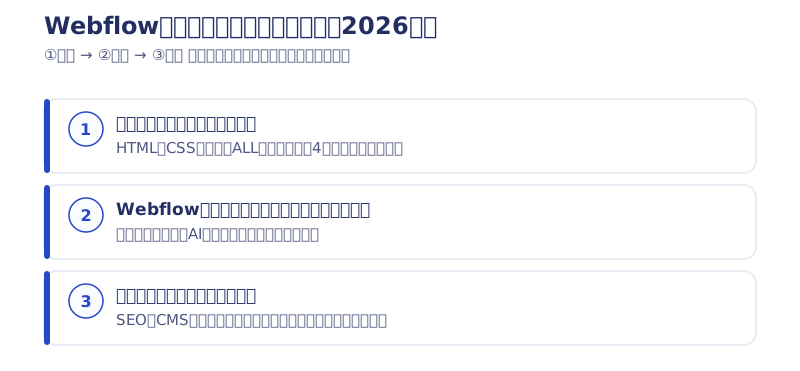
The short answer first. In 2026, the fastest route to learning Webflow is three steps: ① build the operating fundamentals with written guides → ② learn the system at Webflow University (English, free) → ③ finish with articles matched to what you want to build. This blog publishes over 30 Webflow articles, and this piece is their entrance — the hub.
Key takeaways
- Webflow University — what it means
- Webflow University is Webflow’s official free online learning platform, built mainly around English-language video courses. The 21D course this article originally covered — building a portfolio site at 30 minutes a day over 21 days — was itself a Japanese-language version of this official course.
Contents
Can you learn Webflow through written guides? — Yes
You can. Webflow’s own interface and Webflow University are in English, but this blog has guides covering everything from basic operations through SEO, the CMS and localization. On top of that, in 2026 using browser translation and AI side by side has become standard, so the wall that used to sink so many learners a few years ago — “the official material is in English and I can’t follow it” — is far lower than it was.
Step ① | Build the operating fundamentals with written guides first
Your first read is “How to use Webflow: 4 fundamentals that make you 10x faster”. Where HTML and CSS live, the ALL tag, what the colors in the CSS panel mean — touch Webflow without knowing those four things and you end up with a site where you can never tell what to edit. You can read it in your first 30 minutes, so start there.
Step ② | Learn the system at Webflow University (English, free)
Webflow University is Webflow’s official free online learning platform. The courses are mostly English-language video, and the lessons walk through the actual interface on screen, so you can follow the flow just by watching. When a term you don’t know comes up, ask an AI about it and you have the answer on the spot.
You can create a Webflow account for free on the official Webflow site, and you can keep learning on the free plan (Starter) (as of 2026).
How I learned Webflow from scratch [I had no experience at the time]
This is a record of how I myself used Webflow University from Step ②.

The way I learned Webflow started with taking Webflow’s official portfolio-building course over 3 months. The course covers how to use Webflow across the board while you build a portfolio site.
The course is entirely in English. So my first step was getting used to Webflow somehow, through automatic translation and by watching the hands-on work in the videos. The materials can be downloaded from Webflow’s official site. Here is the video:
Two of the easiest, cheapest ways for a beginner to build a website with Webflow
Before learning by goal in Step ③, here is how to build if you just want to make one page first.
I build websites with Webflow and was earning around ¥300,000 a month from it (at the time of writing). This blog is also built and managed in Webflow, using a Webflow template as reference.
How a web beginner can make a professional-grade design with Webflow
The process is the following 5 steps.
- [Step 1] Copy a website from the Webflow showcase
- [Step 2] Change the fonts
- [Step 3] Change the colors
- [Step 4] Photos and block widths
- [Step 5] Put in your text
[Step 1] Copy a website from the Webflow showcase
All you do is pick a cloneable design from Webflow’s showcase.
For recommended showcase sites, see “this article”.
[Step 2] Change the fonts
Add Japanese fonts to the site you cloned.
Safe choices are Google Fonts such as “Noto Sans” and “Sawarabi”.
For how to add fonts, see “this article”.
[Step 3] Change the colors
Giving the footer a darker color than the rest of the page makes the balance look good.
If you’re stuck on the overall background color, I recommend the tweet below from Kobayashi.
He shares information you can use right away in web production, and has plenty of other useful tweets.
テキストが読みやすくなる "やさしい背景色" をあつめてみた pic.twitter.com/278ZDDEPSV
— 小林 I Webデザインアイデアレシピ著者 (@pulpxstyle) January 27, 2022
[Step 4] Replace the photos
In my case I usually put the text in first, but if you already have your photos ready, I recommend adding the photos first. The reason is that you can decide the site’s structure at the same time. It also makes writing the text a little easier.
[Step 5] Put in your text
Once the photos are in and you know where each piece of information goes, add the text as well. If the font size is hard to read, adjust it a little. 16px is the average for text.

Copy a simple template: ¥0 / 7 hours
This is the method of building everything yourself using the steps above. Because you build it yourself, the cost is ¥0.
The time required is as follows.
- Steps 1–5: 1 hour
- Writing and preparing images: 5 hours
- Other adjustments: 1 hour
- Total: 7 hours
(2026 note: back then, as the other pattern, I also took on preparing photos and copy on a per-page basis. I no longer do. For production inquiries, please see the pricing page.)
About this article’s predecessor: the 21-day course (21D)
This article began life as the hub for a 14-part Japanese series explaining Webflow’s official 21-day course (21D): 30 minutes a day for 21 days, taking a complete beginner to a finished portfolio site. What I wanted to convey in that course hasn’t changed.
Which is why, once the 21 days are over, I recommend picking up a different skill rather than more web production skills (design, marketing, and so on). From there, as long as you have the ability to look things up, you can build sites in Webflow as the need arises.
Acquiring web production skills in just 21 days and moving straight on to the next skill: that is, without doubt, the fastest skill acquisition available today.
I worked through the original official “build a portfolio in 21 days” course to the end myself. This learning route is built on knowing where people tend to give up along the way.
2026 update: the old course articles (days 2 through 14) no longer matched the current interface after Webflow’s repeated UI updates, so they were retired and folded into this article. The old URLs now redirect here automatically. The two whose content still holds — the “fundamentals (day 0)” and “how to set up reCAPTCHA” — remain published.
Step ③ | Finish with articles matched to what you want to build
Once the basics are in place, the fastest path is to learn against whatever you actually want to build. Here are the articles, by goal.
- Full index: All Webflow articles
- SEO: The complete Webflow SEO guide (AIO-ready, 2026 edition)
- Blog and CMS: The complete guide to understanding Webflow CMS
- Multilingual sites: A year with Webflow Localization, and its SEO effect
- Design handoff: How to copy and paste designs from Figma into Webflow
- Understanding the cost: Webflow pricing plans explained (updated for the May 2026 lineup)
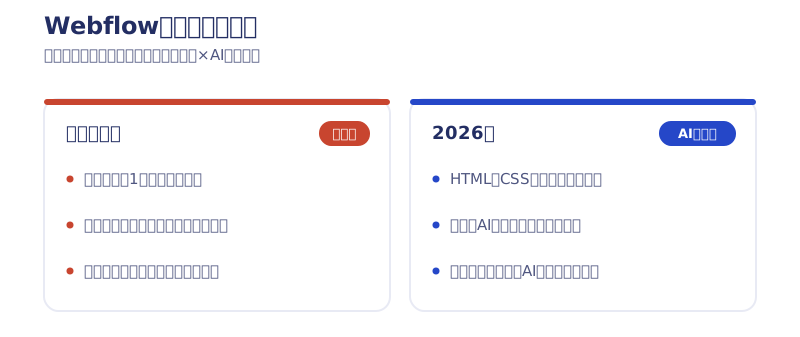
How AI changed the way to learn Webflow in 2026
In short: memorizing click-by-click procedures lost value, and understanding structure gained it.
One concrete example. In July 2026 we fully rebuilt our own website with Claude Code (AI) in 7 days (3 of them on the build itself). Migrating 26 pages and 62 articles was done by one person. You no longer need to memorize every interface step one by one; if you understand the structure of HTML and CSS, you can build a site alongside AI. And that structural understanding is exactly what learning Webflow gives you.
So for anyone learning Webflow from here, I recommend building your study around how things work — the ALL tag, class architecture, box structure — rather than memorizing shortcuts and steps. Anything you don’t understand, search its name as-is or ask an AI, and you can resolve it.
Where to ask questions about using Webflow | Webflow Forum and official support
In 2026, the fastest first move when you’re stuck is to ask an AI. For the latest specs and bugs the AI doesn’t know about, and for Webflow’s official position, check in Webflow’s official channels.
The official entry points as of October 2026
- Webflow Forum (Webflow Community): forum.webflow.com opens as-is. The old URL discourse.webflow.com redirects to community.webflow.com (Webflow Community), and you post questions from “Ask the Community”. No login is needed just to search.
- Official support: submit through the Support Portal at support.webflow.com, and replies arrive by email. In chat, the AI Support Assistant answers first. Support is available to the account owner and to Workspace owners and admins. Custom code, DNS, SEO and third-party integrations are outside support’s scope, and you are directed to ask in the Webflow Community instead.
Source: Webflow Help Center, “Customer Support Policy” (checked October 5, 2026)
How to ask questions that get answered
Writing questions that are easy to answer — questions people want to answer — also raises your response rate. If you’re not sure how to phrase a question, aim for one that can be answered “Yes” or “No”, and your response rate will go up.
Write your post in English. If you state clearly that you’re not good at English, people explain things kindly, so I recommend it if English isn’t your strong point.
What I asked on the Forum in 2021 was “how to 301-redirect from the Webflow.io domain to a domain I purchased” (the original post no longer exists).
I only used simple English, but somehow my meaning came across and people taught me how to do the redirect. This time it turned out to be a fundamentally difficult setting and I couldn’t solve it, but knowing that something “can’t be done” is itself a step forward. (In this case it looked possible but turned out to take a lot of effort, so I didn’t implement it.)
Before asking, I checked whether similar questions already existed, linked to the similar ones, and also quoted Webflow’s official page. I made a point of asking something that could be answered Yes or No. Attaching posts similar to your own question heads off replies like “Have you tried reading this post?”
And when your question can be answered Yes or No, responders instinctively judge it easy to answer, so your response rate goes up. If you’re thinking “I’m just not getting any replies…”, it’s worth reviewing what you asked.
Summary | The fastest route to learning Webflow
① Build the foundation with the fundamentals article → ② learn the system at Webflow University (free) → ③ practice with the articles for your goal. In that order, you can reach a professional working level even learning mainly through written guides.
The latest hands-on practice with Webflow × AI goes out first through the newsletter (emails are in Japanese).
Selected work

JTB Americas
A full renewal of the North America site, with the operations team able to update it themselves

Hosted by Nippon TV
High-fidelity Figma-to-Webflow conversion, with load speed and responsiveness optimized

PonTech Lab Inc.
Built with AI (Claude Code) on Next.js and Cloudflare, with the build process published
FAQ
Can I learn Webflow through written guides?
You can. Webflow University is in English and video-led, but this blog publishes over 30 Webflow articles, from basic operations to SEO, the CMS and localization. In 2026, with browser translation and AI alongside, you can reach a professional working level.
Is Webflow University free?
It is. It’s a video-led learning platform provided officially by Webflow, and you can take it at no extra cost. You can also keep learning on Webflow’s own free plan (Starter) (as of 2026).
Can I learn at Webflow University if I’m not good at English?
You can. The videos walk through the actual interface on screen, so you can follow the flow from the visuals alone, and you can look up unfamiliar terms with browser translation or by asking an AI as you go.
Where can I ask questions about using Webflow?
In two places: the Webflow Forum (Webflow Community) and official support at support.webflow.com (as of October 2026). Support covers the account owner and Workspace owners and admins; for custom code, DNS, SEO and third-party integrations, you are directed to ask in the Community.
How long does it take to learn Webflow?
The old 21D course was designed around 30 minutes a day for 21 days to cover the basic operations once through. In 2026 you can ask an AI about anything you don’t understand as you go, which cuts the time lost being stuck even further.
Can I learn Webflow without knowing HTML and CSS?
You can. Webflow’s interface uses the same names as HTML and CSS (Div block, margin, padding and so on), so anything you don’t understand can be resolved by searching the name as-is or asking an AI. Start with the day 0 article (0step-webflow) for the basics.
![How to Choose a Webflow Agency: Cost and 5 Quote Checks [From a Rival Founder]](/assets/posts/thumb-webflow-agency-choice.avif?v=4c985a91)

![Webflow vs STUDIO: Pricing, CMS, and Which to Choose [2026]](/assets/posts/thumb-webflow-vs-studio.avif?v=7e977456)