
![Webflow vs STUDIO: Pricing, CMS, and Which to Choose [2026]](/assets/posts/thumb-webflow-vs-studio.avif?v=7e977456)
Hi, I’m Kurita, Representative Director of Webharu Inc. I have run a Webflow production company since 2020, and the question I have heard the whole time is: “Webflow or STUDIO — which one is actually better?”
The verdict first. If you want a Japanese interface, Japanese support, and simplicity, choose STUDIO. If you need design freedom, a capable CMS, and code export, choose Webflow. And in 2026 there is also a third option: building with code and using neither tool.
Let me also state my position up front. Webharu specializes in Webflow, and we have never run STUDIO on a real client project. So for STUDIO, I compare using the figures on its official pricing page (checked on October 2, 2026). I do not hide Webflow’s weak points either.

Key takeaways
- STUDIO — what it means
- STUDIO is a Japan-made no-code web production tool that lets you build and publish websites without writing code, with a Japanese interface and support and yen-denominated pricing as its strengths. Paid plans start with Mini at ¥590 per month billed annually (checked October 2, 2026).
Contents
The difference between Webflow and STUDIO is the tool’s philosophy
The biggest difference is not price or features but philosophy. Webflow is American, a professional tool that lets you do through a visual interface what you could do by writing code, with the same freedom. STUDIO is Japanese, a tool that values letting anyone publish quickly, in Japanese. Neither is better; they simply suit different projects.
Webflow vs STUDIO | Pricing (checked October 2, 2026)
STUDIO is priced in yen and lower; Webflow is priced in dollars. Both sets of figures come from the official pricing pages as of October 2, 2026.
| Plan | Annual billing (per month) | Monthly billing | Main limits |
|---|---|---|---|
| STUDIO Mini | ¥590 | ¥1,290 | 2 pages + 404 |
| STUDIO Personal | ¥1,190 | ¥1,720 | 150 pages, 1,000 CMS items |
| STUDIO Business | ¥3,980 | ¥5,460 | 300 pages, 5,000 CMS items |
| STUDIO Business Plus | ¥9,980 | ¥12,900 | 300 pages, 15,000 CMS items |
| Webflow Basic | $15 | $25 | 300 static pages, no CMS |
| Webflow Premium | $25 | $39 | 20,000 CMS items, 40 collections |
Webflow overhauled its pricing in May 2026, going from three plans (Basic, CMS, Business) to two (Basic and Premium). The details are in my article on Webflow’s pricing plans.
Years ago I tweeted a comparison of STUDIO’s ¥980-per-month plan against Webflow’s pricing. Even then I felt that STUDIO’s price would resonate with individuals and small companies in Japan, and that impression has not changed. Webflow bills in dollars, so exchange rates move the cost too. The reassurance of paying in yen is a clear strength of STUDIO.
Webflow wins on design freedom
Webflow offers more design freedom. You can touch CSS properties almost directly in the interface, so you can build with the same precision as someone writing code. Scroll-linked motion and complex layouts are within the standard feature set.
The flip side is that you cannot master it without understanding how CSS works (the box model and flexbox). Speaking as someone who has used it for six years, Webflow is not an “easy tool” but a “free tool.” STUDIO is built so you can use it without knowing CSS, and it is more than enough for an ordinary site. On the other hand, the general assessment in publicly available information is that fine-grained adjustments have their limits.
CMS (blog and portfolio management) limits
If you want to grow traffic by adding articles, Webflow’s CMS is stronger. Premium holds up to 20,000 items and 40 collections, and you can build in links between collections and conditional display. The foundation on which the Webharu blog grew to about 190,000 search impressions over the last 12 months was originally Webflow’s CMS.
With STUDIO’s CMS, the number of items you can publish depends on the plan: 1,000 on Personal, 5,000 on Business, and 15,000 on Business Plus (checked October 2, 2026). That is enough for running news and a blog. But if you are designing a large media site, Webflow has the edge.
For multilingual, decide by whether you can sustain the operation, not by features
Webflow has an official multilingual feature (Localization), priced at $9 per month per language billed annually ($12 billed monthly). STUDIO’s pricing page did not list a multilingual feature.
On our own site, I ran Webflow’s Korean localization for about two years, and the result was withdrawal. Traffic grew, and as far as I could confirm myself there were about 5 affiliate sign-ups. But orders via the Korean version were 0, and no inquiries came in either. I wrote up the whole story in my article on Webflow localization.
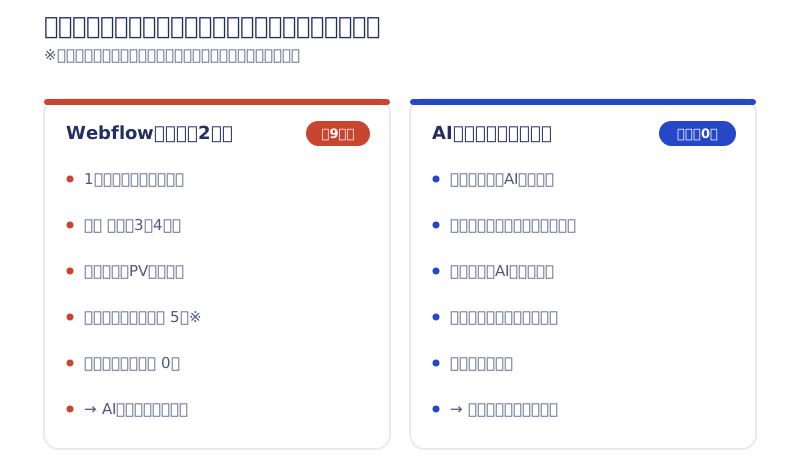
The direct reason I stopped was the lack of results, but the deciding factor was that a monthly fee stacked up for each language. In fact, after I switched to building with code and the additional cost disappeared, I rebuilt the same Korean version. Even an initiative that takes time to pay off can be sustained when it costs nothing to maintain. If multilingual is a must, Webflow is a strong candidate, but do question that requirement itself once.
Code export and Japanese-language support
Only Webflow can export code
On paid Workspace plans, Webflow can export HTML and CSS. However, its official pricing page states that CMS content (such as articles) cannot be exported. STUDIO has no code export; everything stays inside STUDIO. Whether you can take your assets with you if something happens to the service matters more the longer you run a site.
STUDIO has the Japanese interface and support
STUDIO’s interface and support are both in Japanese. Webflow’s are basically in English. If you outsource production this does not matter, but if your team updates the site in-house after launch, the gap bites every day. Hand Webflow to a team that is uncomfortable with an English interface, and the site ends up never being updated. It is a common failure.

Webflow vs STUDIO: which one to choose
- STUDIO suits you if: you want to publish a site of a few pages quickly, you need a Japanese interface and support, and you want to update the site yourselves in-house
- Webflow suits you if: you want to refine the design down to the details, you want to grow traffic by adding articles in the CMS, you anticipate multilingual or future expansion, and you want to keep the code in your own hands
To be honest as a Webflow company: for a site of a few pages that rarely changes, Webflow can be overkill. In those consultations, I do not push Webflow. Once you have decided to build with Webflow, how to choose a production company is covered in my article on choosing a Webflow production company.
In 2026 there is a third option that is neither Webflow nor STUDIO
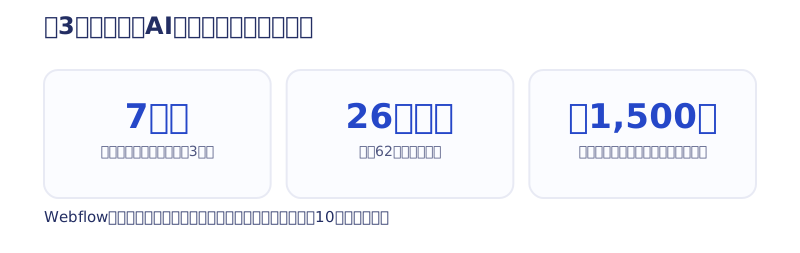
In July 2026, I switched our own site from Webflow to code (Claude Code and Astro) and rebuilt it in 7 days. Including the migration of 26 pages and 62 articles, the build took 3 days, and I was the only one doing the hands-on work (my article on renewing a website with AI in 7 days).
The most obvious change was the running cost. In the Webflow days it was just under ¥100,000 a year including localization; after the switch it is only the ¥1,500-a-year domain fee. I, the person writing comparison articles about no-code tools, stepped off the premise of a monthly subscription myself.
Of course, a site built with code is not something “anyone can update by clicking around an admin screen,” so it is not for everyone. Still, if you are at the stage of debating Webflow or STUDIO, the 2026 answer is that you have three options, not two. What Webharu delivers in code is described in my article on full-scratch websites.
If you are unsure which suits you, tell me about your site’s situation in a free consultation. For the big picture of Webflow itself, see What is Webflow? Pricing, capabilities, and how to choose a production company.
Summary | Choose Webflow or STUDIO by who updates the site and how far you will grow it
To build simply in Japanese, STUDIO. For freedom, extensibility, and keeping even the code in your hands, Webflow. And if you want to eliminate the monthly tool fee altogether, the third option of building with code. It is not about which tool is superior; the answer is decided by “how many pages the site has, who updates it, and how far you will grow it.”
Selected work

JTB Americas
A full renewal of the North America site, with the operations team able to update it themselves

Hosted by Nippon TV
High-fidelity Figma-to-Webflow conversion, with load speed and responsiveness optimized

PonTech Lab Inc.
Built with AI (Claude Code) on Next.js and Cloudflare, with the build process published
FAQ
What is the biggest difference between Webflow and STUDIO?
Philosophy. Webflow is American, a professional tool that lets you design with CSS-level precision and includes a CMS, multilingual, and code export. STUDIO is Japanese, a tool that values a Japanese interface and simple operation.
How much do Webflow and STUDIO cost?
These are the prices confirmed on the official pricing pages on October 2, 2026. STUDIO, billed annually: Mini ¥590/month, Personal ¥1,190/month, Business ¥3,980/month. Webflow, billed annually: Basic $15/month and Premium (with CMS) $25/month ($25 and $39 respectively when billed monthly).
For running a blog, which is better, Webflow or STUDIO?
If you will grow to thousands of articles, Webflow. Webflow Premium’s CMS holds up to 20,000 items; STUDIO holds 5,000 on Business and 15,000 on Business Plus (checked October 2, 2026).
Can I use Webflow if I am not comfortable with English?
If you outsource production, it is no problem. But if your team updates the site in-house every day, the English interface and support will bite daily. For a team with a strong aversion to English, choose STUDIO or a setup where the production company handles updates.
Can Webflow and STUDIO export code?
Only Webflow can. Paid Workspace plans export HTML and CSS, but not CMS content. STUDIO has no code export.
For a small site of a few pages, which is better?
For a site of a few pages that rarely changes, STUDIO keeps costs lower. Webflow is often overkill for that kind of site.
![How to Choose a Webflow Agency: Cost and 5 Quote Checks [From a Rival Founder]](/assets/posts/thumb-webflow-agency-choice.avif?v=4c985a91)

![WordPress to Webflow Migration | How We Moved 100+ Articles, and When to Quit [2026]](/assets/posts/thumb-wordpress-not-recommended.avif?v=975b3637)