
![WordPress to Webflow Migration | How We Moved 100+ Articles, and When to Quit [2026]](/assets/posts/thumb-wordpress-not-recommended.avif?v=975b3637)
Hello, this is Kurita, Representative Director of Webharu Inc.
The conclusion first. Migrating from WordPress to Webflow can be done without changing a single URL, as long as you are given access to the admin panel. I have actually done it on a WordPress site with more than 100 articles, keeping every URL exactly as it was.
And if you are building a new site, there is almost no reason left to choose WordPress in 2026. I am on the side that builds sites with Webflow and AI, so please read this as a position piece. In exchange, every number here is either sourced or measured on my own site.
Key takeaways
- Migrating from WordPress to Webflow — what it means
- Migrating from WordPress to Webflow means exporting a WordPress site’s article and portfolio data, for example as CSV, and moving it onto a site rebuilt in the Webflow CMS. If you keep the URLs and set 301 redirects on any URLs that change, even a site with more than 100 articles can be moved while keeping its search rankings.
Contents
A real WordPress to Webflow migration | over 100 articles, URLs unchanged
The scariest part of a migration is that URLs which have built up search rankings change and lose their value. On the project with over 100 articles, we kept every single URL.
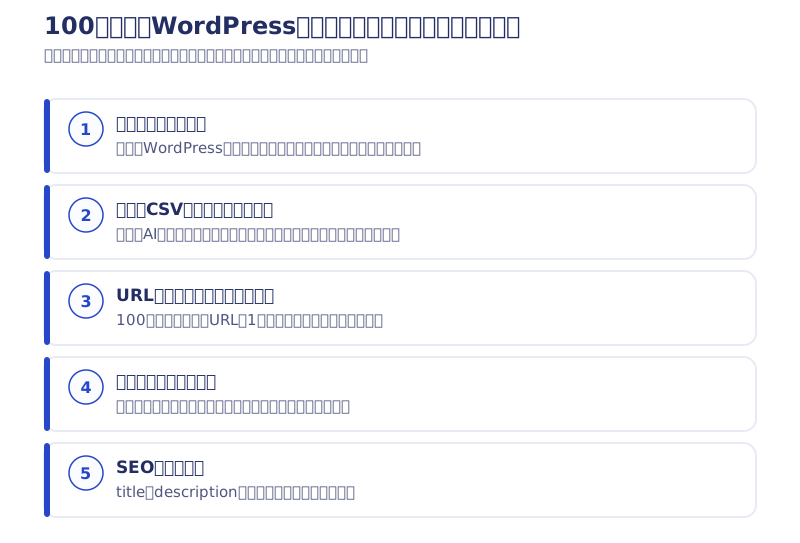
What we did was unglamorous. The client gave us access to the WordPress admin panel, we exported every article as CSV and imported it into Webflow. Then we checked every article by eye and fixed the roughly 60 articles that had broken layouts by hand. The visual check took about 7 days, and the fixes took about another 7 days. In a migration of over 100 articles, that visual check was what took the most time.
Categories, tags, authors and case studies were rebuilt as separate types in the Webflow CMS, and the article template was reworked with headings and line spacing that read well in Japanese. For URLs, we set normalization rules and prepared permanent redirects (301) for any that would change. The sitemap was split by category.
Only the article and portfolio data were moved; the site structure and SEO settings were rebuilt from zero. It is a migration that keeps the contents and replaces the container. The first-draft design was provided by the client, and Webharu handled additional design and the build in Webflow.
On switchover day, we rewrote the domain’s A record and CNAME, and set up email on the custom domain at the same time. Confirming the connection between the Japanese domain registrar and Webflow took about 1 hour, so we did the work just after 12 midnight, when it would not affect the client’s business. Details of the project are on the portfolio page for the move of over 100 articles from WordPress to Webflow.
What we could not learn from the migration
To be honest, I still do not know how search rankings moved after the migration. Our role on this project covered the build and basic SEO setup, and we did not take on maintenance, so we were not in a position to see the post-launch numbers.
Being able to write “rankings went up after the migration” would make for a stronger article. But I cannot write about what I have not seen. What this does show is that a migration is finished not on the day it launches, but on the day you decide who will watch the numbers after launch. If the client and the people rebuilding the site both leave that blank, a year passes with “we moved it, but nobody knows whether it got better.”
How to migrate from WordPress to Webflow, and 3 things to check first
The migration has five stages: get access → export the articles → build the CMS → match the URLs → switch the domain. Where it gets stuck is not the work itself but the very first step, access.
- Can you get into the WordPress admin panel? (Do you have permission to export articles as CSV?)
- Can you get into the domain management panel? (Is there someone in-house who can rewrite the DNS?)
- Can you produce a list of the current URLs? (Needed to set 301s only on the URLs that change)
If these 3 are in place, the migration itself will not get stuck even with 100 articles. Conversely, if your contract does not let you into the admin panel, you start by copying and pasting every article body by hand, and both cost and timeline balloon.
At the time, AI was not as usable as it is now, so the export, the import and the visual fixes were all done by hand. Today, finding broken layouts can be handed to AI, so a project of the same size should finish faster. In Webharu’s pricing, migrating existing articles and content is an option from +¥80,000 (as of October 2026, excl. tax).
Why I quit WordPress and chose Webflow
I started web production around 2020, after coming back to Japan from a working holiday in Australia because of COVID. The first site I built was on WordPress.
I got to the point where I could build with HTML and CSS. But WordPress assumes you will install plugins and learn PHP. Neither my own themes nor existing themes behaved the way I wanted, and maintenance ate my time. What I wanted to do was blogging and web production, so why did I have to learn how to use WordPress? Honestly, it felt like wasted time.
So I tried the no-code tools one after another: Wix, Webflow, Bubble and others. Two things decided it. There was almost no Japanese-language guidance on Webflow, so there was no competition, and Webflow had raised a huge amount of funding. Having studied English in Australia, I could get by on English-only information, which mattered a lot. From there I started building with Webflow, and that brings us to today.
3 reasons people want to quit WordPress | speed, upkeep cost, and what it can do
When people come to us saying “I want to quit WordPress,” the reasons mostly fall into these three.
Structurally disadvantaged on speed
In HTTP Archive’s real-user measurements, about 49% of WordPress sites pass Core Web Vitals. Astro, a static site framework, is at 67%. The median page weight is also about 2.63MB for WordPress against 1.65MB for Astro (Search Engine Journal, May 2026).
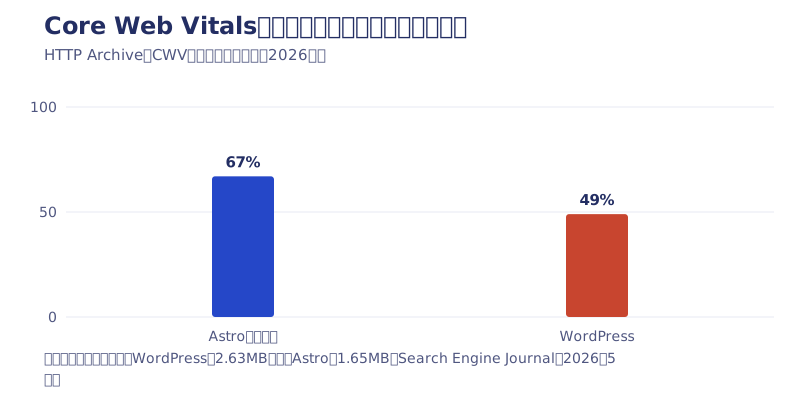
It is not a question of skill but of mechanism. WordPress assembles the page on the server for every visit, while other sites simply serve finished HTML. They start from different lines.
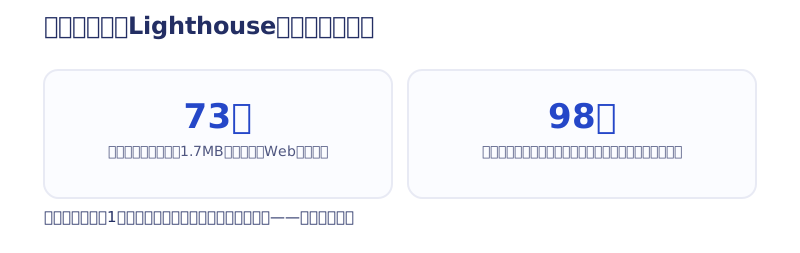
…Having written that, I have a confession: when I first measured my own site, it scored 73. The site I was about to use to say “WordPress is slow” was slow itself (embarrassing). The cause was a 1.7MB web font for headings. Once I cut it down to just the characters actually used, it scored 98 without any design change. It took 1 hour.
Just owning it costs upkeep
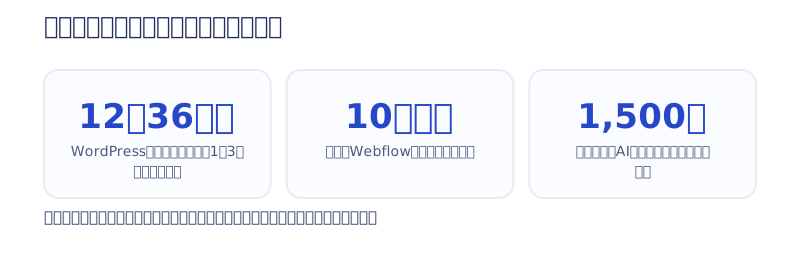
Vulnerabilities in WordPress core, themes and plugins are found every day, which is why “WordPress maintenance” exists as a line of work. The market rate runs from ¥5,000 to ¥100,000 a month, with the center at ¥10,000–30,000 a month (a 2026 survey of maintenance fees). Per year, that is ¥120,000–360,000 going out just for “owning” the site.
My own company site cost just under ¥100,000 a year in its Webflow days; the current static site costs only the ¥1,500 annual domain fee.
There is almost nothing left that only WordPress can do
The old reasons to choose WordPress were “you can update it yourself” and “plugins can do anything.” In 2026, neither is exclusive to WordPress. Webflow’s CMS can be updated from its admin panel, and the news section on this site updates automatically when I post on Instagram. Our invoice calculation tool was also built by AI and put on this site.
What to build with | Webflow, or a static site built with AI
The fastest way to think about a WordPress replacement is as a choice between two: Webflow, or a static site built with AI. Which one you choose changes the 5-year total by 2–3 times.
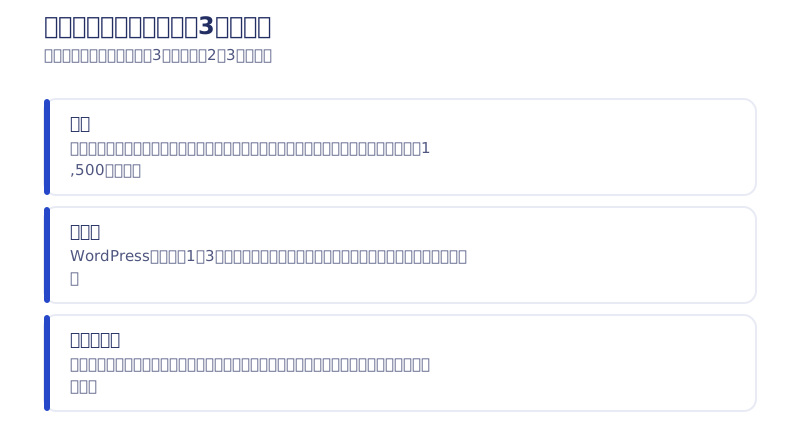
The gap comes not from the production fee but from three things: monthly fees, maintenance fees, and the cost of a rebuild a few years later. The most expensive is the rebuild: build on a system that does not fit your requirements, and a few years later you start over from zero. And if you leave the choice of build method entirely to the production company, you get a site built with the tool that company is good at, not the tool that suits you.
For an SME company site or blog-driven marketing: a static site built with AI
If you want a company site, a shop site, or to attract customers through a blog, I think the top candidate today is a static site whose code is built entirely with AI. There are no monthly tool fees, and maintenance work structurally does not arise. My own company site is built this way, and I have published the full rebuild process in the record of fully redesigning our site with AI.
For companies with many departments or that want split editing permissions: Webflow
Multiple departments updating the site, separate permissions, a support contact. For that kind of organization, Webflow is the realistic answer. The platform handles security and backups, so you do not need to assign anyone to maintenance. The differences from WordPress, summarized for internal approval, are on the Webflow vs WordPress comparison page, and the yearly costs are in our article on the total cost of Webflow.
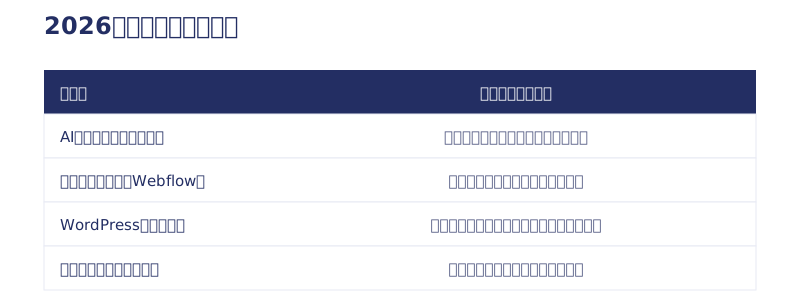
For a company-proprietary fixed system, choose by the exit
With a proprietary CMS that only that company can use, the scary part is not the price but that “you cannot take anything with you when you leave.” These contracts tend to leave you with nothing once you cancel. If you choose one, pick a company that can choose from several build methods based on your requirements.
3 questions to ask when a build method is proposed
When someone proposes a build method, try asking these 3 questions.
- Why this build method? (Do they explain it from your requirements, or is it “this is just what we do”?)
- What is the total over 5 years? (Can they give a figure that includes initial, monthly, maintenance and renewal costs?)
- When we leave, what happens to the site, the domain and the data? (Can they answer about the exit right away?)
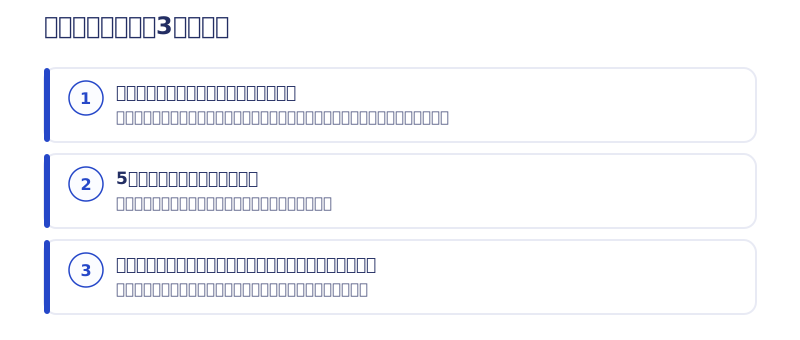
If a company can answer all 3 right away, whichever build method they recommend, you will not go far wrong. If the answers are vague, what you are being recommended is not “the tool that suits you” but “the tool that company wants to sell.”

Cases where WordPress still fits
To be fair: if the following apply to you, WordPress is still a rational choice today.
- You already have in-house WordPress operating know-how and staff
- You depend heavily on specific plugins, such as for a membership site or WooCommerce
- You own a large number of WordPress sites and want to manage them on a single system
- You already have an experienced team of WordPress specialists
If your site runs on WordPress without problems and you have a maintenance arrangement, there is no need to rush to tear it down. The time to decide is your next redesign. Before you “rebuild on WordPress again,” just once, lay out the 5-year totals side by side and compare.
If you want to talk about a migration
If you have doubts, start by measuring your site with PageSpeed Insights. The numbers take nobody’s side.
If you want to learn about Webflow itself, see What is Webflow? Pricing, what it can do, and how to choose a production company; for how to compare who to hire, see How to choose a Webflow production company. For a WordPress to Webflow migration, or advice on which to build with, please use the Contact form. Following the same steps we used to move over 100 articles, we will tell you how many days your site is likely to take.
Selected work

JTB Americas
A full renewal of the North America site, with the operations team able to update it themselves

Hosted by Nippon TV
High-fidelity Figma-to-Webflow conversion, with load speed and responsiveness optimized

PonTech Lab Inc.
Built with AI (Claude Code) on Next.js and Cloudflare, with the build process published
FAQ
Do URLs change when migrating from WordPress to Webflow?
You can move without changing them. When Webharu moved a site with over 100 articles, we kept every single URL. Any URL that has to change gets a 301 redirect.
How do you move articles from WordPress to Webflow?
Export all articles as CSV from the WordPress admin panel and import them into the Webflow CMS. In Webharu’s migration of over 100 articles, we checked every article by eye after importing and fixed about 60 articles by hand. The visual check took about 7 days, plus about another 7 days.
How much does a WordPress to Webflow migration cost?
At Webharu, website production starts at ¥1,000,000, and migrating existing articles and content is an option from +¥80,000 (as of October 2026, excl. tax). It varies with the amount of content to move.
What should I check before migrating?
Three things: whether you can get into the WordPress admin panel, whether you can get into the domain management panel, and whether you can produce a list of the current URLs. If your contract does not let you into the admin panel, you end up copying and pasting articles by hand, and both cost and timeline balloon.
If I want to quit WordPress, what should I use instead?
Webflow or a static site built with AI. Companies with many departments that want to split editing permissions suit Webflow; for an SME company site or blog-driven marketing, a static site suits better. With a static site, in Webharu’s own case the upkeep is only the ¥1,500 annual domain fee.
Should a site that currently runs on WordPress be migrated right away?
There is no need to rush. If it runs without problems and you have a maintenance arrangement, compare the 5-year totals at your next redesign and decide then. The center of the range for WordPress maintenance is ¥120,000–360,000 a year.
![How to Choose a Webflow Agency: Cost and 5 Quote Checks [From a Rival Founder]](/assets/posts/thumb-webflow-agency-choice.avif?v=4c985a91)

![Webflow vs STUDIO: Pricing, CMS, and Which to Choose [2026]](/assets/posts/thumb-webflow-vs-studio.avif?v=7e977456)