

Hi, I’m Kurita, Representative Director of Webharu Inc.. Here is my answer to the question “so what does Webflow cost in total?” — based on the pricing revised in May 2026 and on the bills I have actually paid.
✓ In this article
- The new plans from the May 2026 revision (Starter / Basic / Premium)
- How to think about build fees if you commission the work
- My real running cost, itemized: $576 a year (about ¥80,000), and how it compares with an AI build
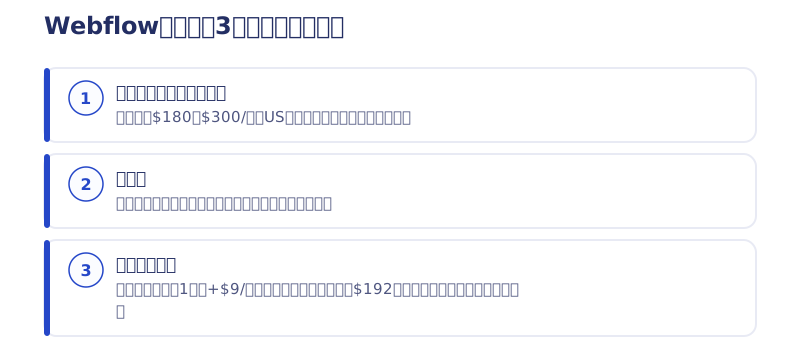
The conclusion first. Webflow’s total cost has three tiers: the site plan ($180–$300/year on annual billing) + the build fee (from several hundred thousand yen if outsourced) + add-ons. I ran my own site on Webflow and, counting Localization and a workspace, I was paying $576 a year (about ¥80,000). Let me walk through the breakdown around those real numbers.
Key takeaways
- Webflow site plan — what it means
- A Webflow site plan is the plan you contract per published website; it covers hosting and custom domain connection. Since the May 2026 revision there are three: Starter (free), Basic, and Premium.
Contents
Webflow’s new pricing plans (revised May 2026)
Per the official help center, site plans were reorganized on May 13, 2026. The old Basic ($14) / CMS ($23) / Business ($39) trio is gone, replaced by three new plans.
- Starter: free For trying things out. You can only publish on a webflow.io subdomain; no custom domain.
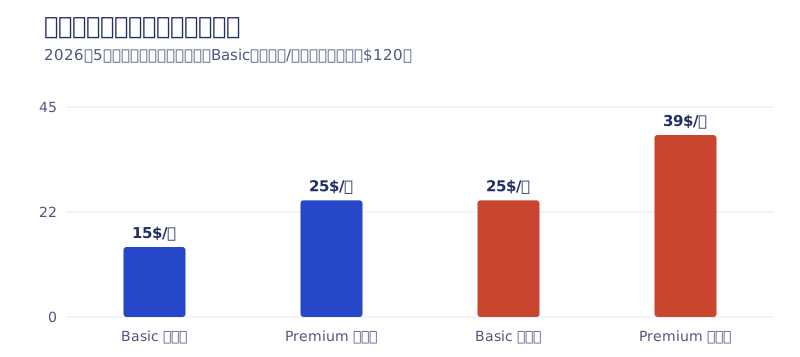
- Basic: $15/mo on annual billing ($25/mo monthly) For static sites without a CMS. Up to 300 static pages (double the old Basic’s 150).
- Premium: $25/mo on annual billing ($39/mo monthly) The plan that unlocks the CMS. Up to 20,000 CMS items and 40 collections — think of it as absorbing what the old CMS plan and paid add-ons used to cover.
Two things to watch. First, annual and monthly billing differ substantially (Basic is $15 versus $25 — a gap of $120 a year). Second, billing is in US dollars, so the yen total moves with the exchange rate. At ¥150/USD, Basic on annual billing works out to roughly ¥27,000/year and Premium to roughly ¥45,000/year.
Note that a custom domain costs extra on every plan. It varies by registrar and domain type, but for reference mine costs ¥1,500 a year — a rounding error next to the site plan.
For a full comparison of workspace plans, e-commerce, and everything else, see the pricing roundup.
→Webflow pricing plans explained
Webflow build fees: how to think about outsourcing
The site plan is only the running cost; the build fee is what dominates the total. It swings widely with page count, CMS design, and how far the design is worked out, so nobody can honestly say “a Webflow build costs X.” The commonly cited benchmark for a corporate site in Japan is from several hundred thousand yen up. How to read a quote is covered in detail in how to choose a Webflow agency.
The thing to watch in a quote is how many hours go into the design phase. I almost never use plugins such as Figma to Webflow on real projects. My standard flow is “Figma is where we agree on the look with AI mockups → implementation is built directly in Webflow,” and most of my work is commissioned in that shape. A simpler process also makes the cost breakdown easier to read.
→Why I don’t use Figma to Webflow on real projects
For what it’s worth, Webharu also offers AI Website Production — sites built with AI rather than Webflow — from ¥1,000,000. As covered below, comparing not just build fees but running costs too tends to change how the options look.
→AI Website Production

Real running cost: my bill came to $576 a year (about ¥80,000)
This is the most concrete part. Instead of quoting market-rate articles, here is the itemized bill I actually paid. It came down to three things: the site plan, Localization, and a workspace.
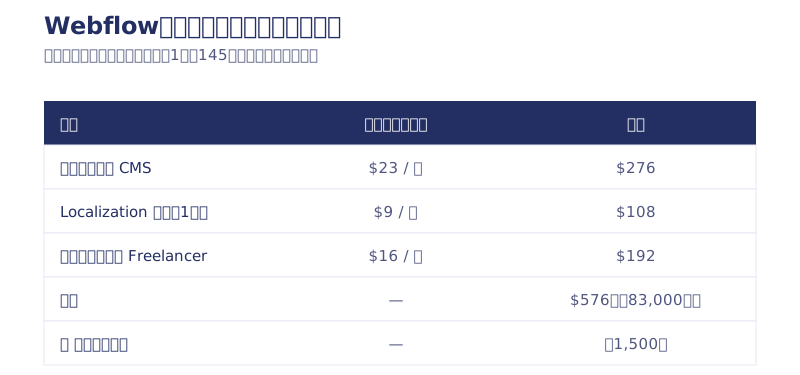
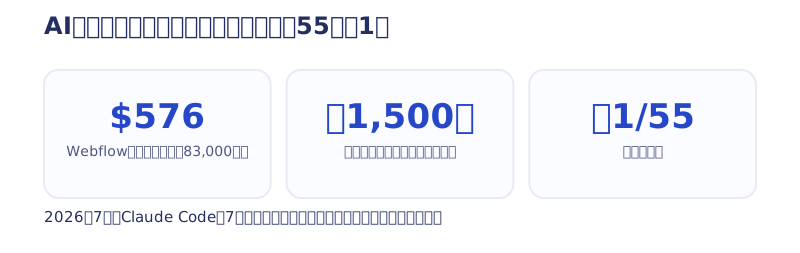
The total is $576. At ¥145/USD that is about ¥83,000, on top of which sits the ¥1,500 a year for the domain. My gut feeling had been “just under ¥100,000 a year,” but laying the items out like this, the accurate statement is that a bit over ¥80,000 was disappearing into Webflow.
The easy one to miss is the workspace plan. You won’t notice it if you only ever look at the site-plan table, but it becomes effectively necessary once you do client work — and that alone was $192 a year, about the same impact as the site plan.
What pushed the total up was the Localization (multilingual) feature, priced at $9 per locale per month. With the exchange rate that is a little under ¥2,000 a month, and I ran it for about two years (the duration is an estimate from memory). Cumulatively, that is roughly ¥30,000–40,000.
Let me be honest about the result: zero projects were won through the Korean version. Traffic itself did grow — page views from Korea genuinely increased. The Webflow affiliate program produced about five signups as far as I could verify. But revenue from any of it was zero. It was very nearly pointless, honestly. NAVER is strong in Korean search, and machine-translation quality was mediocre. The detailed SEO data at the one-year mark is here.
→What a year of Webflow Localization actually produced
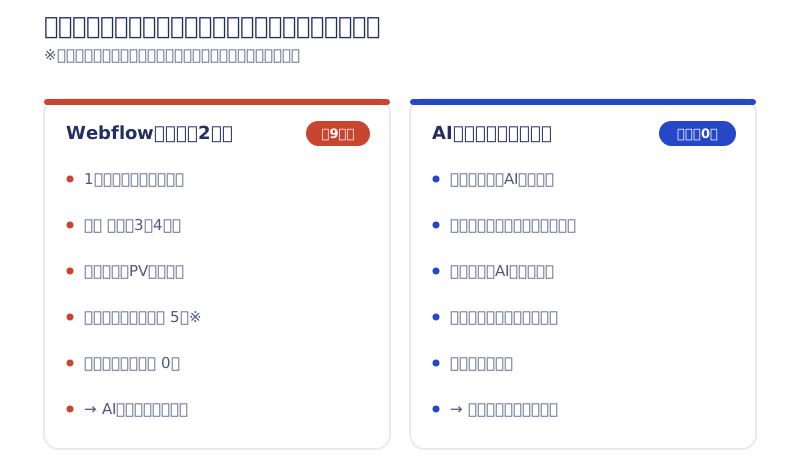
The lesson from that experience is simple. Even at just under ¥2,000 a month, two years with no results is ¥30,000–40,000. Add-ons push the total up fast, so the right answer is to add them when you actually need them. There is no need to quote yourself the fully loaded configuration from day one.
After switching to an AI build, the running cost became ¥1,500 a year
In July 2026 I rebuilt that same company site from scratch with AI (Claude Code) over seven days — 26 pages plus the migration of 62 blog posts, with exactly one human doing the work: me.
The running cost after the switch is the domain alone, ¥1,500 a year. From about ¥83,000 down to ¥1,500 — roughly 1/55th of what it was, looking at running cost only. Honestly, the gap surprised even me.
→Rebuilding our company site with AI in seven days
The interesting part is that the multilingual project I had abandoned came back to life here. I dropped Korean Localization the moment I moved from Webflow to an AI build, because there was no reason to keep paying $9 a month. And yet, after the switch, I ended up rebuilding the Korean version with AI anyway. Translation and updates both happen on the AI side, so there is no per-locale monthly fee riding on top. Same initiative, different cost structure — and that decides whether you can keep it going.
SEO, AI search optimization, and marketing knowledge are, I think, transferable to any country. Now that the running-cost hurdle has dropped, I intend to keep taking swings at other countries, Korea included.
None of this means Webflow is bad. Its value — updating the site yourself in a visual editor, building something polished without writing code — is intact. The way I see it, the split is: Webflow if you want to handle updates yourself, an AI build if you want running costs as low as they can go.
▶ For the big picture on Webflow itself: What is Webflow? Capabilities, how to use it, and case studies, explained by a specialist [2026]
Summary: how to estimate Webflow’s total
Finally, a few model cases (yen figures are rough conversions assuming ¥150/USD).
The fork in plan choice is the CMS. Premium if you will update a blog or news section yourself; Basic is plenty for a company brochure site that rarely changes. The 20,000 CMS item ceiling is a number you never think about even at my scale, running 60-plus blog posts.
- Build it yourself + Starter: ¥0 (no custom domain; for trials)
- Build it yourself + Basic annual: about ¥27,000/year + domain
- Running a blog or CMS + Premium annual: about ¥45,000/year + domain
- Commissioning the build: the above + the build fee (from several hundred thousand yen)
Stack Localization and a workspace on top of that and you reach my $576 a year (about ¥80,000). When you think about the total, separate “the up-front build fee” from “the running cost you pay every single year,” and estimate the latter over five years. Even a ¥50,000 annual difference is ¥250,000 over five years — comparable to a build fee.
If you want to know what the total looks like in your case, tell me your situation in a free consultation. I will answer with numbers, as someone who has paid real money for both Webflow operations and AI builds.
Selected work

JTB Americas
A full renewal of the North America site, with the operations team able to update it themselves

Hosted by Nippon TV
High-fidelity Figma-to-Webflow conversion, with load speed and responsiveness optimized

PonTech Lab Inc.
Built with AI (Claude Code) on Next.js and Cloudflare, with the build process published
FAQ
How much is Webflow per month?
After the May 2026 revision, the site plans are Starter free, Basic $15/mo on annual billing ($25 monthly), and Premium $25/mo on annual billing ($39 monthly). Billing is in US dollars, so the yen amount moves with the exchange rate.
What does it actually cost to run a Webflow site?
It depends on your plan configuration. In my case it came to just under ¥100,000 a year including the Localization feature. On Basic annual billing alone you can run a site for $180 a year (about ¥27,000 at ¥150/USD).
How much does it cost to commission a Webflow build?
It swings widely with page count, CMS design, and how far the design is worked out; the commonly cited benchmark for a corporate site in Japan is from several hundred thousand yen up. Separate the up-front build fee from the running cost you pay every year, and compare on the total.
What happened to the old plans (Basic $14 / CMS $23 / Business $39)?
They were reorganized into the new structure on May 13, 2026. If you use the CMS, Premium ($25/mo on annual billing) is the successor to the old CMS plan.
![How to Choose a Webflow Agency: Cost and 5 Quote Checks [From a Rival Founder]](/assets/posts/thumb-webflow-agency-choice.avif?v=4c985a91)
![Webflow vs STUDIO: Pricing, CMS, and Which to Choose [2026]](/assets/posts/thumb-webflow-vs-studio.avif?v=7e977456)
![WordPress to Webflow Migration | How We Moved 100+ Articles, and When to Quit [2026]](/assets/posts/thumb-wordpress-not-recommended.avif?v=975b3637)