
![The Complete Guide to Webflow SEO: Basics to AIO [2026]](/assets/posts/642bd0976e1153a5fbc425bc_--.avif?v=301dd9e2)
SEO in Webflow starts with getting four basics right: (1) meta settings, (2) content, (3) link strategy and (4) technical SEO. Webflow ships with SEO tools built in, so even a beginner can set all four without help. And as of 2026, SEO covers one more thing on top of those four: designing to be cited by AI (AIO).
In this article I — Masato Kurita of Webharu Inc., who has spent six years building nothing but Webflow sites — pull SEO in Webflow into a single guide, working through the four basics, then an eight-item intermediate checklist, then AIO. Everything covered here is what we have actually done on this blog over years of running it on Webflow, and the measured results are below.
Key takeaways
- SEO in Webflow — what it means
- SEO in Webflow means building search traffic by using the built-in SEO tools to get the four basics right — meta settings, content, links and technical SEO — then working through the eight-item intermediate checklist and, as of 2026, designing to be cited by AI (AIO).
Contents
1. The basics of SEO in Webflow
The short answer: Webflow’s built-in SEO tools, keyword planning and meta tags — those three finish your basic setup.
Using Webflow’s built-in SEO tools
Webflow ships with SEO tools built in. They let you edit metadata and create a Robots.txt file. Configure them properly and search engines can crawl your site correctly.
Keyword research and writing the right page title
Keyword research is the foundation of SEO. Start by being clear about which keyword each page you build is targeting. Choosing the right keyword earns you more traffic. The page title is also a critical element: once the keyword is decided, place it into the title, the headings and the body in the order set out in the eight-item intermediate checklist later in this article.
Optimizing meta tags
Meta tags are a critical element for explaining your content to search engines. Webflow makes them easy to edit, and because both the title tag and the meta tags come with a live preview, even beginners can picture how the page will look in search results. Set your meta tags and search engines will understand your content correctly.
2. Content marketing in Webflow
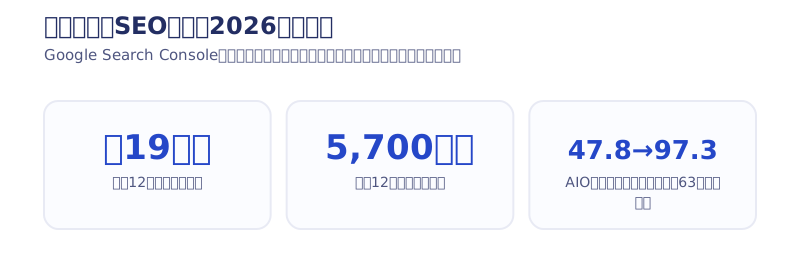
The short answer: content is the pillar of search traffic. On nothing but a growing stack of articles, this blog reached about 190,000 search impressions and over 5,700 clicks in the last 12 months (measured in Google Search Console, 2026).
Publishing blog posts
Content marketing is one of the key elements of SEO. In Webflow, the CMS makes publishing blog posts easy. Posts matter enormously for winning traffic, and beyond acquisition, giving readers information about your business and services removes the doubts they are carrying.
Optimizing the keywords inside your posts
Using the right keywords in your posts earns you more traffic. It bears repeating: setting a keyword is essential and it matters. The right keyword makes your content easier to understand correctly. And in SEO, placing that chosen keyword appropriately in the title, the headings and the body of the article is how you compete for the top positions.
Optimizing images
Webflow makes setting images about as easy as posting a picture to Instagram. Images are not just there to enrich content visually — they matter for SEO too. If you have the capacity, make your own images or use paid ones. Setting proper alt text on images also helps search engines understand your content correctly.
3. Link strategy for SEO in Webflow
Setting internal links
Internal links are the links connecting pages within your own site. Set them up properly and your site’s navigation improves. Internal links also make the content across your site interrelated. This article carries recommendations at the foot of the page for that reason — it matters from an SEO point of view as well.
Earning external links
External links, or inbound links, are called backlinks in English: links pointing from other sites to yours. To improve the quality of your backlinks, the important thing is earning links from authoritative sites. Setting the anchor text of a backlink appropriately also helps search engines understand your content correctly. Building them yourself is possible, but it is not a good method, so you are better off leaving it alone.
4. Technical SEO in Webflow
Speeding up the site
Site speed is one of the most important elements for improving the user experience. It also affects your search engine rankings. In Webflow you can speed a site up by optimizing images and code, among other methods.
The effect of speeding things up is large in practice: on this site, cutting font loading alone took our measured Lighthouse mobile score from 73 to 98 (about an hour of work, with no change to the design, as of 2026). The same thinking — make the images lighter, cut the number of fonts you use — works just as well in Webflow.
Building a mobile-friendly site
A mobile-friendly site matters enormously to visitors arriving from mobile devices. Google now factors mobile-friendliness into rankings. In Webflow, using responsive design lets you build a mobile-friendly site. It is easy to do, so build the mobile views to match the desktop one.
Getting pages indexed correctly
Correct indexing is a critical factor in search engine rankings. In Webflow you can create a Robots.txt file and a Sitemap.xml file to get your pages indexed correctly.
Also set your Webflow subdomain so that it is not indexed, and make your custom domain the default from the custom domain settings screen.
See: How to set up a domain in Webflow
The eight-item intermediate checklist (once the basics are set)
The short answer: after the basics, work through all eight items below from the top. Do every one of them.
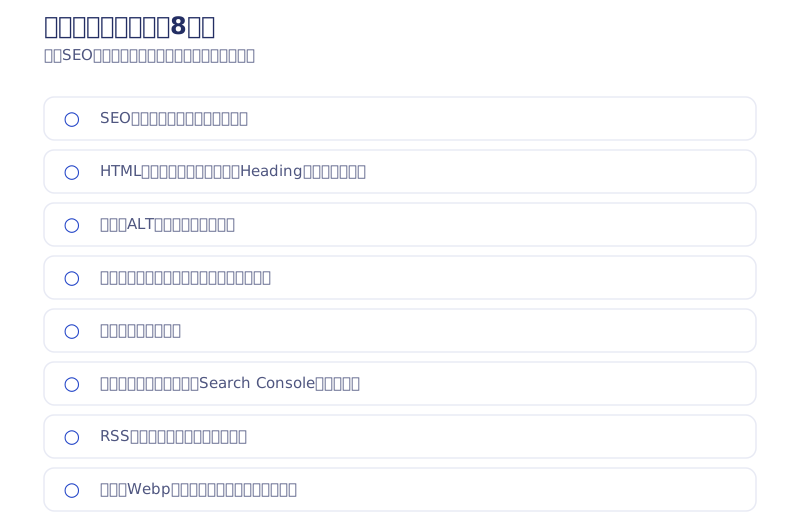
- Set your keyword
- Use HTML tags correctly
- Name your images with ALT tags
- Set the title and the description
- Connect internal links
- Set up the sitemap
- Set up RSS
- Speed up page loading
Set the keyword you are targeting in search
In SEO, the first step is asking which keyword you are going after. If the keyword is not decided at the point the article is written, there is no SEO to do. Work out what keyword you are targeting first, then write the article.
Use HTML tags correctly so Google reads the page correctly
Because Webflow lets you drop elements in with a few clicks, it is common to find Sections, Links and H1 through H6 used at random with no regard for what they are for.
Start by deliberately doing three things: delete pointless link tags, delete Heading tags that are not headings, and keep the heading order intact. Put the keyword you chose into your Heading tags as well (H1 and H2 are enough to begin with). If you are unsure how an element is meant to be used, search its tag name on Google and the answer comes straight up — Webflow names its elements after the HTML tags themselves.
Set the title and the description
You set both from the page settings in Webflow. Put your keyword in here as well. CMS pages can reflect the CMS content automatically.
Name your images (ALT)
Give your images names. Webflow warns you when an image has none, so fill them in where needed. Use a name that would answer the question of what the image shows. Working the keyword in is good too.
Connect internal links
Add a recommended-articles block at the foot of each post, or a pick-up list in the sidebar, and link posts to one another. You are recommending them to readers and to Google at the same time. That is what gets Google’s crawler making its way around your site (roughly speaking).
Set up the sitemap
Open the SEO section of Webflow’s settings and you can generate a sitemap. Register it in Google Search Console. Your sitemap is your site URL with /sitemap.xml on the end.
Set up RSS
Scroll down from the same place where you set titles and descriptions for CMS posts and you can add an RSS feed. Register it with Google as well, just like the sitemap.
Speed up page loading
Mostly this means being conscious of image and video file sizes and keeping them down. Webflow supports WebP, so start by converting every image to WebP. The CMS has no conversion built in, so when we put images into the CMS we use Saruwaka’s WebP converter.
See: Saruwaka’s WebP converter (Japanese)
[Measured, 2026] Keep every URL and a rebuild will not cost you rankings
The short answer: change not a single URL and your search rankings survive a rebuild.
I rebuilt my own company blog — this site — in full on the same domain with every URL preserved, and the next day 24 of the 30 old articles still held their index. The main keyword, webflow, held an average position of 3.9, and in the 92 days after the rebuild the site took 681 clicks from 15,084 impressions (measured in Google Search Console, 2026). It is not that a rebuild costs you SEO. It is that changing URLs costs you SEO.
Localization is not an SEO magic wand (measured)
People tend to hope that adding languages will bring in traffic from abroad. I ran a Korean localization for about two years, won zero projects from it, and withdrew it once (later reviving it as a static version after looking at the Search Console numbers). The full record of using Webflow’s Localization feature (+$9 per month per language, as of the May 2026 revision) is published in the article below.
See: Everything about using Webflow Localization and its SEO impact
Common questions about SEO in Webflow
Q1. Can a beginner handle SEO in Webflow?
A1. Yes. Webflow has SEO tools built in, so even a beginner can handle SEO easily. Start by setting your Webflow title and meta tags.
Q2. What tools should I use for keyword research in Webflow?
A2. You can use tools such as Google Keyword Planner and Semrush. Rakko Keyword, a Japanese tool, is also worth a look.
Q3. How do I earn backlinks for a Webflow site?
A3. Start by getting your internal linking right. Earning external links takes good content and running the site for a long time. You can check where your own site’s backlinks stand, and their health, for free with how to audit a site with Ahrefs’ free tier.
Q4. Do rankings drop when a Webflow site is rebuilt?
A4. Not if you keep every URL. Measured on this blog, 24 of the 30 old articles still held their index the day after a full rebuild, and webflow held an average position of 3.9 (as of 2026).
Q5. Does SEO in Webflow take a long time?
A5. SEO can take time, but choosing the right methods and working at them consistently earns durable long-term results. SEO does not happen overnight, so a long-term view matters.
[2026] After SEO comes AIO — designing to be cited by AI
The search landscape has changed since this article was first written. More people now arrive at a site through Google’s AI Overviews (AI-generated summaries) or AI search such as ChatGPT. Which means that from here, SEO for a Webflow site includes designing to be cited by AI (AIO), on top of the search engines themselves.
The concrete work is simple, and there are four pieces: (1) put the key takeaways — the conclusion — at the top of the article, (2) add an FAQ with structured data, (3) add a one-sentence definition of the key term, (4) install an llms.txt. For the fuller set of tactics, see what LLMO is and how to build a site that gets cited by AI search. We rolled all four out across every article on this blog. Rolling them out across 63 articles took our self-score from an average of 47.8 to 97.3 (implemented in 2026). The full implementation is published in the article below.
See: Rolling out AI Overviews optimization across 63 articles (AIO field report #1: implementation)
Alongside that, what we are doing in 2026 is merging articles that share a search intent into one and 301-redirecting the rest (fixing the split rankings, or cannibalization), and only changing an article’s updated date when the article was genuinely updated. None of it needs special tools, and all of it can be implemented in Webflow. We send it out first through the newsletter (emails are in Japanese).
As for the obvious question — are articles and sites built with AI weak at SEO? — we answer it with measured data from a 63-article site.
See: Are AI-built sites weak at SEO? Measured data from a 63-article site
Work through it from the top in order: the four basics, then the eight intermediate items, then AIO. If you would rather hand over the design and implementation entirely, you can talk to us through the contact form.
Selected work

New Paint
No.1 in Japan for its local painting keyword 8 days after launch (Search Console)

Hosted by Nippon TV
High-fidelity Figma-to-Webflow conversion, with load speed and responsiveness optimized

PonTech Lab Inc.
Built with AI (Claude Code) on Next.js and Cloudflare, with the build process published
FAQ
Can a beginner handle SEO in Webflow?
Yes. Webflow has SEO tools built in, so even a beginner can handle SEO easily. Start by setting your Webflow title and meta tags.
What comes after the basic setup in Webflow SEO?
Eight items: setting your keyword, using HTML tags correctly, image ALT text, the title and description, internal links, the sitemap, RSS and load speed. The intermediate checklist in this article covers them in order.
What tools should I use for keyword research in Webflow?
You can use tools such as Google Keyword Planner and Semrush. Rakko Keyword, a Japanese tool, is also worth a look.
Do rankings drop when a Webflow site is rebuilt?
Not if you keep every URL. Measured on this blog, 24 of the 30 old articles still held their index the day after a full rebuild, and webflow held an average position of 3.9 (as of 2026).
Can AIO (being cited by AI search) be done in Webflow too?
Yes. Four things: takeaways at the top, an FAQ with structured data, a one-sentence definition of the key term, and llms.txt. We rolled all four out across 63 articles and our self-score went from an average of 47.8 to 97.3.
Is there technical SEO a beginner can do in Webflow?
Start with making images lighter (convert to WebP), cutting the number of fonts you use, and deleting unused code. On this site, cutting font loading alone took our measured Lighthouse mobile score from 73 to 98.


