

Hello, this is Kurita, Representative Director of Webharu Inc.. We are based in Shiogama, Miyagi, Japan, but almost all consultations happen online: roughly 60–70% of our projects come from across Japan, about 20% from overseas, and about 10% from within Miyagi.
The conclusion first. There are three ways to connect an AI agent to your internal systems: API integration, CLI tools and MCP servers. If you want staff to operate internal systems from the Claude or ChatGPT they already use every day, the real answer is an MCP server. And “don’t hand the AI full authority” can be built into the system itself, not left to operating rules.
“We’ve rolled out ChatGPT and Claude internally. But the AI can’t touch our customer management or inventory systems, so in the end we’re still moving data around with screenshots and copy-paste.” That is the situation we hear about most often in AI adoption consultations. Webharu runs MCP servers in production on two of its own SaaS products, so this article is written straight from that design.
Key takeaways
- AI agent integration with internal systems — what it means
- AI agent integration with internal systems means making business systems such as customer management, inventory and core systems readable and writable by AI. There are three methods, API integration, CLI tools and MCP servers, and if staff should operate them directly from the Claude or ChatGPT they use, an MCP server is the real answer.
Contents
There are three ways to connect an AI agent to internal systems
Which one to use depends on which AI is used, and by whom.
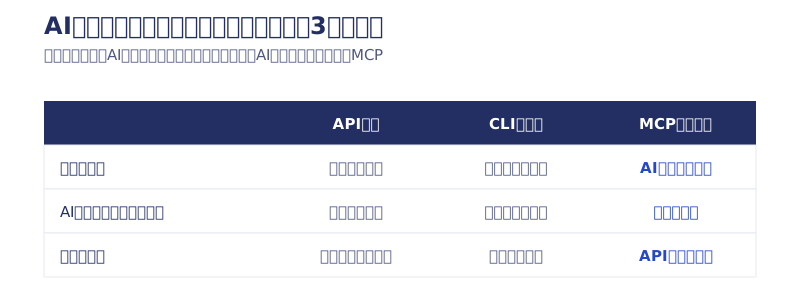
- API integration: create an entry point that lets outside programs read and write the system. It is the foundation for every kind of integration
- CLI tools: call the AI from the internal tool’s side. A way to add a small piece of AI to a specific task
- MCP server: a common standard that lets AI such as Claude or ChatGPT operate internal systems directly
If you only need fixed processes running in the background, API integration is enough. If you just want to add one AI feature to a specific internal tool, a CLI is the shortest route. If you want the AI your staff are already talking to to operate the system itself, choose an MCP server.
API integration | the foundation that connects business systems and AI
An API is the entry point for reading and writing a system from the outside. Neither AI nor any program can touch a system that has no entry point. At Webharu, we built a REST API (creating, retrieving, updating and deleting posts, uploading images and so on) for our own CMS, HaruCMS, and put an MCP server on top of it. Because the API foundation came first, the MCP layer could be kept thin. The design record is in our article on making two of our own SaaS products MCP-ready.
However, if you try to have an AI use the system with only an API, you are left explaining the endpoints and authentication to the AI every time. If you want to operate the system within a conversation with the AI, you need one more layer (MCP) on top of the API.
CLI tools | calling the AI from the internal tool’s side
APIs and MCP point in the direction of “the AI touches internal systems”; CLI tools point the other way. The AI is called from the internal tool’s side.
At Webharu, we built our own CLI bridge that lets local apps and internal tools call Claude without an API key, and we use it in an AI website builder project. If you issue API keys and hand them out to each tool, managing those keys and preventing leaks becomes an ongoing operational burden. Through the bridge, there is no key to hand out in the first place.
It suits small, task-specific integrations, such as “we want a button that has the AI draft a quote.” On the other hand, each tool needs its own development, so as the foundation for company-wide AI use we choose MCP.
MCP server | operating directly from the AI your staff use
MCP (Model Context Protocol) is a common standard that lets AI operate external systems. If an API is the system’s entry point, MCP is the hand the AI uses to go through it. Once you have an MCP server, staff can simply ask Claude or ChatGPT to “list last week’s inquiries” or “register this article as a draft,” and the internal system acts on it.
Webharu has made public an MCP server with 8 tools, plus developer documentation and llms.txt, for our CMS HaruCMS, and our email API HaruMail can also send and receive mail via MCP. These are not demos built to sell; they are systems we use ourselves every day.
By contrast, when we tried a general-purpose MCP from an outside SaaS (Webflow MCP 1.0), simply connecting it loaded a huge amount of information and used up most of the AI’s context, which made it impractical (our article on trying Webflow MCP). That is why our own MCP servers are designed with a limited number of tools and small responses. An MCP server isn’t finished once it is built. The quality of this design decides whether it is actually usable.
Four safety designs for letting an AI agent touch internal systems
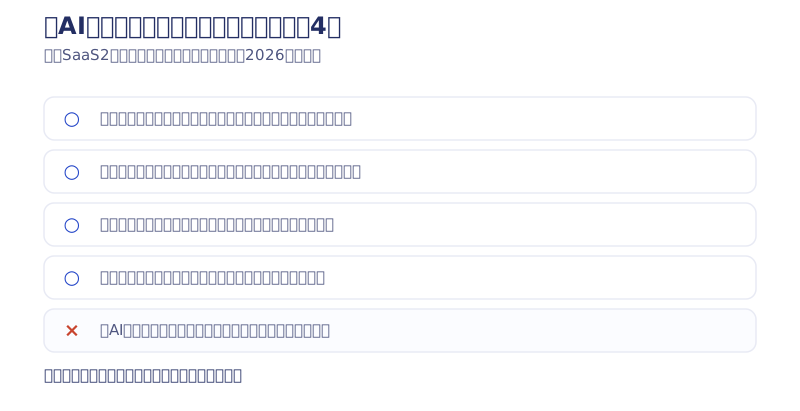
What IT and DX leads worry about most is: “If we give the AI the keys to our internal systems, won’t it delete or send things on its own?” The answer: if you build the API and MCP so that dangerous operations simply cannot be executed, you can connect the AI without handing it full authority.
An operating rule like “let’s give the AI careful instructions” won’t protect you. What protects you is the system. The four designs below are what Webharu uses in production on its own services. In internal approval requests and briefings to management, the deciding question is whether you can state that “even if the AI malfunctions, the damage is structurally contained within this range,” so they are written in that form.
Key revocation | when a person leaves, their keys stop too
In HaruCMS, when a member is deactivated, the API keys that person issued are automatically revoked as well. If a key outlives its account, you get a hole where “we stopped their login, but they can still write from outside.” For any internal system with transfers and departures, this is probably the first item to put in.
Two-step dangerous operations | an API that can’t execute them in one shot
In HaruMail, every sending tool can only go as far as “create a draft.” Actual sending can only be executed through a separate tool called confirm_send. Even if the AI misunderstands, the worst that happens is one draft gets created. Every irreversible operation, such as sending email, payments, deletion or publishing, can be made two-step with the same approach.
Audit logs | every operation can be traced afterwards
Every write operation is recorded in an audit log. Because you can see when, which key, did what, any unexpected behavior can be pinned down right away and just that key can be stopped.
Allowlist | narrow what can be written from the start
In the admin MCP that operates Webharu’s operations platform, writable operations are limited to those on a safe allowlist. Rather than handing over a key that can touch everything and asking the user to be careful, the idea is to make the authority you hand over small to begin with.
Connect AI agents and internal systems in three stages, starting read-only
Don’t plan writes to core systems from the start. The approach Webharu recommends has three stages.
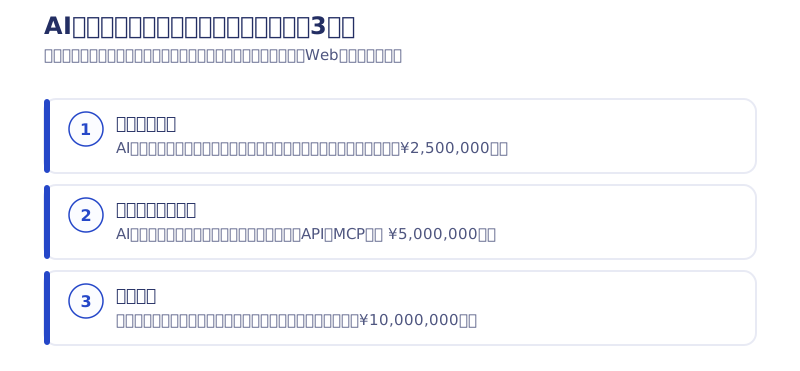
- Connect read-only: the AI is only allowed to read data. Since there is no write permission, accidents where data is deleted or overwritten structurally cannot happen. Just having “the AI can answer questions about internal data” eliminates most copy-paste transcription
- Open up writes with two-step approval: registering, sending and publishing are added in the form “the AI creates a draft, a person checks and confirms it.” It is the same idea as HaruMail’s confirm_send
- Full operation: with audit logs and key management in place, expand the target systems and the operations allowed
In this order, the upper limit of damage is fixed at every stage. Internal approvals also go through more easily when you cut them into stages, such as “first, within a read-only scope,” because the approvers get the information they need to decide.
Cost of integrating AI agents with internal systems (at Webharu)
Webharu’s development menu also follows the three stages above (excl. tax, as of October 2026).
| Menu | What it covers | Price |
|---|---|---|
| MCP Starter | An entry point that puts a read-only MCP over your existing API. About 4–6 weeks | From ¥2,500,000 |
| API + MCP Full Pack | Everything from API design to authentication, rate limiting, audit logs, two-step dangerous operations, the MCP server and developer documentation | From ¥5,000,000 |
| Full Integration | Opening up writes, use from multiple AIs, individually quoted per business system | From ¥10,000,000 |
| Maintenance | Keeping up with API spec changes, monitoring, key management | From ¥150,000/month |
The development period varies a lot depending on whether your current system has an API. If a well-structured API already exists, the MCP layer on top stays thin; if not, the work starts with designing the connection point, which takes longer. The five things to ask when choosing a vendor are in our article on MCP server development costs.
The barrier to AI adoption is the connection point, not the AI’s performance
Most AI adoptions that stall do so not because of the AI’s performance, but because the AI can’t reach the company’s data. Background automation calls for an API, small integrations for a CLI, and direct use from staff’s AI for MCP. Safety comes from the system itself: key revocation, two-step operations, audit logs and an allowlist. That is the conclusion Webharu has verified in production on its own services.
We take on API and MCP server development as a complete package, including authentication, rate limiting, audit logs and public documentation (API & MCP Development service page). Even just a judgment on “could this task of ours be handed to AI?” is fine, so please send it through our free consultation. We publish the next steps on MCP and API implementation first in our Newsletter (emails are in Japanese).
Selected work

New Paint
No.1 in Japan for its local painting keyword 8 days after launch (Search Console)

Hosted by Nippon TV
High-fidelity Figma-to-Webflow conversion, with load speed and responsiveness optimized

PonTech Lab Inc.
Built with AI (Claude Code) on Next.js and Cloudflare, with the build process published
FAQ
How much does it cost to develop an integration between AI agents and internal systems?
At Webharu there are three stages (excl. tax, as of October 2026). The read-only MCP Starter from ¥2,500,000 (about 4–6 weeks); the Full Pack, covering everything from API design to authentication, audit logs, the MCP server and developer documentation, from ¥5,000,000; and Full Integration, which opens up writes and is built per business system, from ¥10,000,000. Maintenance is from ¥150,000/month.
What are the ways to connect AI agents to internal systems?
There are three: API integration, which connects systems in the background; CLI tools, which call the AI from the internal tool’s side; and MCP servers, which let AI such as Claude or ChatGPT operate systems directly. If you want the AI your staff use every day to touch internal systems, choose an MCP server.
Our internal system is old and has no API. Can it be integrated with AI agents?
Yes. In that case we start by designing the connection point (API). You don’t need to turn every function into an API; the standard approach is to first build a read-only entry point just for the data of the tasks you want the AI to handle.
Won’t the AI delete our internal data or send it outside?
We stop that with the system itself. In Webharu’s production environment we use four mechanisms: deactivating a member automatically revokes their keys, dangerous operations such as sending can’t be executed without going through a separate confirmation tool, every write is recorded in an audit log, and only operations on an allowlist can write.
Can it be used from both ChatGPT and Claude?
If it is built as an MCP server, the same connection point can be used from any compatible AI, such as Claude, ChatGPT or Cursor. The key to avoiding a rebuild when you switch AIs is not to tailor it to one specific AI.
Where should we start?
Pick the one task in your company where people most often “transcribe data by copy-pasting while looking at a screen,” and start by connecting that data to the AI read-only. With no write permission, accidents structurally cannot happen, and the effect becomes clear quickly.


