

I’m Masato, CEO of Webharu Inc. We build and run our own headless CMS, “HaruCMS,” and our own email API, “HaruMail.”
Here’s the conclusion first. MCP support for a SaaS does not mean rebuilding your API. You add one thin MCP layer on top of your existing REST API, and that’s it.
Where you should spend your time isn’t the code but three design decisions: tool granularity, how you stop dangerous operations, and keys and permissions. I’ve added MCP support to both of our products this way, and I use them from AI every day. Below is the playbook that took shape along the way, written up as is.
This is for CTOs and product leads at companies that already run a SaaS, a business system, or a membership platform. “Our customers are asking for MCP support.” “The board handed us AI agent support as homework.” I’ve been getting more and more requests like these.
Key takeaways
- MCP support for a SaaS — what it means
- MCP support for a SaaS means adding an MCP server layer on top of your existing REST API so that AI clients such as Claude and Cursor can operate it directly. Webharu has confirmed in production, on two of its own SaaS products (a CMS with 8 MCP tools and an email API), that this can be done without rebuilding the API.
Contents
What MCP support for a SaaS means: giving AI hands on your existing API
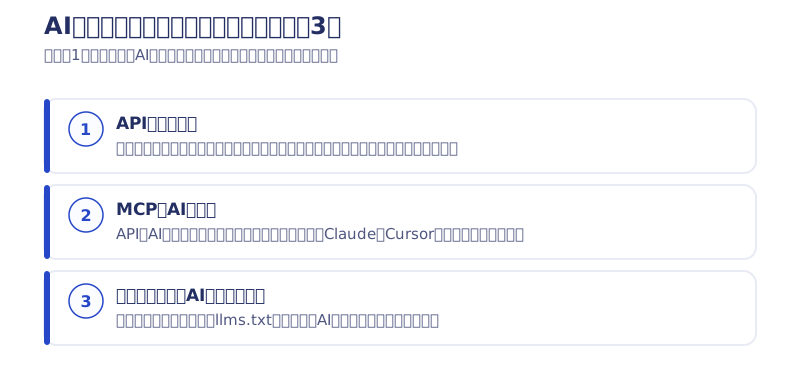
MCP support for a SaaS means adding an MCP server layer on top of your own REST API, so that AI clients such as Claude and Cursor can operate your product directly.
MCP (Model Context Protocol) is a common standard that lets AI operate external systems. If the API is “the entrance to the system,” MCP is “the hands AI uses to go through that entrance.” Only when you also have an instruction manual AI can read (documentation) does AI move beyond being an advisor that can only look.
Why an API alone wasn’t enough
“If there’s an API, can’t AI just use it?” You might think so. I did too, at first.
In practice, when you let AI use a bare API, you end up explaining the endpoints, how to pass authentication, and how to read the responses in the prompt every single time. It forgets across conversations, and since everyone explains it differently, the results vary. With MCP, the AI receives the list of tools and the shape of their arguments as structure, and that variation disappears.
The other reason is that the standard is shared. If you build something tailored to one specific AI service, you rebuild it every time you switch. With MCP, you can change the AI you use and keep the same connection point. The longer a business system is meant to last, the more this difference matters.
The 5-step playbook for MCP support in a SaaS
In short, the order is the five steps below. Each one is a step we actually went through on our own two products.
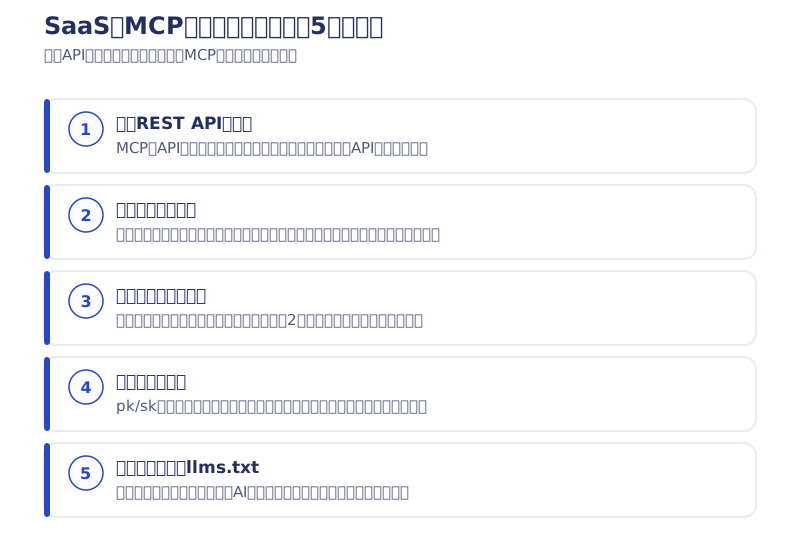
1. Tidy up your existing REST API: the API is the source of truth
An MCP server does not hold any business logic of its own. MCP is a translation layer for the API, and the REST API stays the source of truth. So the first job isn’t writing MCP code; it’s getting your existing API into a state you can hand to AI. Check whether authentication is consistent, whether errors come back structured, and whether operations are split into consistent units.
In HaruCMS, whether you write from the browser editor, the REST API, or MCP, everything goes through the same validation, history, and audit log. If behavior differs by entrance, you get holes like “the editor rejects it, but the API lets it through.”
We also narrowed the shape of the entrance. Article bodies are accepted only as Markdown, and conversion to HTML happens on the server. If outsiders can pour in raw HTML, broken markup and unexpected tags end up in production, all the more so when the content is AI-generated. If your SaaS doesn’t have an external API yet, build the API first. This step can’t be skipped.
2. Decide tool granularity: too many tools fill up AI’s desk
This is the most design-heavy part of MCP support. In short: keep the number of tools down, and keep what each tool returns small.
The evidence is my own failure. When I tried to use a general-purpose MCP for an external SaaS (Webflow MCP 1.0) on a real client project, just connecting it loaded a huge amount of information and filled most of the AI’s context. It never got to practical use (the details are in my article on trying Webflow MCP). Tool definitions and the data they return occupy the AI’s workspace directly. An AI whose desk is buried in documents can’t do the actual job.
So HaruCMS fits its basic operations, such as creating, getting, updating, and deleting articles, categories, and image uploads, into 8 tools. Mapping every API endpoint one-to-one to a tool is the most common design, and the one that ends up least usable.
3. Make dangerous operations two-stage: stop them with structure, not prompts
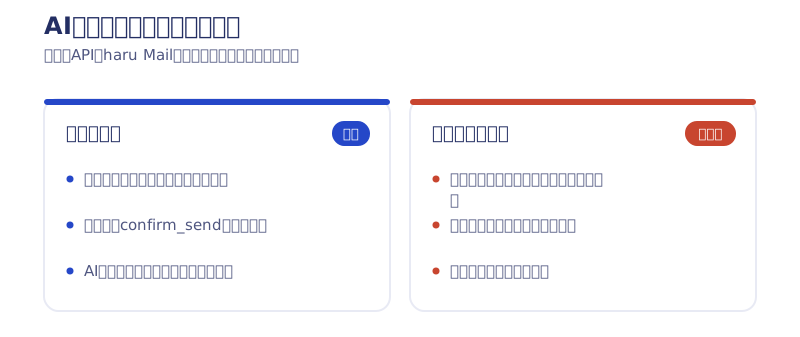
In our first product, HaruCMS, we stopped it with defaults. Any create without a specified status always becomes a draft. AI never publishes something on its own just because of how a conversation went.
In the second, HaruMail, we went one step further. Every sending tool stops at creating a draft, and the actual send only runs through a separate tool called confirm_send. There is simply no path for AI to send an email in one shot.
We didn’t take the approach of asking in the prompt, “Always check before sending.” Instructions fade as conversations get longer, and everyone words them differently. Sending, publishing, deleting, billing: list the operations in your SaaS that would cause an incident if they ran in one shot, and put one confirmation tool in between. It’s a small move, but it completely changes how safe your AI integration is.
4. Keys and permissions: stop one thing and everything stops
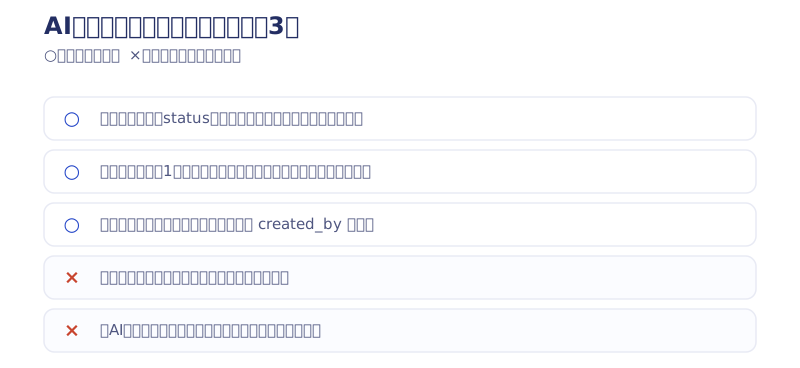
API keys handed to AI clients get written into config files and live for a long time. They tend to be treated more carelessly than human logins. Here are the four things I put in place.
- Separate pk (public key) and sk (secret key). Distinguish, by name alone, what can sit in the front end from what must only be held on the server
- Limit each key’s scope to one site. It can’t reach other sites’ data or admin functions
- When a member is suspended, the keys they issued are suspended automatically too. It’s a suspension, not a deletion, so a mistaken stop can be reversed
- Record every write operation in the audit log. You can trace afterward when, which key, and what it did
The third one is quietly important. If keys live separately from accounts, you can end up in a state where “login is stopped, but the external API can still write.” AI integration incidents happen less as “the AI went rogue” and more as “a key with broad permissions survived.” Tying a key’s lifetime to a person is the invisible core of MCP support.
5. Documentation and llms.txt: the reader is AI
Documentation for an MCP-enabled SaaS isn’t read only by humans. Adopting teams now ask their own AI agents to “read the spec and build it in.”
For HaruCMS, in addition to a reference for people, we publicly released llms.txt, which gives AI the key points, and llms-full.txt, the full spec in a single file. You can see the real thing in HaruCMS’s public documentation. Hand over the full text and say “build a system that posts articles with this,” and the adopting side’s AI writes the connection code. Whether your documentation is machine-readable directly becomes how easy you are to adopt.
Once your SaaS supports MCP, AI becomes your customers’ entrance
MCP support is less a technical task and more a matter of adding one more channel.
Users no longer open the admin screen; they just ask the AI at hand to “create a draft and take it all the way to publishing.” When the one operating moves from a person to AI, the criteria for choosing a product also widen from “is the UI easy to use?” to “is it easy to use from AI?”
If a prospect’s AI can read your llms.txt and documentation and write the integration code, all the friction from trial signup through tutorials to retention disappears. Get your API, MCP, and machine-readable docs in place while competitors still only have an admin screen. I think that’s a bigger edge than adding one more feature, which is why we built both of our products this way.
For the other side of the story, connecting AI agents to your own business systems rather than providing a SaaS, see my article on connecting AI agents with existing systems.
Pricing if you outsource MCP support for your SaaS
At Webharu, we take on API & MCP Development using the same playbook proven on our own two products (as of October 2026, excl. tax).
- MCP Starter (read-only) ¥2,500,000: put a read-only MCP layer over your existing REST API. With no writes, the path to write incidents doesn’t exist by design. Roughly 4–6 weeks
- API + MCP Full Pack ¥5,000,000: everything from REST API design to authentication, rate limiting, audit logs, two-stage dangerous operations, the MCP server, developer documentation, and llms.txt
- Full Integration ¥10,000,000+: opening up writes, multiple AI clients, integration per business system. Quoted individually
For a first step, I recommend the Starter. It lets you show your board and your customers what your product looks like when used from AI, without the risk of write incidents. Market rates for outsourcing, and five things to check in a quote, are in my article on MCP server development costs.
What to read next
- MCP server development costs, and 5 things to ask before outsourcing
- Why I built my own email delivery system (HaruMail, with two-stage sending via confirm_send)
- Trying Webflow MCP, and how it filled up the context
I write about the ongoing development of our SaaS, along with numbers I don’t put in articles, in the newsletter. If you’re a developer building MCP servers or APIs, please sign up for the newsletter (emails are in Japanese). If you’re at the stage of “how would this work for our SaaS?”, start with a free consultation.
Selected work

PonTech Lab Inc.
Built with AI (Claude Code) on Next.js and Cloudflare, with the build process published

Hosted by Nippon TV
High-fidelity Figma-to-Webflow conversion, with load speed and responsiveness optimized

JTB Americas
A full renewal of the North America site, with the operations team able to update it themselves
FAQ
How long does MCP support for a SaaS take, and how much does it cost?
For a setup that puts a read-only MCP layer over your existing REST API, roughly 4–6 weeks. Webharu’s pricing is ¥2,500,000 for the MCP Starter, ¥5,000,000 for the API + MCP Full Pack including authentication, audit logs, and public documentation, and ¥10,000,000+ for integration per business system (all excl. tax, as of October 2026).
How many tools should an MCP server have?
Webharu’s CMS fits its basic operations (create, get, update, delete, categories, image upload) into 8 tools. Single digits is a good guide. Tool definitions and the data they return use the AI’s context directly, so creating one tool per endpoint makes the server unusable.
Can a SaaS without an external API still add MCP support?
Yes. The API comes first. An MCP server is a translation layer with no business logic, so you build a REST API with authentication, structured errors, and audit logs first, then add the MCP layer on top. The API you build can also be used as is for external integrations other than AI.
Is there a way to stop AI from sending emails by mistake or publishing on its own?
Yes. Webharu’s design has two stages. In the CMS, any create without a specified status always becomes a draft; in the email API, sending tools only go as far as creating a draft, and the actual send can only run through a separate tool called confirm_send. We don’t rely on cautionary notes in prompts.
What is the difference between MCP and an API?
An API is the entrance to a system; MCP is the hands AI uses to go through that entrance. Programs can operate a system with just an API, but if AI uses it, you have to pass explanations in the prompt every time. With MCP, the AI understands the list of tools and argument shapes as structure, so it runs stably without explanations.
What is llms.txt for?
To let the adopting side’s AI agent read your spec. Webharu’s CMS publishes two files: llms.txt with the key points and llms-full.txt with the full spec. Give the full text to AI and it can write the connection code, so nobody has to study the documentation by hand.


![Custom Website vs Web App | Full-Scratch or Full-Stack? [Cost, Timeline, Fit]](/assets/posts/thumb-full-scratch-vs-fullstack.avif?v=2b619e52)