

Hi, I’m Kurita, Representative Director of Webharu Inc..
Ahrefs’ Site Audit is free to use on your own site. Register for the free Ahrefs Webmaster Tools (AWT), verify that you own the site, and you can crawl it with the same Site Audit as the paid plan.
In July 2026, I ran our AI-rebuilt company site (rebuilt with Claude Code) through Ahrefs’ Site Audit. The old site scored 6 on health; the rebuilt site scored 98. Even at 98, though, six holes were still left to fix. This article is written in the order I actually worked through it on our own site: registration, crawling, how to read the results, and how to fix what came up.
Key takeaways
- Ahrefs Health Score — what it means
- Ahrefs’ Health Score is a 0–100 measure of the share of internal URLs crawled by Site Audit that have zero errors. Only red errors pull the score down; warnings and notices have no effect on it.
Contents
Ahrefs Site Audit is free on your own site
The short answer: Site Audit is available free through Ahrefs Webmaster Tools. The only condition is verifying that you own the site you want to audit.
Ahrefs is known as a paid SEO tool (from $129/month as of July 2026). But for any site whose ownership you’ve verified, Site Audit, Site Explorer and Web Analytics are all free. Ahrefs’ own help pages state that the free tier of Site Audit checks over 170 technical SEO and on-page issues (confirmed October 2, 2026).
- ✓ Site Audit for your own site (5,000 crawl credits a month per project)
- ✓ Your own site’s backlinks and incoming keywords (up to 1,000 results shown at a time)
- ✗ Competitor site analysis (Ahrefs’ real selling point — paid)
- ✗ Keyword research tools and rank tracking (paid)
That said, the free tier is not enough for large sites over 5,000 pages. Ahrefs’ own help pages also direct sites over 5,000 URLs to a paid plan. A small or midsize company site, or a blog with a few hundred articles, fits comfortably within the free tier.
How to use Ahrefs Site Audit: 4 steps from registration to crawling
There are four steps. Once ownership verification clears, all that’s left is clicking a button and waiting. The steps below are what I confirmed on Ahrefs’ own help pages on October 2, 2026.
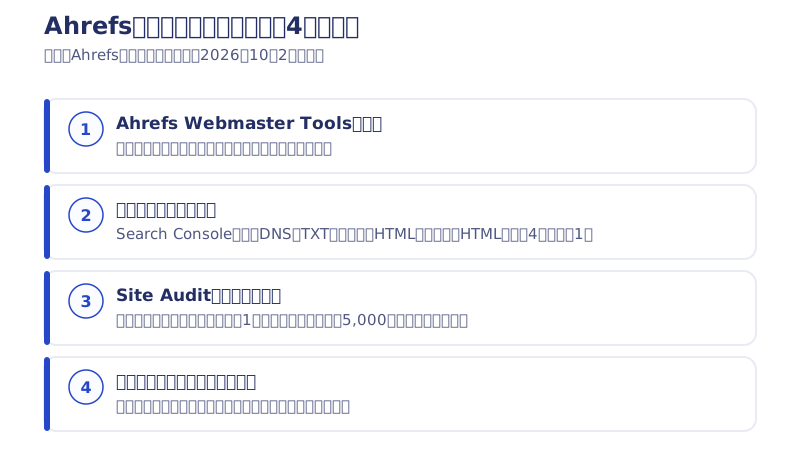
Step 1: Sign up for Ahrefs Webmaster Tools for free
Create a free account from the Webmaster Tools page on Ahrefs’ official site. No paid plan required.
Step 2: Verify that you own the site
This is the step where Ahrefs confirms “is this site really yours.” There are four ways to do it.
- Connect Google Search Console (the official recommendation — a site already verified in Search Console is verified automatically, and you can verify multiple sites at once)
- Add a TXT record to your DNS (propagation can take up to 48 hours)
- Upload an HTML file to the root of your site
- Paste an HTML tag (meta) into the <head> of your homepage
If you already have Search Console set up, connecting it is the fastest route, exactly as Ahrefs recommends — just link your Google account and you’re done. If you verify by DNS or HTML file, leave the verification record or file in place; Ahrefs re-checks that ownership is still valid every time it crawls.
Step 3: Start the crawl with Site Audit
Once ownership verification clears, check your Site Audit settings and click “Start crawl.” From there, Ahrefs’ crawler goes through your site and gathers the issues for you. For large sites, raising the crawl speed setting before you start finishes the job faster (per Ahrefs’ own help pages).
Step 4: Read the health score and issue list
Once the crawl finishes, you get a Health Score and a list of the issues found. The next section covers how to read them in detail.
How to read the results: only red errors pull your health score down
The Health Score is the share of crawled internal URLs that have zero errors. The formula is “number of internal URLs with no errors ÷ number of internal URLs crawled × 100.” If 2 out of 10 pages have an error, that’s a score of 80 (Ahrefs’ own example).
What matters here is the color coding of the issues.
- Red Error: pulls the health score down. Fix these first
- Yellow Warning: does not affect the score. Fix if you have spare time
- Blue Notice: does not affect the score. Just worth knowing about
As a rough guide, 0–30 is Weak, 31–70 is Fair, 71–90 is Good, and 91–100 is Excellent (again, per Ahrefs’ own help pages).
In fact, our new site scored 98 even with 167 warnings, because warnings don’t touch the score. Put the other way around, if you want the number to go up, red errors are all you need to watch. There’s no need to burn time trying to get every warning down to zero.
Measured: 6 on the old site, 98 on the AI-rebuilt new site
We ran Ahrefs’ Site Audit on our own site twice, with these results.
- Before the rebuild (old Webflow site): 6 — 236 errors, 230 warnings
- After the rebuild (AI-built new site): 98 (+92) — 19 errors, 167 warnings
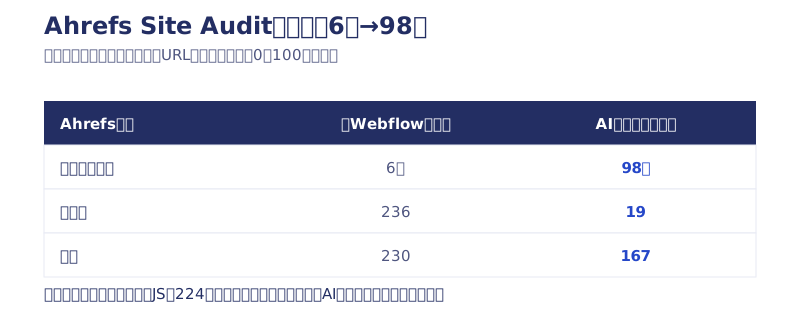
An honest footnote: the old site’s score of 6 wasn’t low because Webflow itself was bad. Years of running the site had left 224 pages’ worth of JavaScript that could no longer load. With errors sitting on almost every page, the score fell straight to the floor by the formula above.
On top of that, what pushed the new site up to 98 was carrying the URLs over unchanged and redesigning the structured data from scratch. I wrote up the whole rebuild process in the record of the seven-day AI website rebuild.
How we fixed it: the six holes that remained even at 98
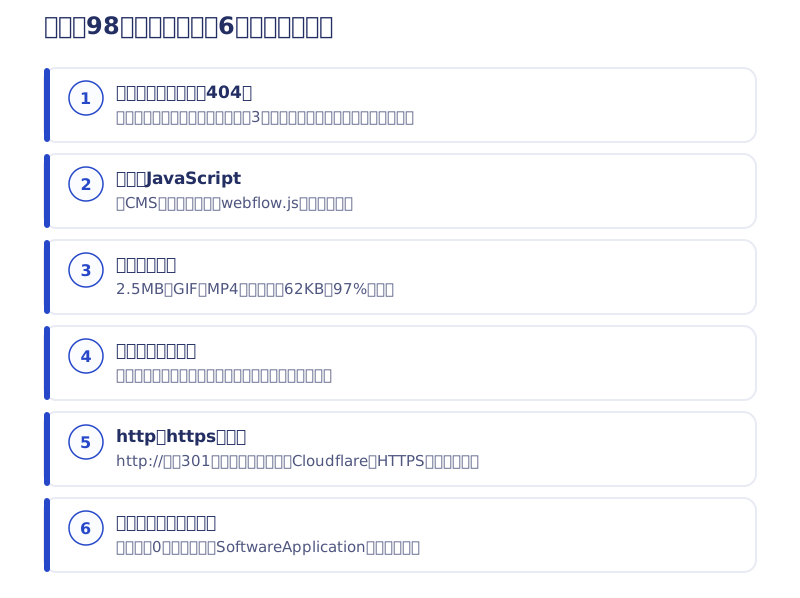
98 is not a perfect score. We fixed the remaining holes Ahrefs flagged for us, one by one. Here are the six fixes.
① Remove dead internal links (404)
Links to old articles were still pointing at articles that hadn’t been migrated, returning 404. Three in total. Since there was no plan to bring those articles back, I removed just the links and kept the text. Finding these by hand across 62 articles isn’t realistic, so Ahrefs’ list became the work list as it was.
② Remove broken JavaScript
Among the articles migrated from Webflow, leftovers from the old CMS export (an unloadable webflow.js) had slipped in. Removing it was the whole fix. If Ahrefs hadn’t pointed it out, I probably would never have noticed.
③ Turn a heavy GIF into a video
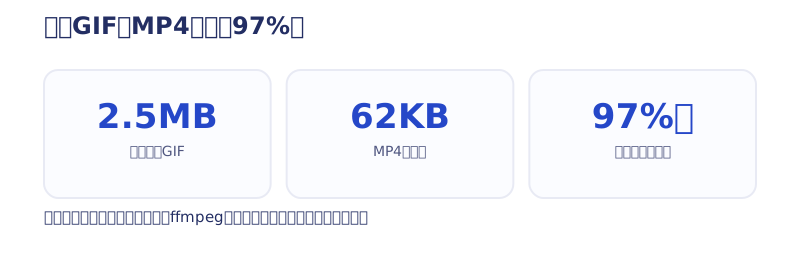
An old tutorial article had a 2.5MB GIF embedded in it. Converting it to an MP4 video brought it down to 62KB, a 97% cut. Add autoplay, muted, loop and playsinline to the video element and it still displays as the same automatic loop as the GIF. The conversion was a single ffmpeg command.
④ Fix titles that are too short
Pages like the company profile page came up with titles that were too short. I fixed them by adding fact-based words.
⑤ Remove the http and https duplication
The http:// version of our URLs was still alive without forwarding to https, so every page was being counted as two separate URLs. Turning on HTTPS enforcement in Cloudflare solved it. Unglamorous, but it wipes out a whole batch of “duplicate” findings in the audit.
⑥ Remove the structured data error
The structured data (SoftwareApplication) for our three in-house apps came back flagged for missing rating (star) information. Showing an app with star ratings in Google requires rating data, but all three apps still have zero reviews. Since you can’t enter a rating that doesn’t exist, I removed that structured data instead. The apps are still introduced through App Store links and body copy, just as before.
Ahrefs Site Audit vs. Search Console
Search Console tells you whether Google sees a problem with indexing or how a page displays. Ahrefs’ Site Audit, on the other hand, sends its own crawler through your entire site and lists the technical holes — broken JavaScript, heavy images, short titles — that turns up.
I use both. I watch the search numbers in Search Console and hunt for technical holes in Ahrefs. Both are free, so there’s no reason to settle for just one. I wrote up how we decide which numbers to watch every month in the article on website KPIs that measure inquiries through GA4.
The faster you build with AI, the more a free audit pays off
Precisely because AI lets us build faster, the step of checking afterward whether the result is technically healthy earns its keep. And the free tier of Ahrefs is entirely enough to do it.
- Site Audit is free on your own site (just registration and ownership verification)
- Only red errors pull the health score down. Warnings can wait
- Holes remain even at 98. Finding and fixing them is one full set of work
Our measurements on the search-ranking side are in the article testing whether AI-built sites are weak at SEO. The migration steps that keep a renewal from losing SEO, with real accident examples, are in how a site renewal affects SEO.
At Webharu, we handle everything from AI-assisted website production through to post-launch audits and fixes like this. We try all of it on our own site first before bringing it into client work. If you’d like someone to look at the state of your site, reach out through the contact form any time.
Selected work

New Paint
No.1 in Japan for its local painting keyword 8 days after launch (Search Console)

Hosted by Nippon TV
High-fidelity Figma-to-Webflow conversion, with load speed and responsiveness optimized

PonTech Lab Inc.
Built with AI (Claude Code) on Next.js and Cloudflare, with the build process published
FAQ
Can I use Ahrefs Site Audit for free?
Yes. Register with the free Ahrefs Webmaster Tools, verify that you own the site, and Site Audit is free for your own site. The free tier gives you 5,000 crawl credits a month per project (as of October 2026).
How do I verify ownership on Ahrefs Webmaster Tools?
There are four ways: connecting Google Search Console, a DNS TXT record, an HTML file, or an HTML tag. The official recommendation is connecting Search Console — a site already verified there is verified automatically. DNS verification can take up to 48 hours to propagate.
How is Ahrefs’ health score calculated?
It’s the number of internal URLs with no errors divided by the number of internal URLs crawled, multiplied by 100. If 2 out of 10 pages have an error, that’s a score of 80. Only red errors pull the score down; warnings and notices don’t affect it.
What health score counts as good enough?
By Ahrefs’ own guide, 91–100 is Excellent and 71–90 is Good. Our own site scored 98, yet six holes still remained — dead 404 links, a heavy GIF and more. Prioritize bringing red errors toward zero over chasing the number itself.
When is Ahrefs’ free tier not enough?
When your site has more than 5,000 URLs, or when you want competitor analysis or keyword research. Those two are paid-tier territory. For a technical check of a small or midsize company site, or a blog with a few hundred articles, the free tier is enough.
How do I make a heavy GIF image lighter?
Converting it to a video such as MP4 works well. On our own site, a 2.5MB GIF became 62KB in MP4 — a 97% cut. Add autoplay, muted, loop and playsinline to the video element and it still displays as the same automatic loop as the GIF.


