

Hi, I’m Kurita, Representative Director of Webharu Inc..
GA4 won’t count your inquiries unless you set it up to. To count a contact-form submission as a conversion, send a submission-complete event and register that event as a GA4 “key event.” On my own site, I use Google’s recommended name for it: generate_lead.
This article covers the steps for measuring contact-form conversions in GA4, then just 5 website KPIs to check every month once that tracking is live. All of it is what I actually do on our own site.
Key takeaways
- Key event (GA4) — what it means
- A key event in GA4 is the setting that counts a business-critical action — such as a contact-form submission or a brochure request — as a result in Google Analytics 4; the name changed from “conversion” in 2024. GA4 can’t count inquiries out of the box, so you need to send an event and register it as a key event.
Contents
How to Turn a Contact-Form Submission Into a Conversion in GA4
The short version: there are two steps. Send an event when an inquiry is completed, and register that event as a key event. GA4 renamed “conversions” to “key events” in 2024, so look for “key events” on the screen.
Step 1: Send an Event When the Form Submission Completes
The most reliable way is to send the event on the completion page (the thank-you page) after submission finishes. Counting a button click instead also counts people whose submission failed due to an input error. The event name is up to you, but using generate_lead (lead generation) from Google’s recommended events keeps the meaning clear even when you look back later.
Step 2: Register That Event as a Key Event
- Open “Admin” in GA4
- Go to Data display → Events, and find the generate_lead row
- Turn on “Mark as key event” for that row
If the event has never arrived yet, you can also register it by going to Data display → Key events and creating a “New key event,” entering the event name directly. Once registered, send one test submission and check the next day or later whether the number shows up in a report.
How We Built Our Own GA4 Contact-Form Conversion (generate_lead)
On my own site, I count inquiries, brochure downloads, and newsletter sign-ups all under the same generate_lead. I tell them apart with a value called “form_name” attached to the event. Splitting the count by form_name in GA4 shows which form is actually doing work.
- Inquiries and brochure downloads: move to a completion page (/success) after submission and send it there, exactly once
- Reloading the completion page or hitting “back” doesn’t send it (so the same person isn’t counted twice)
- Opening the completion page by typing the URL directly doesn’t send it either
- Newsletter sign-up: since the screen doesn’t change, send it the instant the “registered” message appears
Even built this carefully, the numbers still get dirty. On September 24, 2026, an automated program (a bot) overseas sent 59 submissions through the English newsletter sign-up form, and 58 of those became bot sign-ups counted under generate_lead. So since October 1, sign-ups that fail bot verification get split into a separate event (nl_unverified) and kept out of key events.
A conversion number matters just as much for whether you’re counting the wrong things as for whether you’re counting at all. If the count suddenly spikes, check what’s inside before you celebrate.
Only 5 Website KPIs Matter: 30 Minutes a Month in Total
Once you can count inquiries, the next thing is the numbers to check every month. I watch the following 5, about 30 minutes in total.
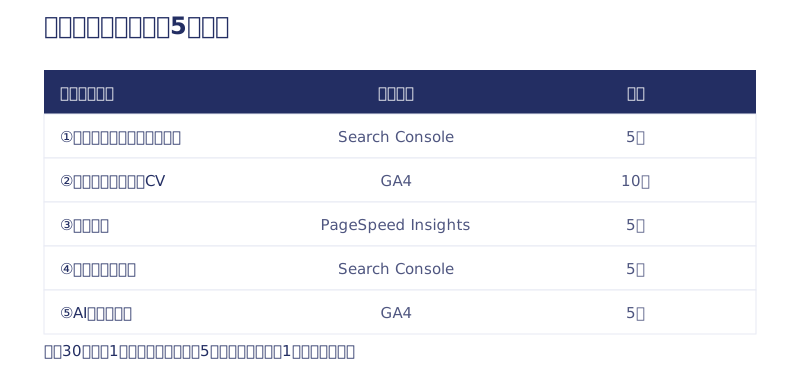
PV (pageviews) isn’t on the list. More pageviews alone don’t do any work. My blog gets about 190,000 search impressions over the last 12 months, but the number of impressions itself doesn’t earn a single yen. What matters is checked in this order: are we being found → is that turning into inquiries → is the experience comfortable.
1. Search Impressions and Clicks (Search Console, 5 minutes)
- Open Search Console’s “Search performance”
- Set the period to “Last 3 months”
- Only check whether the “Total impressions” and “Total clicks” lines are trending up or down
What you’re reading is the slope, not the absolute value. A sudden drop is a sign something’s happened — that’s the only time you need to dig in further.
2. Contact-Form Conversions (GA4 Key Events, 10 minutes)
The single most important number of the five. In GA4’s Reports → Engagement → Events, compare the key event count against last month. Splitting by form_name lets you track inquiries and brochure downloads separately. If you have zero key events, do Steps 1 and 2 above before you look at the other four — without this, no other number can answer “so did it lead to revenue?”
3. Page Speed (PageSpeed Insights, 5 minutes)
Put your own URL into PageSpeed Insights and check the “Mobile” score, since most visitors are on phones. Our own site started at 73; I cut the web font causing it and fixed it up to 98. As a rule of thumb, 90 or above is fine, and staying in the 50s or lower is the line for talking to your production company.
4. Growth in Branded Search (Search Console, 5 minutes)
This is how many times people searched for your company or service by name — a report card for everything happening off the site, like sales, referrals, social, and flyers. In Search Console’s “Search performance,” filter by “+ New” → “Query” for your own company name (including hiragana and katakana spellings), then compare against last month and the same month last year.
5. Traffic via AI (GA4, 5 minutes)
In GA4’s Reports → Acquisition → Traffic acquisition, filter the source by “chatgpt.” On our own site, ChatGPT traffic grew from 12 sessions in August 2026 to 54 in September. It’s still a small number, but I check it every month to catch the moment it starts moving. The full method and the trend are in our article measuring ChatGPT traffic in GA4.

Number Zero: Is GA4’s Tracking Itself Even Alive?
There’s one more thing to check before the five numbers: whether the mechanism collecting them is actually running. I got badly burned here myself.
From July 16, 2026 — the day we relaunched our own site — until July 30, GA4 was almost completely down. Two causes overlapped: the file that loads the tracking tag (gtag.js) was returning a 404, and a security setting (CSP) was blocking where the tracking data gets sent. The site itself displayed completely normally, with no error screen. Only the tracking had stopped, so nobody could notice unless they went and looked.
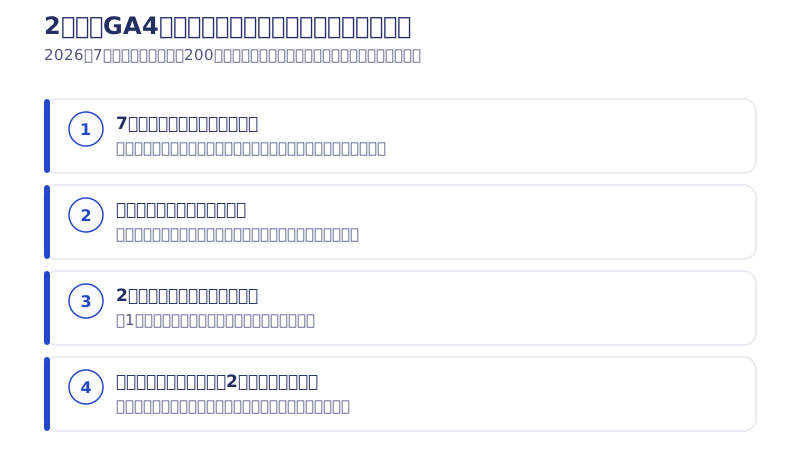
I noticed when I opened GA4 after two weeks and saw zero. Honestly, I was pretty disappointed, because tracking data can’t be recovered after the fact. Visits that were never recorded stay blank forever.
So now I’ve put in a mechanism that automatically checks every day whether tracking is alive. It checks twice a day whether the tracking tag itself is actually being delivered, and whether data is really reaching GA4, and I get notified if it stops. If building this yourself is hard, just ask your production company: “can you do a periodic check that the tracking tag is alive?” That’s a completely reasonable request within the scope of a monthly maintenance plan. The full story of the incident is in how a site relaunch affects SEO.
How Often to Check the 5 KPIs, and How to Keep a Record
On the same day every month (the start of the month works well), check them in this order and leave just the 5 numbers and the date as a single line.
- Search Console: impressions and clicks (5 minutes)
- GA4: the contact-form key event count (10 minutes)
- PageSpeed Insights: the mobile score (5 minutes)
- Search Console: impressions for branded search (5 minutes)
- GA4: sessions via AI (5 minutes)
You don’t need an elaborate report. Three months in, the slope becomes visible; six months in, you can check your moves against the results.
For what it’s worth, I personally open it about once a week or once every two weeks. Not every day. Traffic moves up and down day to day, so getting worked up over a single day’s number doesn’t lead anywhere. That said, the longer the gap between checks, the later you notice a tracking incident like the one above. Just keep that in mind.
What I Actually Did After Looking at the Numbers
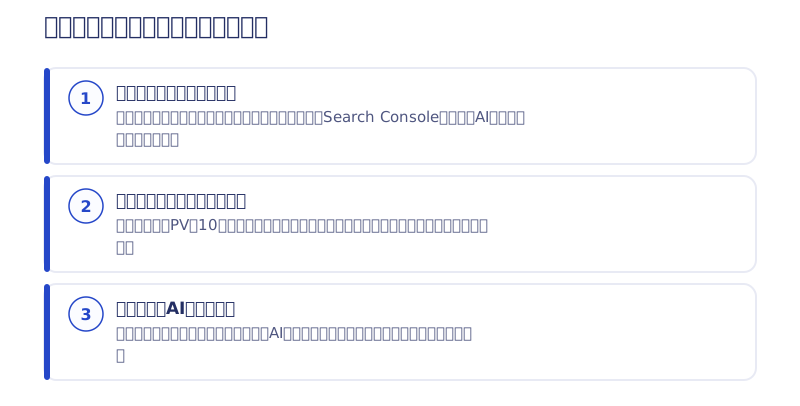
1. I Reversed a Decision to Drop the Korean Pages
During the relaunch, I judged that the Korean version made with Webflow’s automatic translation was unnecessary and redirected all of it to the Japanese version. Then, looking at Search Console later, I noticed the Korean pages I’d supposedly folded were still getting clicks. Thinking it would be a waste, I’ve rebuilt the Korean version with AI. Left to instinct alone, that page would have simply disappeared.
2. When Traffic on an Article Spiked, I Fixed Up What Comes Next
Our blog has an article whose pageviews jump nearly tenfold whenever it gets picked up on TV. What I do at moments like that isn’t anything flashy — just rebuilding the related articles (coupon information, for example) or updating the dates to the latest. Preparing the next page for the people who actually showed up is what works best.
3. I Have AI Read All the Numbers and Hunt for Opportunities
Lately, I have AI read every number I can pull and dig out “where’s the next opportunity.” A human inevitably looks only at the metrics they already care about. AI reads across everything and picks up combinations I hadn’t noticed. The method is in letting AI handle GA4 analysis.
What to Check When a Production Company Runs Your Site
Even when operations are outsourced, these 5 numbers work as shared vocabulary on the client’s side. There are only two things to check.
- Does the monthly report include the contact-form key event count? If it’s just pageviews and visitors, ask: “which event are you counting as the inquiry key event?”
- Does each number come with a proposal for what to do next month? Reporting alone is measurement, not operation
Webharu’s Site Care Plan includes a monthly report based on real GA4 and Search Console measurements (traffic, conversions, AI-driven traffic) plus fixing the issues it finds, starting with the Managed plan (from ¥50,000/month, excl. tax) and above. If you’re at the stage of “I just want someone to check whether our GA4 is set up right,” ask us through the contact form. We share our own measurements first in the newsletter.
Selected work

New Paint
No.1 in Japan for its local painting keyword 8 days after launch (Search Console)

Hosted by Nippon TV
High-fidelity Figma-to-Webflow conversion, with load speed and responsiveness optimized

PonTech Lab Inc.
Built with AI (Claude Code) on Next.js and Cloudflare, with the build process published
FAQ
How do I turn a contact-form submission into a conversion in GA4?
Send an event (for example, generate_lead) on the contact form’s submission-complete page, then mark it as a key event under GA4’s Admin → Data display → Events. If no event has arrived yet, you can register the event name directly on the Key events screen.
Are conversions and key events different things in GA4?
No, they’re the same. GA4 renamed “conversions” to “key events” in 2024. If you want to count an inquiry as a result, look for the key event setting.
What is generate_lead?
It’s one of Google’s recommended event names, representing lead generation — an inquiry, a brochure request, and so on. On our own site, we count inquiries, brochure downloads, and newsletter sign-ups all under generate_lead, split by type with form_name.
What if the number of inquiries suddenly spikes?
Check what’s inside before you celebrate. On our own site, bots overseas sent 59 newsletter sign-ups on September 24, 2026, dirtying 58 key events. We now split sign-ups that fail bot verification into a separate event.
What KPIs should a website manager check every month?
Five: impressions and clicks in Search Console, the contact-form key event in GA4, the mobile score in PageSpeed Insights, impressions for branded search, and sessions arriving via AI. You can check all of them in about 30 minutes.
How do I check that GA4 tracking hasn’t stopped?
Check whether your own visit shows up in GA4’s realtime report, or whether yesterday’s number has dropped to zero. On our own site, we automatically check twice a day that the tracking tag is actually there and that data is reaching GA4, and we get notified if it stops.


