

Hi, I’m Kurita, Representative Director of Webharu Inc.. We build websites in Shiogama, Miyagi, Japan.
The SEO impact of a website renewal comes down almost entirely to whether you can carry your URLs across. Set up a 301 redirect for every old URL to its new one, one by one, and move your articles, meta information and measurement tags without missing anything, and your rankings won’t drop. Miss even one of those, on the other hand, and that page’s evaluation comes close to being reset.
In July 2026, I rebuilt our own company site entirely with AI. The day after launch, 24 of our 30 old articles kept their index entry, and our flagship keyword held its ranking too. But the same renewal also caused an incident where 57 Korean pages vanished from search results, and another where GA4 stopped working for two weeks. This article covers both what went right and what went wrong, with dates and numbers.
Key takeaways
- The SEO impact of a website renewal — what it means
- The SEO impact of a website renewal is the way search rankings and traffic shift when a rebuild changes the URLs, content, meta information and measurement setup. Rankings can be held if every old URL gets a 301 redirect to its new one and nothing is missed in the migration; miss even one piece, and that page’s evaluation comes close to being reset.
Contents
The SEO impact of a website renewal: changing your URLs comes close to resetting their evaluation
To a search engine, a page whose URL has changed is essentially a different page. Without a design that carries the evaluation over, the rankings you’ve built up get treated close to a reset.
On the other hand, when a 301 redirect (a permanent forward) is set up correctly, search engines are said to recognize the new URL within a few days to a few weeks. In other words, it isn’t the renewal itself that drags your ranking down — it’s gaps in the carry-over.
In fact, our own company site’s Japanese pages measured 641 clicks and 17,920 impressions in June 2026, before the renewal, and 746 clicks and 32,100 impressions in September 2026, two and a half months after launch (measured in Search Console). We also added new articles during that period, so not all of the growth is down to the renewal. Even so, we replaced the entire build — from Webflow to Astro — and the search numbers didn’t drop.
One more thing: if you change the domain itself, the carry-over tends to weaken even with 301s in place. Unless you have a specific reason, keep the domain unchanged.
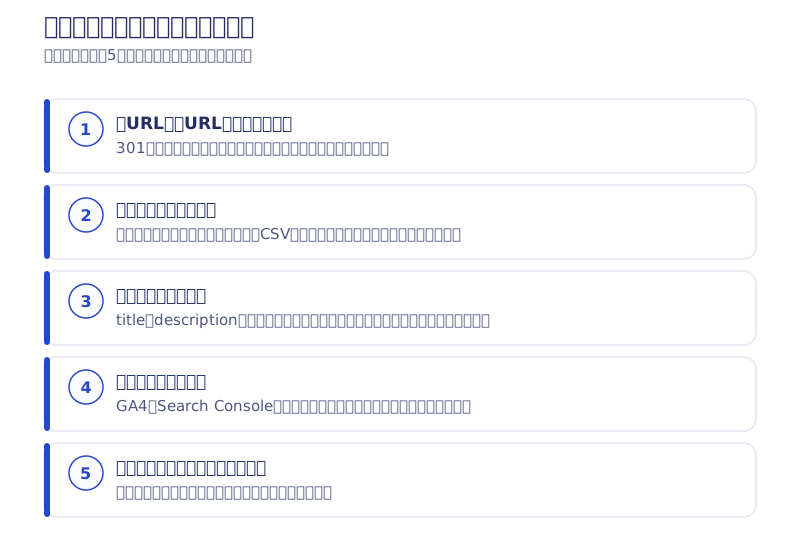
The five-item migration checklist that limits the SEO impact of a website renewal
You don’t need to understand every technical detail. It’s enough to be able to ask your production company, “how are these five handled?”
| What to check | What it means | What happens if it’s missed |
|---|---|---|
| URL design and 301 redirects | Whether a permanent, page-by-page redirect is set from every old URL to its new one | Both search engines and visitors get stranded on the old URL, and the evaluation isn’t carried over |
| Content migration | Whether every article, project entry and announcement moves to the new site without omission | The more items there are, the more gaps appear from manual work |
| Carrying over meta information | Whether each page’s title and description are designed with how they currently appear in search results in mind | Your click-through rate in search results shifts |
| Carrying over measurement tags | Whether your existing Search Console and GA4 properties are kept as they are, rather than rebuilt | You lose the ability to compare before and after the renewal |
| Post-launch index checks | Whether there’s a routine for confirming that search engines have recognized the new pages | Some pages can stay missing from search results for a long time |
The first item, 301 redirects, and the fourth, measurement tags, matter most. The basic rule is to carry over your existing Search Console and GA4 properties rather than rebuild them. Rebuild them fresh and you lose the ability to verify later what the renewal actually changed.
What to have ready before you start
- Login details for your current site’s admin panel (CMS)
- Administrator details for your own domain (where it’s registered)
- Access to GA4 and Search Console
- A list of the articles, project entries and announcements you want to migrate
Domain administrator details especially tend to get forgotten. We’ve had people tell us they spent days just tracking down which registrar held the contract.
An SEO incident from our own renewal: 57 Korean pages vanished
From here it’s my own failure. Neither incident was noticed by anyone for more than two weeks after launch. I think this is more useful than a success story, so I’m writing it with the dates attached.
Let me be clear about where I stand first. We built this site with the AI doing the hands-on work and me making the calls. As work, both incidents below were carried out by the AI. But failing to catch them was my responsibility, since giving the instructions, reviewing, and giving the go-ahead is my job. The same would be true if we’d outsourced the work to people instead.
The old site had a Korean version. Some articles were read in Korea before they were read in Japan — one article that sat on the first page of Korean search results for the single word “webflow” (average position 5.6) had 11,663 impressions in seven weeks.
When we built the new site, the instruction I gave the AI was “don’t rebuild the Korean version for now.” In response, the AI wrote a single line into a file called _redirects: “forward everything under /ko/ to the Japanese version with a 301.” Faithful to the instruction. But the AI never got as far as thinking about what that one line meant — throwing away the rankings we’d built up in Korea. And I let that line pass straight through review.
We launched on July 16. The pages stayed in search results for a few days, but from July 20 onward, impressions for the Korean pages were effectively zero. Google read the redirect, concluded the pages had been merged into the Japanese version, and dropped them from the index. We rebuilt the Korean version and removed the redirect on July 26, but they didn’t come back right away. Once a URL has been judged to be a redirect, its priority for a re-crawl drops.
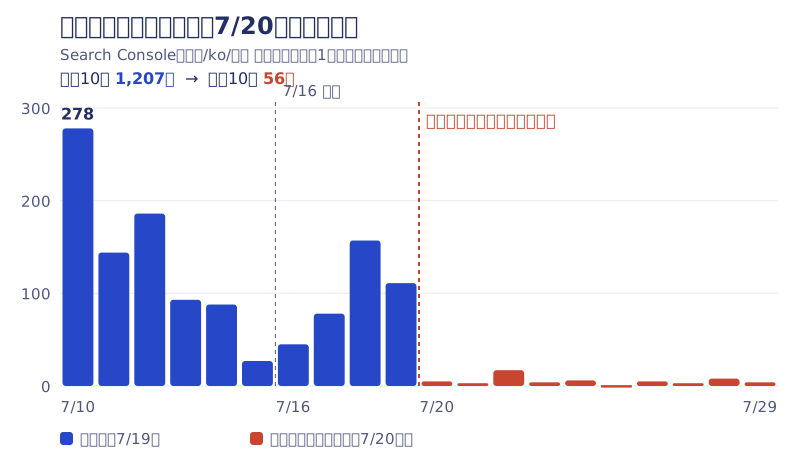
I noticed something was wrong on August 1, sixteen days after launch. It started with looking at the numbers and catching that Korean traffic had gone to zero. From there I had the AI dig in, and the cause and the exact date it started came out right away. Put the other way around: if I hadn’t caught it, the AI would never have reported it on its own.
After that, total impressions for the Korean pages climbed back from 2,252 in August 2026 to 3,355 in September. Even so, the impressions lost during the gap can’t be recovered.
The second incident: GA4 wasn’t running for two weeks from launch day
What turned out to be worse was the measurement outage. From launch day on July 16 through July 30, GA4’s visitor count stayed at essentially zero.
Two causes overlapped. One was that the file that loads the measurement tag (gtag.js) was returning a 404 — the measurement ID itself was pasted in correctly, but the tag’s actual body never arrived. The other was that a security setting (CSP) the AI had configured was blocking the destination the measurement data was sent to. Either one alone might have been easy to catch, but with both stacked together, separating them took time.
As a result, the two weeks of data right after launch — exactly the period you most want to see — simply doesn’t exist. We restored it between July 31 and August 1, and in September 2026 we measured 1,681 sessions in a month. Since it was our own site, we can still laugh about it. On a client project, it would have been unrecoverable.
What the two incidents have in common: the site looks completely normal
In both cases, open the page and it displays normally. The server returns 200 (OK), and no errors show up anywhere. What was broken was only “how it looks to Google” and “the back end of measurement” — nothing surfaced within the range a human eye can inspect. That’s why two weeks went by unnoticed.
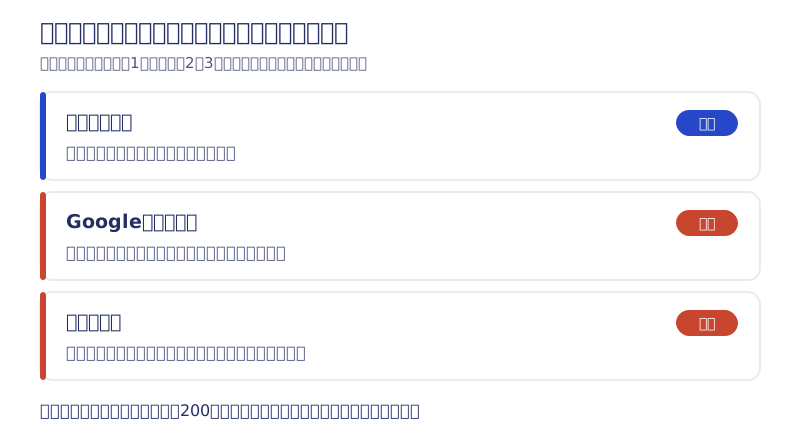
The four things we check automatically every day after a renewal
After the incidents, I had the AI build the act of noticing itself. It’s a mechanism that watches the live site automatically, checking these four things twice a day.
- Whether the main URLs are actually returning content (rather than a redirect or a 404)
- Whether a page we want in search results has accidentally been tagged “exclude from search”
- Whether the measurement tag itself is still alive
- Whether data is actually arriving in GA4
If anything is abnormal, I get a notification. The last one — whether data is arriving — is the one I rely on most, because whatever the cause, if measurement has stopped, it always trips this check. After building it, I fed in the dates of the July incidents to test it, and it correctly flagged them as abnormal.
The AI is faster at the work. The AI is faster at tracking down causes. But for now, noticing that something is off in the first place is still a human job. And human eyes have limits. So that “noticing” role had to be built into a system too.
When you choose a production company, ask them, “what do you check after launch, and how?” A company with a checking routine is safer than one that just looks at the screen and calls it done. I wrote up how we decide which numbers to watch every month in the article on website KPIs that measure inquiries through GA4.
Six signs it’s worth considering a renewal
One sign alone is fine to just watch. If several apply, it’s a good time to consider it seriously.
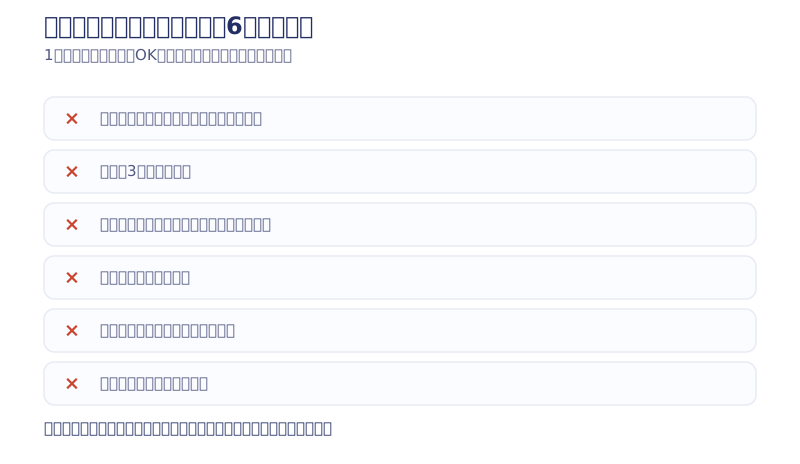
- Hard to use on a phone: text too small, buttons hard to tap, layouts breaking
- Takes more than three seconds to load: usually caused by heavy images, an old theme, or unused plugins piling up
- You can’t update it yourself: even fixing a single line of wording needs a quote and a lead time
- The information is out of date: pricing, project examples and staff don’t match reality anymore
- Almost no inquiries come in: suspect the path to contact before you suspect the design
- You’re only paying a maintenance fee: money leaves your account every month with no work behind it
In particular, treat “you can’t update it yourself” and “no inquiries come in” as higher priority than the rest. We’ve written about how the technical platform changes the structure of maintenance costs in our Webflow vs. WordPress comparison page and why we don’t recommend WordPress for a new site.
How to think about the timing and cost of a renewal
For timing, the basic rule is to avoid launching right before the event you most want to use the site for, and to start moving at least two to three months ahead of it. Launching right before a hiring push, a trade show or a campaign leaves no time to fix whatever bugs turn up. Fiscal year-end and the start of a new business year make convenient triggers for the budget, but if several of the six signs above apply, there’s little reason to wait for the timing.
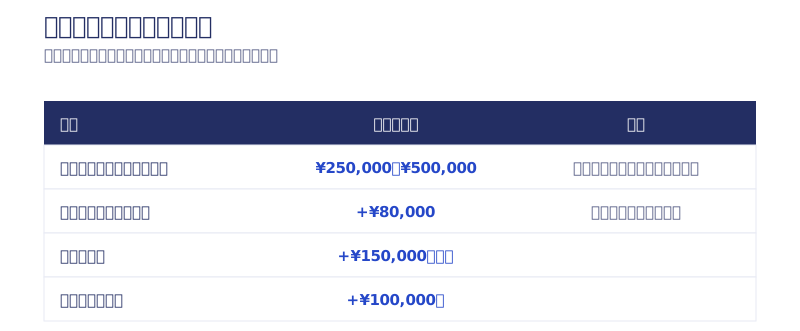
Treat the cost as roughly the same going rate as new production, with the migration work added on top. Checking sources such as the production-company matching service Web Kanji, the going rate runs about ¥50,000–150,000 for a template-based site, ¥200,000–500,000 for a standard small-business site, ¥500,000–1,000,000 with acquisition and SEO design included, and from ¥1,000,000 for e-commerce or booking integration.
People often assume it gets cheaper because you’re not building from zero, but in practice it’s frequently the opposite. Taking inventory of your current site, sorting what to migrate from what to drop, building the old-to-new URL mapping table and redirects, and cross-checking after the move — these are all work a new build never has.
Webharu’s own pricing, as of October 2026, is from ¥1,000,000 for both AI Website Production and Full-Scratch Website Build, plus from +¥80,000 for migrating from an existing site (excl. tax, lower bound shown). What moves the figure is page count, multilingual support, migration volume, the number of approval steps, and security requirements, and once a quote is confirmed we don’t change it after work begins. The full picture is on our pricing page. I wrote up the process of migrating 62 articles and 24 project entries on our own site in the full record of our seven-day AI renewal.
Three patterns that make a renewal fail
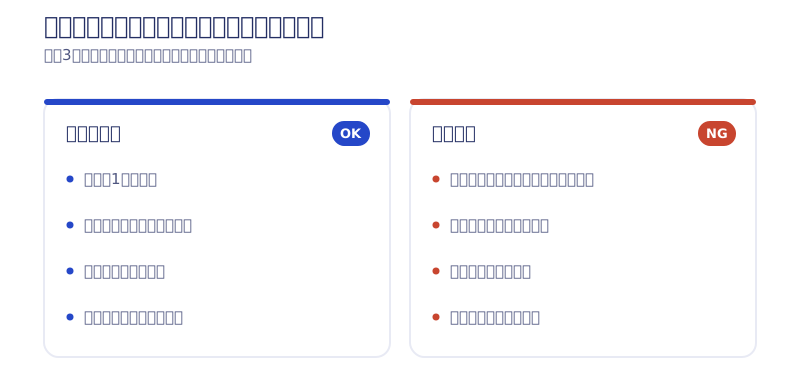
- Changing only the design and leaving the content as it was: most of the reason inquiries don’t increase has nothing to do with design. Review your copy and your paths to contact at the same time
- Going live with no redirects: this is item one on the migration checklist. Before launch, always confirm that a mapping table from old URLs to new ones actually exists
- Starting without deciding the goal: begin because “it just looks kind of old” and you’ll spend your time arguing over taste. Narrow it down to the one thing you most want this renewal to achieve
And honestly, sometimes a renewal isn’t needed at all. If your business and pricing haven’t changed, inquiries are coming in fine, and the only complaint is that it “looks a bit dated,” swapping photos or touching up the paths to contact is often enough. When we look into it and conclude you’re better off not rebuilding, we tell you so.
How Webharu runs a renewal
Looked at purely as a figure, a renewal is a rebuild. But what we’re actually doing is carrying everything you’ve built up into its next form without breaking it. That’s why we spend real time sorting what to keep and what to change, and why we keep checking the index status and traffic trend together with you after launch too. Every project we’ve delivered is on our work page, with the client’s name attached.
What to decide before you place an order is in the website commissioning handbook. Even while you’re still unsure about the timing or how to approach a renewal, feel free to reach out through the contact form.
Selected work

New Paint
No.1 in Japan for its local painting keyword 8 days after launch (Search Console)

Hosted by Nippon TV
High-fidelity Figma-to-Webflow conversion, with load speed and responsiveness optimized

PonTech Lab Inc.
Built with AI (Claude Code) on Next.js and Cloudflare, with the build process published
FAQ
Will a website renewal hurt our SEO rankings?
It depends on the carry-over. Set a 301 redirect from every old URL to its new one, and move your articles, meta information and measurement tags without missing anything, and rankings can hold. Our own site’s Japanese-page clicks went from 641 in June 2026 to 746 in September, even after we replaced the entire build.
Can we change the domain during a renewal?
Unless you have a specific reason, don’t. Changing the domain tends to weaken the carry-over of a search engine’s evaluation even with 301 redirects in place.
How long does it take for rankings to come back after a renewal?
With 301 redirects set up correctly, search engines are said to recognize the new URL within a few days to a few weeks. But a URL once judged to be a redirect is slow to come back — our own Korean pages didn’t recover right away even after we fixed them on July 26.
What should we check once a renewed site goes live?
Four things: that old URLs forward correctly to the new ones, that no search-exclusion tag has been attached by mistake, that the measurement tag itself is running, and that data is actually reaching GA4. Check right after launch and again a few days later.
Should we rebuild GA4 or Search Console for a renewal?
No — carry over your existing properties instead. Rebuild them fresh and you lose the ability to compare against data from before the renewal. Our own site’s GA4 stopped for two weeks, and we have no data from right after launch to show for it.
How much does a website renewal cost?
Treat it as roughly the same going rate as new production, with the migration work added on top. At Webharu, both AI Website Production and Full-Scratch Website Build start from ¥1,000,000, plus from +¥80,000 for migrating an existing site (as of October 2026, excl. tax).
![3 Ways Small Business Website Projects Fail | Prep and Timeline Before You Order [2026]](/assets/posts/thumb-website-order-guide.avif?v=763694b8)

