

Hi, I’m Kurita, Representative Director of Webharu Inc.. I build websites in Shiogama, Miyagi, Japan.
The conclusion first. Zero website maintenance cost is nearly possible. Webharu’s own site is a static site that just serves finished HTML, and maintenance is the ¥1,500-a-year domain fee alone (as of October 2026). Back when we ran it on Webflow with the Localization feature, it cost nearly ¥100,000 a year — changing the build alone cut that to about a sixtieth.
That said, “zero maintenance cost” and “nothing to do” are two different things. Mix them up and you end up with a site that’s cheap to keep but sits there running on stale content.
Key takeaways
- Website maintenance cost — what it means
- Website maintenance cost is the total of what it takes to keep a published site running — domain, server, SSL, CMS or tool subscriptions, maintenance work, and update services. It varies hugely by build type: WordPress centers on ¥120,000–360,000 a year in maintenance fees alone, while a static site can run on nothing but the ¥1,500-a-year domain fee.
Contents
The Setup That Gets Website Maintenance Cost to Zero
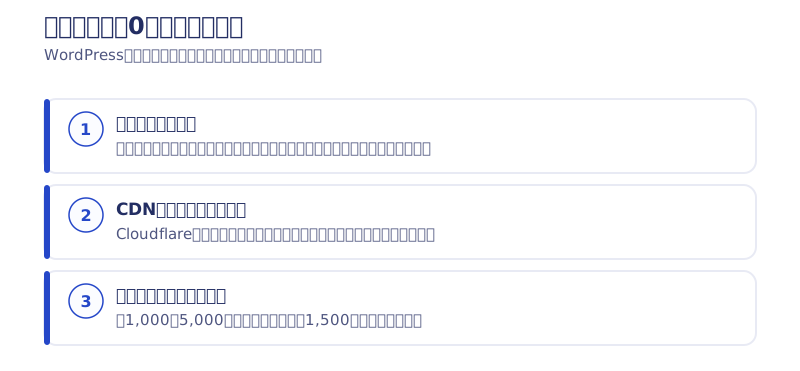
Maintenance can get close to ¥0 because there’s no program on the server assembling pages.
A site like WordPress pulls information out of a database and assembles the page on the spot every time someone visits. Keeping that assembly mechanism running safely requires ongoing server administration, program updates, and security patches. Most of a maintenance fee is payment for that work.
Think of it as the difference between a restaurant that cooks every order from raw ingredients and a shop that just reheats dishes prepared in advance. A static site is the latter — it just delivers finished HTML through a CDN (a delivery network placed around the world). Because there’s no program on the server, there’s no program to update and no plugin to break into. Webharu’s own site running on ¥1,500 a year isn’t the result of some cost-cutting effort — it’s simply the reason we chose this build.
Sites That Can’t Get to Zero Maintenance Cost
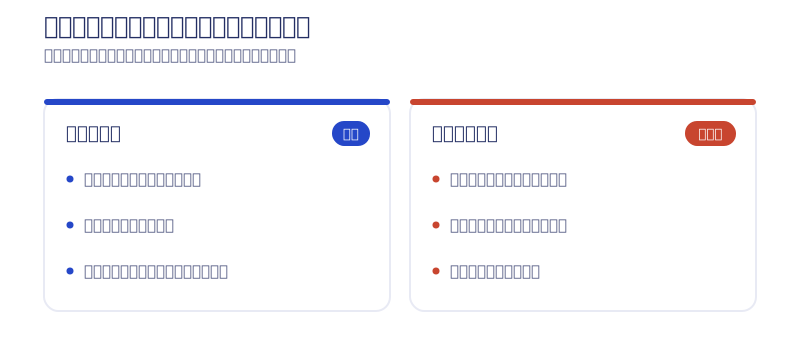
A site built around features where the data changes on every visit — member logins, bookings tied to live inventory, payments — needs a dynamic mechanism. A static site keeps maintenance down for sites like a company site, a recruiting site, or a blog, where updates after launch are mostly swapping out content. Work backwards from the features you need to see which camp your site falls into.
What Still Remains Even With Zero Maintenance Cost
- Keeping information current (price changes, new services, new case studies)
- Improvements driven by traffic (which pages get read, where people leave)
- Checking that the contact form and external integrations still work
Lowering the technical maintenance cost doesn’t help if you stop updating — you just end up with a site that runs while its information goes stale. Cheap to keep and fine to neglect are two different things.
The Annual Comparison of Website Maintenance Cost: It Changes by Multiples Depending on the Build
Website maintenance cost is decided by the build, not by negotiation. Lined up by year, it looks like this.
| Build | Maintenance work needed | Rough maintenance cost |
|---|---|---|
| WordPress | Updating the core, themes, and plugins plus backups never stops | Maintenance fees center on ¥10,000–30,000/month (¥120,000–360,000/year); domain and server fees come on top |
| Subscription tools like Webflow | The vendor handles backups and patches, so maintenance work is small | Under pricing revised in May 2026, Basic runs $15/month and Premium with CMS $25/month on annual billing (roughly $180–300/year) |
| Static site | No program on the server side, so maintenance work is almost nonexistent | Webharu’s own site runs on just the domain fee: ¥1,500/year |
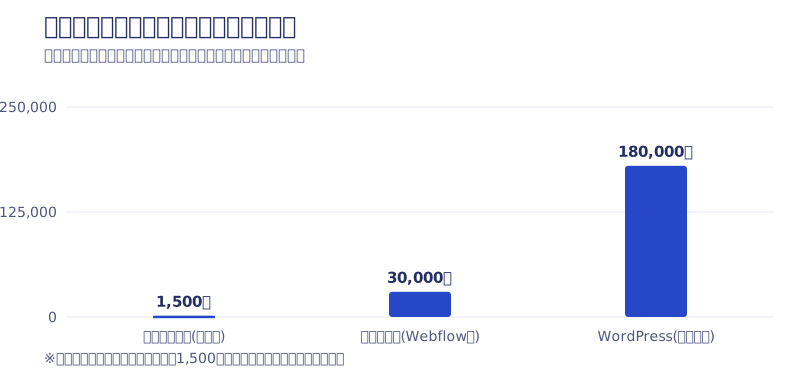
Over three years, WordPress’s maintenance fees alone reach ¥360,000–1,080,000 (domain and server fees on top). A static site, in Webharu’s own case, is ¥4,500 — three years of domain fees. The right build depends on what features you need, so this isn’t a simple better-or-worse comparison, but use it as a sense of how big the gap can get. Webflow’s pricing details are in our article on Webflow’s pricing plans (the current official prices are on Webflow’s pricing page).
The 6 Line Items Inside Website Maintenance Cost
“Maintenance cost” gets lumped together as one thing, but it’s really the sum of six costs of different natures.
| Item | What it’s for | What happens if you stop |
|---|---|---|
| Domain | The cost of holding your site’s address, such as “example.co.jp.” Renewed every year | You lose the URL itself; a third party can pick it up |
| Server / hosting | The cost of the place that stores and serves your site’s data | The site stops appearing |
| SSL certificate | The cost of encrypting traffic for https. Free and auto-renewing on most services | Browsers show a warning, and more visitors leave |
| CMS / tool fees | The fee for the tool itself — WordPress extensions, Webflow, and the like | The editing or publishing mechanism can stop working |
| Maintenance work | Backups, system updates, security monitoring | Vulnerabilities pile up, raising the risk of defacement or broken layouts |
| Update service | The fee for asking a production company to swap in new text or images | The information sits there going stale |
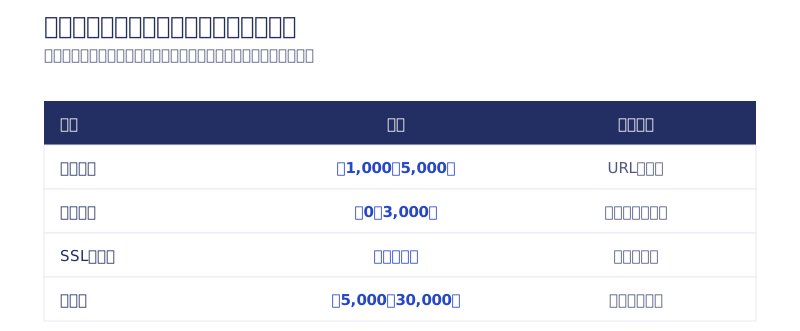
These six are naturally billed by different parties. The domain comes from a registrar, the server from a hosting company, the tool from its vendor, and maintenance and update services from the production company. If all of it is bundled into one company’s single “maintenance fee” or “management fee,” it’s worth checking the contract to see what you’re actually paying for. I wrote up how to move a domain away from its current registrar in our article on transferring from Onamae.com.
When you review, divide the annually billed items (domain, tool fees) by 12 and add them to the monthly ones (maintenance, update service) so everything lines up as a monthly figure. Leave annual and monthly mixed together and you can’t compare against another vendor or another build.
How to Check What a Website Maintenance Fee Actually Covers
A high maintenance fee isn’t a problem in itself. The question is whether work matching that amount is actually happening. With the invoice and contract in front of you, check the following six. I’d recommend setting a date to review this once a year.
- Is the work described in words? (Or does it just say “maintenance, all in” or “management fee”?)
- The scope of coverage and any monthly limits (how many text fixes a month, is incident response billed separately?)
- How often the work actually happens (scheduled monthly work, or only when you ask? Is “round-the-clock monitoring” automated or human?)
- Whose name is on the domain and server (is it inside the maintenance fee, and is it registered to your own company?)
- Will they show you a work history? (update records, backup timestamps)
- What happens if the person in charge stops (is it one individual, or a team?)
If you’re asking your provider, these three are enough.
- “Could you list the work included in our current maintenance fee, item by item?”
- “Is the domain and server contract registered in your name, or ours?”
- “If we cancel, in what format do we get the full set of data?”
How concrete the answers are tells you a lot about how transparent the provider is. An equal business partner shouldn’t have any trouble being asked about the substance.
The “¥300,000 a Month for Almost Nothing” Maintenance I Actually Heard About
I’ve heard a peer talk about charging ¥300,000 a month for another company’s maintenance. Clients paying that much for a big corporate site or a hospital site do seem to exist. But by that person’s own account, almost nothing was actually being done.
It’s not great form to air the industry’s dirty laundry like this, but that’s a rip-off. ¥300,000 a month is ¥3.6 million a year — enough to rebuild the whole site and still have change left over.
To be clear, a ¥300,000-a-month maintenance fee isn’t always unreasonable. For a large e-commerce site, or a project with round-the-clock monitoring, security requirements, and regulatory compliance, substance to match that number does exist. A ¥300,000 you can’t explain and a ¥300,000 you can explain are completely different things.
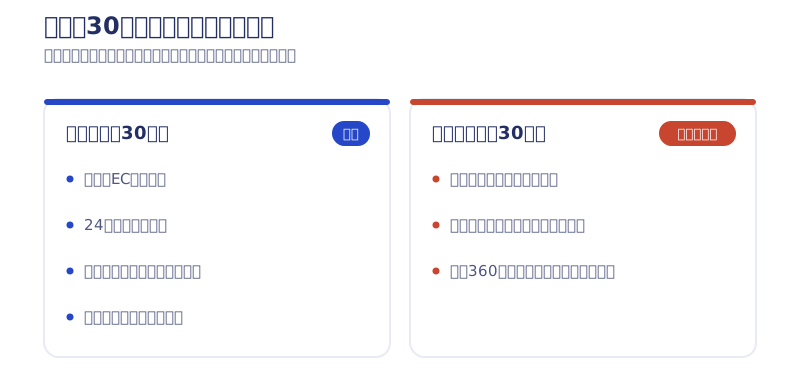

3 Things to Check Before You Cancel or Switch
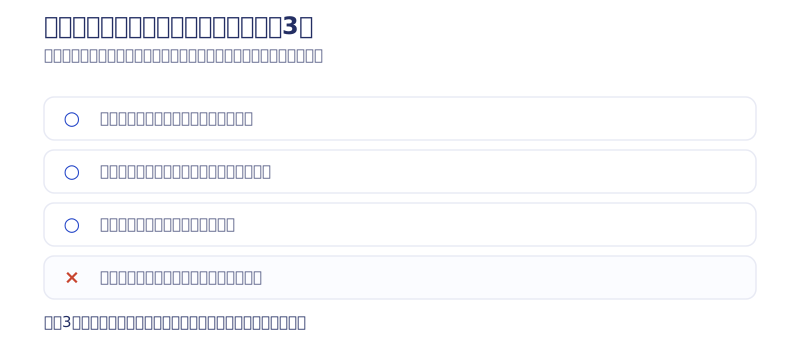
When you review your maintenance cost and switch providers, check the following three before you look at the price.
Is the Domain Registered in Your Own Company’s Name?
If the production company handled the domain registration, the name on it is sometimes theirs, not yours. Switch as-is and you risk losing the domain along with the provider.
Will They Hand Over the Data?
Check what format the design files, copy, images, and the site’s content itself get handed over in when you cancel. If the data only exists inside the production company’s own dashboard, your next provider has to rebuild from zero.
Does the Site Disappear When You Cancel? Is There an Auto-Renewal Clause?
If the site is built on a subscription tool, publication can stop the moment you stop paying. Annual maintenance contracts and tools sometimes carry a clause that auto-renews for another year unless you give notice, so check in advance how many months ahead you need to contact them.
The Real Cost of “¥0 Setup” Arrives When You Try to Leave
I’ve never personally had a dispute over a domain’s registrant or handing over data. But it’s a story I hear often about other projects.
Be especially careful with outfits advertising ¥0 sites or subscription models as cheap. The setup fee is ¥0, but the moment you say you want to bring management in-house, it’s common to get charged several hundred thousand yen in migration fees — sometimes more than the setup fee would have been. I’ve even heard of a peer charging around ¥200,000 just to hand over a domain. The business model is securing the rights first and then locking you in with clauses nobody understands, so this is something I sound the alarm about fairly loudly. The going rate for cancellation fees is in our article on the downsides of subscription websites.
Migrating to a new provider costs money too. At Webharu, migrating from an existing site is a +¥80,000 option (as of October 2026, excl. tax). If you’re switching to lower your maintenance cost, work out how many years it takes to earn back the migration fee, and the decision stays steady.
What’s Inside Webharu’s Site Care Plan
Finally, here are the facts of Webharu’s own operations pricing (as of October 2026, monthly, excl. tax).
| Plan | Monthly | What’s included |
|---|---|---|
| Standard | From ¥15,000 | Email a request → reflected by the next business day (3 requests/month), automatic Instagram sync. Focused purely on an update point of contact (no monthly report) |
| Managed | From ¥50,000 | 5 requests/month, improvements from proposal through to the fix, a monthly report measured in GA4 and Search Console, daily automated monitoring, AIO maintenance |
| Growth | From ¥100,000 | Everything in Managed, plus one landing page a quarter and a quarterly strategy review |
| Marketing Ops | From ¥300,000 | 2 landing pages a month, continuous A/B testing, ongoing SEO/AIO, a monthly strategy meeting (up to 3 clients at a time) |
Every plan has no minimum contract term and no cancellation fee, and we hand over the full codebase when you cancel. The site keeps running even if you don’t sign up, so joining is optional. The prices shown are the floor for a baseline scale of one site, about 30 pages; the actual figure comes with an itemized quote after a hearing.
What’s different from the “¥300,000 for nothing” maintenance above, I think, is this: what we did and what comes next gets put into words every month and kept on the record. The full pricing picture is on the pricing page, and WordPress’s maintenance cost compared against Webflow is on our Webflow vs. WordPress comparison page.
It’s fine to come to us at the stage of not knowing whether your current maintenance cost is high or fair — we’re happy to look at an invoice from a contract with another company too. Start with the contact form and let’s break down your current invoice together. What to decide before you commission anyone is in our article on 3 common failures in small-business website production.
Selected work

New Paint
No.1 in Japan for its local painting keyword 8 days after launch (Search Console)

Hosted by Nippon TV
High-fidelity Figma-to-Webflow conversion, with load speed and responsiveness optimized

PonTech Lab Inc.
Built with AI (Claude Code) on Next.js and Cloudflare, with the build process published
FAQ
Is zero website maintenance cost possible?
Nearly, with a static site. Webharu’s own site just serves finished HTML, and maintenance is the ¥1,500-a-year domain fee alone (as of October 2026). A site built around member logins or payments needs a dynamic mechanism, so it can’t be brought to zero.
How much does website maintenance cost a year?
It depends on the build. WordPress centers on ¥120,000–360,000 a year in maintenance fees alone, Webflow runs roughly $180–300 a year on annual billing, and a static site, in Webharu’s own case, is just the ¥1,500-a-year domain fee.
What’s included in a website maintenance fee?
Mainly backups, system updates, and security monitoring. Update services and the domain fee are often bundled into the same invoice, so ask what’s covered item by item.
What’s the single most effective way to lower website maintenance cost?
Reviewing the build itself, rather than negotiating the maintenance fee down. Check whether you genuinely need a dynamic mechanism; if you don’t, moving to a static site removes the maintenance work itself.
What happens to the site if I cancel a maintenance contract?
It depends on the contract. With a subscription tool, publication can stop the moment you cancel. Before cancelling, check the domain’s registrant, how data is handed over, and the auto-renewal clause.
How much is Webharu’s Site Care Plan?
From ¥15,000/month (Standard, 3 update requests a month), ¥50,000/month (Managed, with a monthly report and improvements), ¥100,000/month (Growth), and ¥300,000/month (Marketing Ops) (as of October 2026, excl. tax). No minimum contract term, no cancellation fee, and we hand over the full codebase when you cancel.
![3 Ways Small Business Website Projects Fail | Prep and Timeline Before You Order [2026]](/assets/posts/thumb-website-order-guide.avif?v=763694b8)

