

Hi, I’m Kurita, Representative Director of Webharu Inc..
You can check traffic from ChatGPT in GA4 by looking at “Session source” for chatgpt.com. On my own site, sessions from ChatGPT went from 12 in August 2026 to 54 in September. Add Copilot, Perplexity, and Gemini, and the total from AI sources was 61 sessions in September.
In July 2026, when we rebuilt our own site with AI, we rolled AI-search-oriented measures into all 63 blog articles at once. This article shows exactly what those measures were and the monthly numbers we measured in GA4, with nothing hidden.
Key takeaways
- ChatGPT traffic — what it means
- ChatGPT traffic refers to visits to a site that came from a link shown in a ChatGPT answer; in GA4 it is recorded with the session source chatgpt.com. On webharu.com it was 54 sessions in September 2026.
Contents
Real Traffic from ChatGPT: 54 Sessions in September 2026
The short version: traffic from ChatGPT is still small, but it is growing steadily. Here are the AI-driven sessions we saw in GA4.
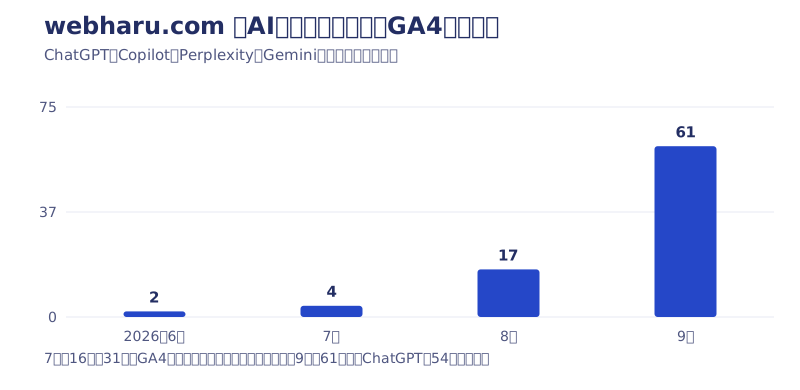
- June 2026: 2 sessions (ChatGPT 1, Perplexity 1)
- July 2026: 4 sessions (ChatGPT 4; GA4 tracking was down from the 16th to the 31st)
- August 2026: 17 sessions (ChatGPT 12, Copilot 2, Gemini 1, Perplexity 1, other OpenAI 1)
- September 2026: 61 sessions (ChatGPT 54, Copilot 3, Perplexity 3, Gemini 1)
Almost all of it is ChatGPT. The whole site had 1,681 sessions in September, so AI-driven traffic was about 3.6% of that — still a small number next to search traffic.
July’s low count is because GA4 tracking was down for about two weeks right after the relaunch. I wrote about the cause and how to prevent it in how a site relaunch affects SEO.
Honestly, I still can’t separate out why it grew. It could be the measures we rolled into the 63 articles, or it could simply be that more people are using ChatGPT — both happened around the same time. What is true is that the numbers started moving after we finished the rollout.
How to Check Traffic from ChatGPT in GA4
There are two ways to check. Use the standard report for a quick monthly look, or the Explore report to see every AI source together.
Using the Standard Report (for Monthly Checks)
- Open GA4’s Reports → Acquisition → Traffic acquisition
- Switch the table’s dimension to “Session source”
- Type “chatgpt” into the table’s search box to filter
Seeing All AI Traffic Together with an Explore Report
- Build a free-form report under GA4’s “Explore”
- Add “Session source” and “Year month” as dimensions
- Use a regular expression in the filter, such as chatgpt|openai|perplexity|copilot|gemini|claude, to catch AI domains together
Clicks from ChatGPT get recorded with chatgpt.com as the source. My August data also had one session with the source “openai” mixed in, so including openai in the regular expression keeps you from missing it.
One more thing: I exclude overseas Direct (no-referrer) traffic from my counts. On my own site, most overseas Direct traffic turned out to be bots crawling automatically. That doesn’t change the AI-source numbers themselves, but it does change the denominator when you calculate AI’s share of the total, so watch out for that.
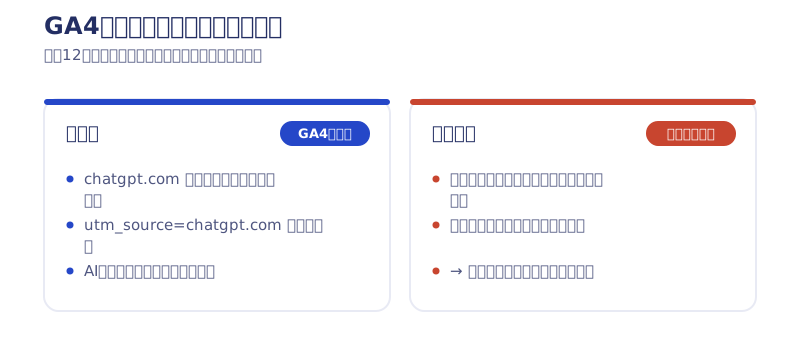
The catch is that GA4 can’t measure a citation that nobody clicked. Even if an AI mentions your site name in its answer, not a single session shows up unless the link gets clicked. So I’d also recommend watching the trend in branded searches for your company or service name. I covered how to decide which numbers to check every month in tracking contact-form conversions and website KPIs in GA4.
The Measures We Rolled into 63 Articles for Traffic from ChatGPT
In July 2026, we rolled the following six measures into all 63 blog articles at once. We had just rebuilt the entire site with AI (Claude Code) over seven days, so this rode on the back of that.
1. Takeaway box
We put 3–5 lines of key points at the top of each article. There’s one rule: the first line directly answers the question in the title. If the title is “Why we chose X,” the first line states the reason itself. AI is said to pick up summaries at the top of an article more readily.
2. FAQ and FAQPage structured data
We added 3–5 FAQ questions to each article and set it up to auto-generate FAQPage JSON-LD. The questions themselves can double as search queries or questions someone asks an AI. We always keep the on-screen FAQ and the structured data in sync — having structured data with nothing matching it in the body isn’t allowed under Google’s guidelines either.
3. One-sentence definitions
We added a box that defines each article’s main topic in a single “X is Y” sentence. It’s said that when an AI assembles an answer, a self-contained sentence it can lift as-is tends to get picked up.
4. Speakable structured data
This is structured data that marks passages suited for text-to-speech. Support for it is still limited, but since it can be generated automatically from the takeaway-box data, adding it cost us nothing.
5. llms.txt
This is a text file that tells AI how the site is organized and which pages matter. It isn’t a spec that any major AI company has officially committed to supporting (as far as I’d checked by July 2026). But it costs almost nothing to create, so it falls into the “no reason not to” category. I explain how to write one, using our own file as the example, in LLMO measures small businesses can do themselves.
6. Reworking meta descriptions
We fixed every article whose meta description was empty, too short, or too long. It’s unglamorous, but it directly affects how you look in search results, AI aside.
The Design Behind the Rollout: We Didn’t Touch the Body Text
The thing I cared about most was leaving the body text completely untouched. Rewriting the body of 63 articles wasn’t realistic, and I didn’t want an AI rewriting my own first-hand accounts either.
So instead, we added “takeaway,” “FAQ,” and “one-sentence definition” fields to the article data, and had the template generate both the on-screen display and the structured data from those fields. Because the display and the structured data come from the same source, they can’t drift apart. Hand-maintaining JSON-LD across 63 articles forever wasn’t realistic, so we solved it with a system instead.
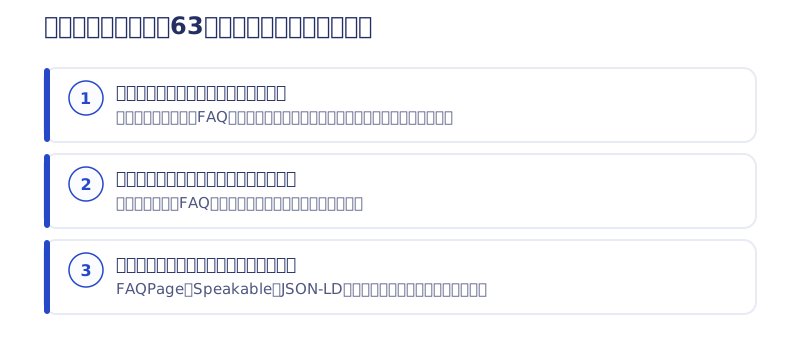
We generated the content by running multiple Claude Code agents in parallel. We imposed two rules on them, though.
- Base everything only on what’s already in that article. Don’t add new facts or numbers
- For first-hand accounts, keep my own wording as-is
My blog is built on first-hand experience and real numbers, so if an AI invented facts, the whole thing would fall apart. Those two rules were the lifeline of the whole rollout.
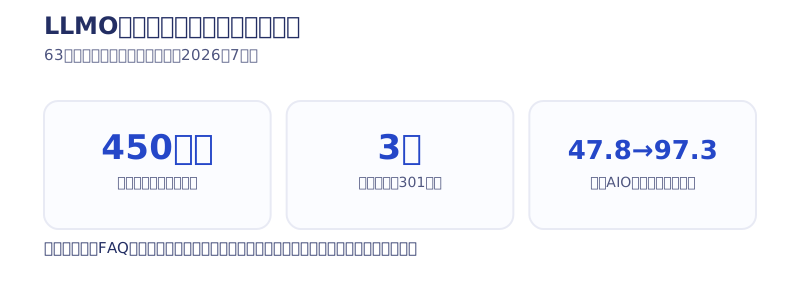
Scoring every article before and after with a checklist we built ourselves, the average went from 47.8 points to 97.3. That score just measures how thoroughly the measures were applied, though — it isn’t a search result. While we had every article read back mechanically anyway, we also fixed over 450 typos and inconsistent spellings, and merged three pairs of overlapping articles with 301 redirects.
Three Numbers to Watch When Reading Traffic from ChatGPT
So the rollout doesn’t just sit there unchecked, I decided in advance which numbers to watch.
- GA4’s AI-driven sessions: the clearest metric, tracked month by month
- Search Console’s impressions and position: Google’s official help says impressions and clicks via AI Overviews are counted together with regular search results, not separately. So there’s no number that directly shows whether you were cited in an AI Overview — you can only track it indirectly
- The actual search results and ChatGPT’s answers: visually checking on an ongoing basis whether your name shows up for the questions you’re targeting
For what it’s worth, Google’s official documentation takes the position that “no special measures are needed for AI features — following conventional SEO best practices is enough.” I still went ahead and did the work anyway, because a form that’s easy for AI to summarize overlaps almost entirely with conventional SEO, so there was nothing to lose.
I wrote about how to read the numbers once they start moving — and decide what to fix — in letting AI handle GA4 analysis.
I Think First-Hand Information Is What Works Best
I’ve talked about structure up to this point, but what I consider most important is first-hand information — my own experience and my own numbers.
One article on my blog holds an average position of 1.7 with 162 clicks (over the most recent 92 days as of July 2026) for the Japanese search “address 最悪” (roughly “ADDress is the worst”). It’s just an honest write-up of what I felt after actually using the service. In search engines and in AI alike, there’s no substitute for the account of someone who actually did it. Structural tricks only work once there’s content worth citing.
I’ve written up the full search measurement for the AI-built site in testing whether AI-built sites are weak at SEO. I share the next installment of this experiment first in the newsletter. If you’d like to talk through AI search measures for your own site, reach out through the contact form.
Selected work

New Paint
No.1 in Japan for its local painting keyword 8 days after launch (Search Console)

Hosted by Nippon TV
High-fidelity Figma-to-Webflow conversion, with load speed and responsiveness optimized

PonTech Lab Inc.
Built with AI (Claude Code) on Next.js and Cloudflare, with the build process published
FAQ
How do I check ChatGPT traffic in GA4?
Open Reports → Acquisition → Traffic acquisition, switch the dimension to “Session source,” and filter for chatgpt. Clicks from ChatGPT get recorded with chatgpt.com as the source.
How much ChatGPT traffic is there in practice?
On webharu.com it was 12 sessions in August 2026 and 54 in September. Total AI-driven sessions, adding Copilot, Perplexity, and Gemini, were 61 in September — about 3.6% of the whole site.
What regular expression shows all AI traffic together?
In a GA4 Explore report, filter “Session source” with a regular expression such as chatgpt|openai|perplexity|copilot|gemini|claude. Our own data also had the source “openai” mixed in, so including openai keeps you from missing it.
What did you do to grow ChatGPT traffic?
We rolled six measures into all 63 blog articles at once: takeaway boxes, FAQ and FAQPage structured data, one-sentence definitions, Speakable, llms.txt, and reworked meta descriptions. Whether these measures are actually why traffic grew is something we still can’t isolate.
Do I need to rewrite the body text of existing articles?
We didn’t. If you add takeaway, FAQ, and one-sentence-definition fields to the article data and let the template generate both the display and the structured data, you can roll this into every article at once without touching the body text.
Is there AI traffic that GA4 can’t measure?
Yes. Even if an AI mentions your site name in its answer, nothing shows up in GA4 unless the link gets clicked. I’d recommend also watching the trend in branded searches for your company or service name.


