


- Platform selection — what it means
- Platform selection means deciding what your website runs on — WordPress, no-code such as Webflow, an AI-built static site, and so on. That single decision fixes not only the build fee but also the monthly fees, maintenance, extensibility, and the migration cost you face if you ever leave.
Before you start comparing website quotes, let us back up one step. Choosing the wrong thing to build your site on — the platform — makes the very same site cost 2–3× more in total. Not in build fees. In monthly fees, in maintenance, and in the cost of rebuilding from scratch a few years later.
✓ In this article
- Why the platform swings the total by 2–3×
- The 2026 selection map (decide by scale and risk tolerance)
- Three questions to ask when a platform is proposed to you
Why the total swings by 2–3×
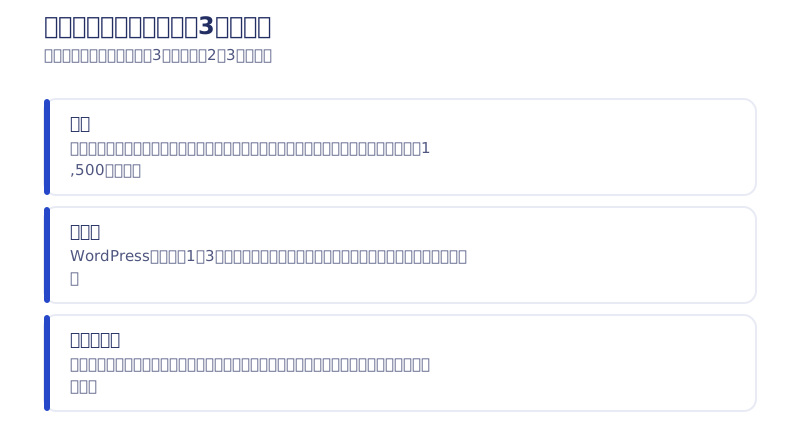
As covered in our article on cheap website packages, the formula for the total is “initial cost + monthly fee × 36 months + the cost of leaving.” The platform moves every term in that formula.
- Monthly fees: a subscription tool bills a fixed amount every month. A static site is close to zero — my own site costs ¥1,500 a year for the domain, and nothing else
- Maintenance: with WordPress, maintenance at the going rate of ¥10,000–30,000/month is effectively mandatory. On a static site, that work does not exist
- Rebuild cost: the most expensive line item. Build on a platform that doesn’t fit your requirements and you start over from zero a few years later
Platform choice is therefore not a matter of taste. It is a matter of budget. Leave it to your agency and the site gets built on whatever tool that agency happens to be good at — not on the one that is best for you.
Not sure what to build on? The 2026 selection map
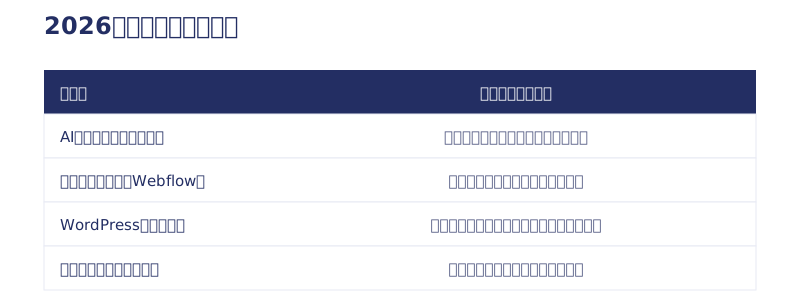
Small to mid-sized general sites → AI full-stack (a static site)
For a company site, a store site, or a blog-driven lead engine, I believe a static site written as code with AI is the strongest option in 2026. The reason is simple: you build it with an AI that holds the world’s knowledge. Web technique, SEO, and AIO (designing to be cited by AI search) are contested globally, not domestically. You get a world-standard implementation with no monthly subscription. My own site is built this way — 97–98 for mobile speed in real measurements, ¥1,500 a year to run (the full rebuild log).
Large-scale, security- and governance-first → commercial no-code such as Webflow
If your organization needs editing permissions across several departments, audit trails, and a support structure, Webflow is the realistic answer. Security is carried by the platform as a whole, and in the US adoption keeps spreading across the marketing sites of household-name companies. I expect the shift of large sites toward commercial no-code to continue. For pricing, see our Webflow pricing guide. For a small site where Japanese-language support matters most, STUDIO is another option (comparison).
Adopting WordPress for a new build → we don’t recommend it
The reasons, with measurements, are in a separate article; here is the short version. Its page-speed pass rate is structurally low — around 49% as of 2026 — maintenance costs never stop, and in an era where attackers have started using AI as well, it is the CMS with the deepest archive of published vulnerabilities. Nothing about the defender’s burden is going to get lighter from here. If you already run on WordPress there is no need to rush, but the reasons to choose it for a new build are limited.
A vendor’s own locked-in system → be most careful here
A proprietary CMS only that one vendor can operate, or a team that can only handle one fixed tool, is a risk not because of the price but because of the missing exit. Those contracts tend to leave you with nothing when you cancel, and they struggle to keep up with AI. My read is that tool-locked agencies face a hard few years. Choose flexibility instead — a firm that can select from several ways of building based on your requirements.

When a platform is proposed, ask these three questions
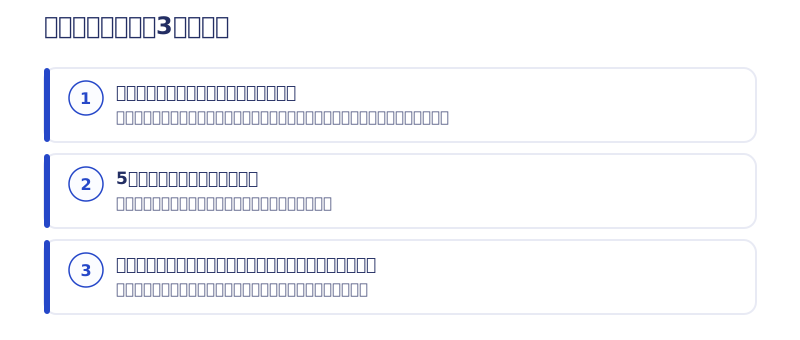
- “Why this platform?” — do you get an explanation derived from your requirements, or a “this is what we work with”?
- “What is the five-year total?” — can they produce a number covering the initial build, monthly fees, maintenance, and updates?
- “If we leave, what happens to the site, the domain, and the data?” — a company that can’t answer the exit question on the spot may be a company that collects at the exit
A firm that answers all three clearly will not be far off, whichever platform it proposes. If the answers are vague, what is on the table is not the tool that fits you, but the tool they want to sell.
▶ For the big picture on Webflow itself: What is Webflow? Capabilities, how to use it, and case studies, explained by a specialist [2026]
Summary: knowing the mechanics is what changes the total
- Small to mid-sized general sites: an AI full-stack static site
- Large-scale, governance-first: commercial no-code such as Webflow
- New WordPress builds and vendor-locked systems: proceed carefully, and always compute the total and the exit
We do both AI builds and Webflow builds, so we have no reason to steer you toward either one. We will review the plan you are considering for free, with a five-year total estimate. → Book a free consultation / See our AI Website Production
FAQ
We already run on WordPress — should we switch?
If it works and you have a maintenance arrangement, there is no rush. The sensible move is to compare the five-year total (monthly fees, maintenance, and rebuild cost included) against other platforms at your next renewal.
Where does STUDIO fit in?
It is a commercial no-code tool for small sites that value Japanese-language support and ease of use. If design freedom or code export — your exit — matters, Webflow fits better; if you want to minimize running costs, an AI static site is the candidate.
Does an AI full-stack static site have weak points?
It is a poor fit for sites built around dynamic features such as memberships or e-commerce, and few producers can build one yet. Quality also depends heavily on the design skill of whoever is directing the AI, so checking their past work matters.
What costs pile up when you pick the wrong platform?
The classic cases are choosing WordPress for what is really a digital business card and paying maintenance every month forever, and building on a cheap subscription that doesn’t fit your requirements and starting over from zero a few years later. Both start with the cheapest up-front price and end at 2–3× the total.


