
![HTML Code Export Tools Compared | No-Code, AI, and Real Deliveries [2026]](/assets/posts/61fdd8d7a30e6e7ecc5feec7_----------2022-02-05-10.25.31.avif?v=aefec79e)
Hello, this is Kurita, Representative Director of Webharu Inc..
This article answers the following questions.
- Which tools can export HTML code?
- Can sites built with STUDIO or Wix be exported as code?
- Here in 2026, is building HTML with AI or Figma a real option?
- I want to hear from someone who has actually exported code and delivered it to a client.
The short answer first. If you want to build without code and then export HTML, the first choice that holds up in real work is Webflow. On a paid plan you can export HTML, CSS and JS in a single Zip file, and the exported code can be hosted on your own server or delivered as code as-is (CMS content is not included in the Zip and has to be exported separately as CSV). And here in 2026, a second path has become realistic: skipping the tool and having AI write the HTML from the start. We still operate a site we delivered to a company via the first path, and we rebuilt our own 26-page site via the second. I cover real examples of both.
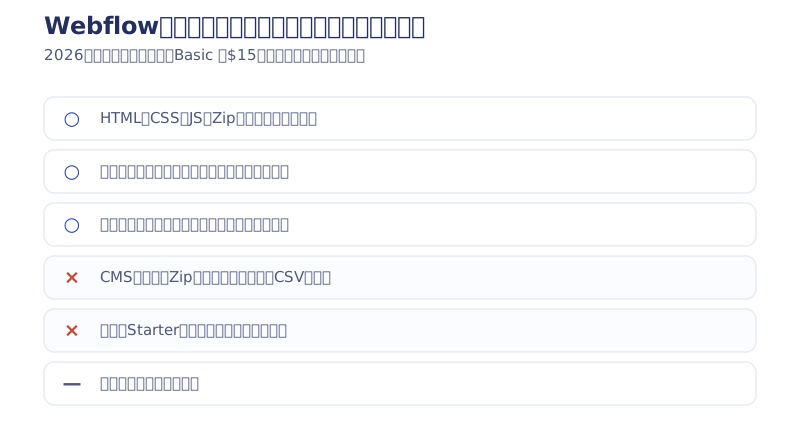
We use the no-code web development tool “Webflow” for website production and for setup support of external tools for Webflow. Among that work, we have also exported code and delivered it to a company, so I introduce that case as well.
Key takeaways
- Code export — what it means
- Code export is a feature that writes out a website built with a no-code tool as HTML, CSS and JS code files. Webflow can export everything into a single Zip file, enabling hosting on your own server or delivery as code. STUDIO and Wix have no such feature, and in 2026 having AI write the code from the start was added as an option. We have measured results of cutting running costs to about 1/55 by going static (from ¥83,000 a year to ¥1,500 a year).
Contents
Tools that can export HTML code, and tools that can’t
First, the big picture. Judged by “can you keep the site you built as HTML, CSS and JS code in your own hands,” the major tools split as follows.
| Tool | HTML code export | Format / conditions | Cost guide |
|---|---|---|---|
| Webflow | ○ | Exports HTML, CSS and JS in one Zip (CMS content separately as CSV) | Paid plan (Basic from $15/month, as of 2026) |
| Nicepage | ○ | Supports HTML export and WordPress export | Free plan available (at time of writing) |
| readymag | ○ | Code export limited to the Business plan | $65/month (at time of writing) |
| STUDIO | × | No code export feature. Designed to be self-contained on the platform | — |
| Wix | × | No code export feature | — |
| Figma | △ | No official feature to export a full site as HTML (Dev Mode is for viewing code; Figma Make, the AI builder, is a separate product) | — |
| AI build (Claude Code, etc.) | ○ | The output is HTML, CSS and JS from the start, so there is no export barrier | Free tiers available, up to monthly plans |
Tools that can’t export aren’t bad. Because everything stays inside the tool, they are easy and fast. But you are directly exposed to service shutdowns and price increases, and moving away means rebuilding, not migrating code. No-code services really do shut down (I give real examples in the downsides of no-code websites).

No-code web development tools that can export HTML code
At present, not many no-code tools can export code. At most, around 2 to 5 provide stable support.
Here I only cover tools that have a code export feature. Let’s go through them.
- Tips: If you are locked into a building tool, you could lose your website. Always use a web development tool that can export code. We have also published an article explaining the downsides.
Webflow: a web development tool for web designers

Webflow is the tool we specialize in. It is built for website production and handles everything from building a site to publishing and operating it.
For code export, it can bundle all of the HTML, CSS and JS into a Zip file.
Taking company size and funding into account, Webflow is the best-known and most stable of the no-code tools that can export code.
I myself have been using it continuously, now in my fourth year. It has been comfortable with no particular problems, so I genuinely recommend it. (2026 update: I now have more than 6 years with Webflow, and as Webharu Inc. we also make AI website production one of our main fields.)
- This is as of 2021, but I covered its funding in What is “Webflow,” said to be worth ¥210 billion in the US? How I came to specialize in Webflow and build a company around it is on my profile.
Cost of code export (after the May 2026 revision)
To export code from Webflow you need to subscribe to a paid plan. After the May 2026 pricing revision the lineup is Starter free / Basic $15/month / Premium $25/month (all monthly prices when billed annually, as of 2026), and the free Starter plan cannot export code.
Pros and cons
Pros: One click exports everything, including HTML, CSS and JS, into a Zip file. CMS content has to be exported separately as a CSV file.
Cons: Support is in English. The exported code also has its comments written in English.
- We offer Webflow contract development and setup support for add-on tools, such as auto-reply emails, cookie consent and Webflow form customization. Please get in touch via our pricing page.
STUDIO cannot export HTML (as of 2026)
Sites built with STUDIO cannot be exported as HTML (code export) (as of 2026). It is designed to be self-contained on the platform, and there is no feature to take a site out as HTML, CSS and JS files. It is a good tool with a Japanese UI that lets you publish quickly, but if you want to keep the code as an asset in your own hands, choose Webflow or the AI build covered later in the section “Exporting HTML code with AI.” If you want to move a site already running on STUDIO, it means rebuilding, not migrating code. I have put the criteria for choosing between the two in our Webflow vs. STUDIO comparison.
Nicepage: can export to WordPress

Nicepage can also export code. Like Wix, you build just by dragging, it is cheap, and you get a large range of high-quality templates. It can also be used as a WordPress plugin.
Update: I have decided it is still too early to use. “Heavy, doesn’t behave well, and exported code is a pain to fix.” Webflow feels more stable in business, features and support. Trying it now and teaching how to use it in Japan could earn a first-mover advantage. I had planned to cover it on this blog too, but I won’t touch on it much from here on.
Cost of code export
Believe it or not, free. (Pricing at the time of writing.)
Pros and cons
The pros are that you can export code for free, that it is easier than Webflow for building a website, and that it has a huge number of templates. In particular, it is about as easy to build with as Wix. Wix can’t export code, so if you understand English, I recommend Nicepage over Wix.
The cons are that the tool itself is heavy. Every action feels slow. The UI is also a bit cluttered and hard to read, though I think you’ll be fine once you get used to it. There is no CMS feature, so if you want to run a blog, export to WordPress. If “WordPress again?” makes you groan, Webflow is the better choice.
readymag

The catch here is that the plan needed to unlock code export is very expensive. I haven’t used it myself, so I can’t write about it in detail. If you’re interested, why not try it?
Other no-code tools that can export code are summarized in the following article. 7 FREE ONLINE WEBPAGE BUILDER WITH HTML CODE EXPORT (in English)
Cost of code export
To export code you need to subscribe to the Business plan. The Business plan is $65/month. (Pricing at the time of writing.)
Pros and cons
The pros are that it is new, so it may keep getting better with future updates, and that you could gain a first-mover advantage.
The cons are that, compared with Webflow, Nicepage, Studio, Wix and others, it currently has no particularly standout advantage. Maybe it didn’t belong in this lineup. I knew of it, so I’m sharing it just in case. If you use it, I’d love to hear about it.
If code export is your criterion, Webflow is the recommendation
With code export in mind, I recommend Webflow. I share code actually exported from Webflow, so if you want to check it, please download it.
In Webflow you basically build by specifying numeric values. If you have been writing code until now, it is designed so you can master it relatively quickly.
Nicepage is more about building visually. It feels close to Illustrator or Photoshop. Of course, you can also manage it with numeric values.
Real example: exporting code from Webflow
Neko no Kimochi | a cat support cafe

The image above is a site I built as a volunteer and exported from Webflow as code. The exported code was cleanly formatted, and the class names were written out exactly as designed.
(2026 update: The password distribution of sample code that I used to do has ended. Now, I give away a bonus guide that goes beyond code export, how to build an entire site with AI, called “The AI Site Building Textbook (Mini Edition),” free to newsletter subscribers. This site itself was built that way.)
[Experience] Delivering exported code to a company
Here I share my experience in the following 3 areas.
- A site we actually exported as code and are operating now
- The quality of Webflow’s code, as I heard it from a veteran web designer
- Code delivery experiences I heard in the Webflow community
A site we actually exported as code and are operating now
New Paint | a young, locally rooted painting company

This website was commissioned when I was just starting out, and I handled everything from the design to the Webflow build and operation.
Partly because of the yen-dollar exchange rate, this site is currently exported from Webflow as code and operated on a server in Japan. I explain how in a separate article.
We also support migrations from WordPress to Webflow and from Webflow to code.
The quality of Webflow’s code, as I heard it from a veteran web designer
As of January 2025, I provide Webflow usage support to about 5 companies. Through that I had a chance to talk with a veteran web designer, and I’ll share part of that conversation.
- A: “I’d like to see code actually exported from Webflow.”
- Me: “Here it is!”
- A: “Wow! It’s already cleaner than code written by a human!”
They were genuinely impressed. The reasons were as follows.
- The code is laid out very cleanly!
- Comments are written where needed, so it’s easy to read.
- The way it’s written is fixed, so editing is easy!
- Publishing a site on your own server is incredibly easy
Overall, they called it top level.
From my own experience exporting code and managing sites, I have seen firsthand that it is easy to host on your own server. But “easy” here means easy from a developer’s point of view, so beginners should work carefully.
Code delivery experiences I heard in the Webflow community
This is what I heard in the community from someone who had actually delivered to a company.
He works as a full-time web designer and delivered code files exported from Webflow to the company he belongs to. He said the following.
- When delivering to a company, he states clearly that it is Webflow’s export feature
- After that, code exported from Webflow came to be preferred
- Once you get used to Webflow’s code, the structure is always the same, so it’s easy to edit.
That’s how it goes, apparently. He says he only translates the English comments when he doesn’t understand them. These days, AI and the like might translate all of it for you.
Exporting HTML code with AI [the 2026 frontrunner]
Here in 2026, this is the method I consider most realistic. Instead of building in a tool and then exporting, have AI write HTML, CSS and JS from the start. Because the output is the code itself, the question “can it export code?” disappears. You can put it on any server, and you are not locked into any tool.
Claude Code | a real example of rebuilding our own 26-page site in HTML
In July 2026, we fully renewed our own site (webharu.com) with Claude Code over 7 days (3 of them for the build). We moved 26 pages and 62 articles from Webflow to a static site, and the only human who worked on it was me. What it generates is ordinary HTML, CSS and JS, so you can publish just by putting it on a server. I have published the process in the full steps of building a website with Claude Code.
To be honest, it took about a month before decent design came out consistently. Concept and aesthetic design judgment are still human work. Even so, the disappearance of the “export the code” step itself was a revolution for the theme of this article. I cover how to get started in our guide to vibe coding.
Can you export HTML from Figma? (My honest take from real projects)
The conclusion first: Figma itself has no official feature to export a design as a full site in HTML. Dev Mode lets you view code element by element, but within what I have tried, I have not found a way to export a full set of pages at production quality. In fact, even with the official Figma-to-Webflow copy-and-paste plugin, my conclusion after 3 years of use was “I’ve almost stopped using it on real projects” (I added the reasons to the article on copying and pasting from Figma to Webflow).
What is interesting in today’s Figma is actually Figma Make. It adds AI vibe coding and publishing to Figma, and I built an attendance management app requested by a restaurant owner just by giving instructions in chat. No setup is its biggest strength, and it suits prototyping very well. I wrote about how to use it alongside other AI tools in our comparison of AI website builders.
v0, Bolt, Lovable (I haven’t used them; based on research)
These are AI building tools that run entirely in the browser. v0 generates React UI, Bolt.new builds full-stack prototypes, and Lovable can build apps including a database and authentication. All of them have free tiers, so they are a good entry point for getting a feel first. I haven’t used them on real projects, so this positioning is an assessment based on research.
How to create and export HTML for free
As of 2026, there are 3 ways to make HTML without spending money.
- Nicepage (code export available on the free plan): As introduced above, you can go all the way to HTML export for free. Just be prepared for its sluggishness.
- Have the free tier of an AI chat write it: Even the free tiers of ChatGPT or Claude can write HTML, CSS and JS for about a one-page LP. Within what I have tried, the deciding factor for quality is how many rounds of detailed revision requests you can go through.
- Free tiers of v0, Bolt, Lovable: You can try AI building entirely in the browser. Good for getting a feel before serious use.
Even including publishing, static HTML can bring server costs close to zero. Measured on our own site, it runs on ¥0 in server costs and just ¥1,500 a year for the domain.
[2026 update] Our own site has also moved from Webflow to a static site
Beyond code export, there is the option to graduate from Webflow and minimize running costs as a static site. In July 2026, we fully renewed our own site (webharu.com) with Claude Code in 7 days (3 of them for the build), moving 26 pages and 62 articles from Webflow to a static site. One human did the work.
The biggest effect was on running costs. The Webflow subscription actually cost $576 a year (about ¥83,000), but after going static it became just the domain fee of ¥1,500 a year. That is about 1/55 (measured as of 2026). I explain the thinking behind the migration in the article on moving from Webflow to other tools.
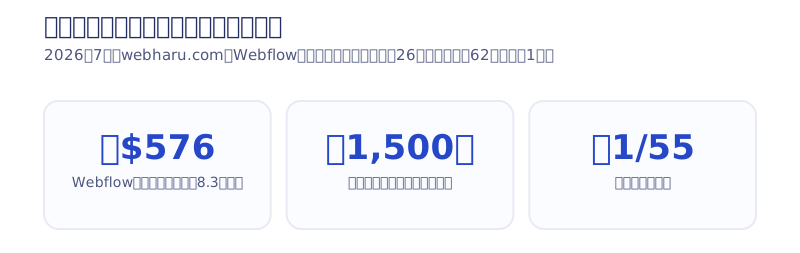
Of course, I don’t recommend going static for every site. For a site that is updated often and makes good use of Webflow’s CMS and editor, staying on Webflow is the right answer. If you are “still paying the subscription even though there are almost no updates,” code export and static operation are worth considering.
3 ways to earn with no-code code export
Earn on crowdsourcing sites
You can earn through sites such as Lancers, CrowdWorks and Coconala (Japanese freelance marketplaces). Besides taking on projects that use no-code tools, you can also take on projects that want code delivery, which makes it easier to raise your income.
Honestly, it isn’t too late to commit even starting in 2025. There was a period when I was getting projects on crowdsourcing as one of the first people who could use Webflow.
Join a company that uses no-code tools
Companies whose business specializes in no-code tools have been increasing in recent years. Until recently people laughed at “no-code,” but in 2025 no-code has overwhelmingly won.
Even large companies have started using no-code with security in mind. We are also always looking for web designers and Webflow coders. We start with one-off contract requests, so if you are interested, please contact us.
Sell with no-code
Making full use of no-code to go out and sell is another way to earn. In the early days I also tried door-to-door sales, handed out flyers, and had all kinds of experiences.
Now I am on the side of gathering people who want to do sales on our behalf. We are thinking of expanding the business further through arrangements such as revenue-share contracts.
How people react to “I use no-code”
This time I introduced web development tools that can export code. You can earn just by being able to use no-code, and being able to export code widens that range. But many people out there are still critical. Below are the reactions I actually got from web designers I met while traveling around Japan.
How web designers reacted in January 2023 when I said “I use no-code!” *from experience
— Taking on the 10 million yen challenge with no-code @Webflow designer (@METANA_flow) January 10, 2023
1. Oh, I see… (tone drops and changes the subject)
2. Heh, so it’s no-code lol
3. Ah, well, yeah, no-code is trendy, isn’t it.
4. For simple stuff, sure, no-code works, lol
That’s what it’s really like
Precisely because the reactions are lukewarm, I feel there is still plenty of money to be made with Webflow. In terms of features and stability, web production with Webflow is the best. Because I truly believe that, I started my business with Webflow, and I use it every day to build all kinds of sites. If you’re curious, why not start by trying it for free to get a feel for it?
We support Webflow production, delivery via code export, and migration to static sites. Please check our pricing page and then consult us via the contact form.
Selected work

JTB Americas
A full renewal of the North America site, with the operations team able to update it themselves

Hosted by Nippon TV
High-fidelity Figma-to-Webflow conversion, with load speed and responsiveness optimized

PonTech Lab Inc.
Built with AI (Claude Code) on Next.js and Cloudflare, with the build process published
FAQ
Does exporting code from Webflow cost money?
You need to subscribe to a paid plan. After the May 2026 revision, pricing is Starter free / Basic $15/month / Premium $25/month (monthly price when billed annually, as of 2026), and the free Starter plan cannot export code.
What files does Webflow’s code export produce?
With one click, you can export everything, including HTML, CSS and JS, bundled into a Zip file. CMS content has to be exported separately as a CSV file.
Are there no-code tools that can export code for free?
Nicepage can export code for free and can also be used as a WordPress plugin. Note, however, that the tool itself runs heavily and it has no CMS feature.
Is the code exported from Webflow good enough for real work?
A veteran web designer rated it “cleaner than code written by a human.” The reasons were that the code is laid out cleanly, comments are written where needed, and the writing style is fixed, which makes editing easy.
How much do costs drop if you export the code and run it as a static site?
In our measurement, the Webflow subscription of $576 a year (about ¥83,000) became just ¥1,500 a year for the domain, about 1/55 (as of 2026). How much it drops depends on the site’s structure and update frequency.
Can a site built with STUDIO be exported as HTML?
No (as of 2026). STUDIO is designed to be self-contained on the platform and has no code export feature. If you want to keep the code in your own hands, choose Webflow (Zip export on a paid plan) or have AI write the HTML from the start. Moving an existing STUDIO site means rebuilding it.
Can I create HTML code for free with AI?
Yes. Even the free tiers of ChatGPT or Claude can generate a set of HTML, CSS and JS for about a one-page LP. Development-oriented tools such as Claude Code suit full-scale sites, but they require a monthly subscription. For publishing, static HTML can bring server costs close to zero; in our measurement, we run it on just the ¥1,500 annual domain fee.
![How to Choose a Webflow Agency: Cost and 5 Quote Checks [From a Rival Founder]](/assets/posts/thumb-webflow-agency-choice.avif?v=4c985a91)

![Webflow vs STUDIO: Pricing, CMS, and Which to Choose [2026]](/assets/posts/thumb-webflow-vs-studio.avif?v=7e977456)