

Hi, I’m Kurita, Representative Director of Webharu Inc. I’ve been building Webflow-specialist sites from Shiogama, Miyagi since 2020.
In July 2026 I rebuilt that same company site from scratch with AI (Claude Code). A Webflow-specialist company deliberately ran the entire AI production process on its own site. Along the way I also put Figma Make and Webflow’s AI features to real use. I saw what was good, and I saw what was honestly rough — so here it is, straight.
Key takeaways
- Building a website with AI — what it means
- Building a website with AI means humans handle the planning, judgment, and quality checks while AI (such as Claude Code) handles the coding and page generation — the approach Web Haru used to rebuild its own 26-page site in 3 days of building, 7 days including planning.
Contents
The conclusion on building a website with AI: AI production for solo and small businesses, Webflow for large ones
For a sole trader or a small-to-midsize company, building the website with AI is the smart move. For large enterprises and organizations that put weight on governance and approval flows, a proven no-code platform like Webflow is the better fit.
I like Webflow, and I still use it on client projects. Even so, I switched our own site to AI production, because at our size the cost and speed advantages were overwhelming.
What I did: a full rebuild of our own site in 7 days
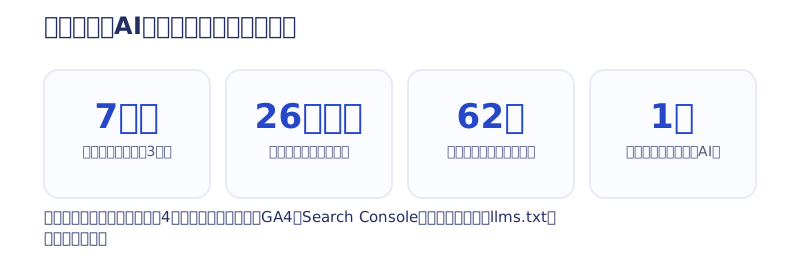
- Built 26 new static pages
- Migrated 62 articles from the old site (Webflow)
- Connected four form types, including contact and brochure requests
- Set up GA4, Search Console, structured data, and llms.txt
It took 3 days to build and 7 days including planning. The only human was me; the hands doing the work belonged to Claude Code. The logs for each stage are all published in the day-by-day record of the 7-day rebuild, so this article focuses on the part people actually ask about: “so, how was it really?”
What was good: three things that honestly mattered
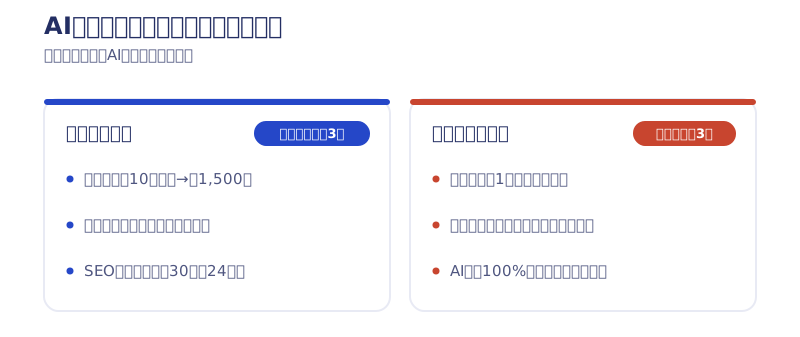
Running costs went from just under ¥100,000/year to ¥1,500/year
The clearest change is money. The old site ran on a Webflow subscription and, with the localization feature included, cost just under ¥100,000 a year. After switching to the AI-built site, all we pay is the domain: ¥1,500 a year. Being released from the feeling of subscriptions stacking up month after month is bigger than I expected.
The wall of unfamiliar technology basically disappeared
This site is built with a framework called Astro. I chose it because I confirmed it performs best as an SEO medium, given its fit with Cloudflare and its rendering speed. With AI alongside you, that kind of technology decision stops being scary. In fact, I carried that momentum far enough to ship several Swift apps to the App Store. As long as you can handle the planning and the design judgment, which language you build in is no longer a barrier.
SEO didn’t drop after the rebuild
The scariest part of a rebuild is losing search rankings. Here is the result: as of the day after the rebuild, 24 of 30 old articles kept their index status (measured via Search Console). If you migrate URL design, structured data, and the sitemap carefully alongside the AI, you can switch platforms while keeping your SEO assets.
Where I stumbled: I won’t hide this part
It took about a month of producing garbage before a decent design came out
I wrote “finished in 7 days,” but there is a prologue. Before I could reliably generate good design, I spent about a month mass-producing garbage with AI. Getting the wording right is genuinely hard, and at one point I threw away a half-built site and started over from zero. “Anyone can make a beautiful site instantly with AI” is, at least for now, a lie.
Fine-grained tweaks are slower than no-code
This may surprise you, but small adjustments like “widen the gap between these sections a little” were faster back when I was brute-forcing them in Webflow. With no-code you click the element and widen the margin. With AI, “just widen that one spot” doesn’t land cleanly, and a small tweak escalates into a global one.
Leave it 100% to AI and every site ends up with the same face
If you publish what the AI produces as-is, the AI-ness gets strong, and most sites end up looking the same. On top of that, the pages the AI produced were full of wording and figures I had never intended. You cannot publish wrong company information, so I visually check every page before launch. The AI does the hands-on work; the human makes the calls. Break that split and the quality collapses.
The honest truth about trying three AI website-building tools
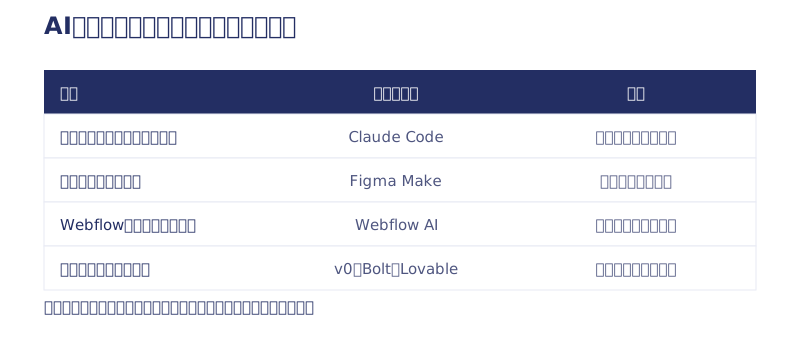
I built our own site with Claude Code, but I have actually used the other tools too. Sorted by use case, here is how they break down.
Claude Code: for building the company’s main site
Its biggest strength is freedom. There is next to no constraint from the tool, so you can push SEO and AI-search readiness as far as you like. The trade-off is that it needs setup and working in a terminal, and as I wrote above, it fails if the human judgment goes missing. The full procedure is in the complete walkthrough of building a site with Claude Code.
Figma Make: for building a small app with chat alone
Figma Make is Figma with site publishing and AI code generation bolted on. It starts the moment you say “build me an attendance app” in the chat — no setup at all. Figma even proposes Supabase from its own side as the backend to hold your data. The catch is that plenty of errors come up, so you need the patience to keep throwing “there is an error, fix it” into the chat as you go. I got burned once when it stopped letting me go back to an earlier version, so once you have built something worth keeping, duplicate the whole file and save a copy. More detail is in the article on building the attendance app.
Webflow AI (App Gen): for adding features to an existing Webflow site
Just ask it to “save a form submission to the database and list the entries in an admin screen,” and it generates everything from the data structure to the processing flow to the screen that connects to it. The strength is that a human builds the delicate UI in Webflow while AI takes on only the tedious backend. It suits adding a membership feature or a dashboard onto a Webflow site you already run. My notes from trying it are in the article on App Gen.
v0, Bolt and Lovable: for getting a feel for it on the free tier
I have not used these three on a real project myself, so this is based on public information (as of July 2026). v0 specializes in building React screens, Bolt.new prototypes a full stack right in the browser, and Lovable generates apps complete with a database and authentication — all three have a free tier. They sit as Figma Make’s competitors. Still, I suspect every tool in this category needs the same patience for the last 20% — connecting real data, stamping out errors, and running the thing after launch.
Fit and misfit: AI production or Webflow
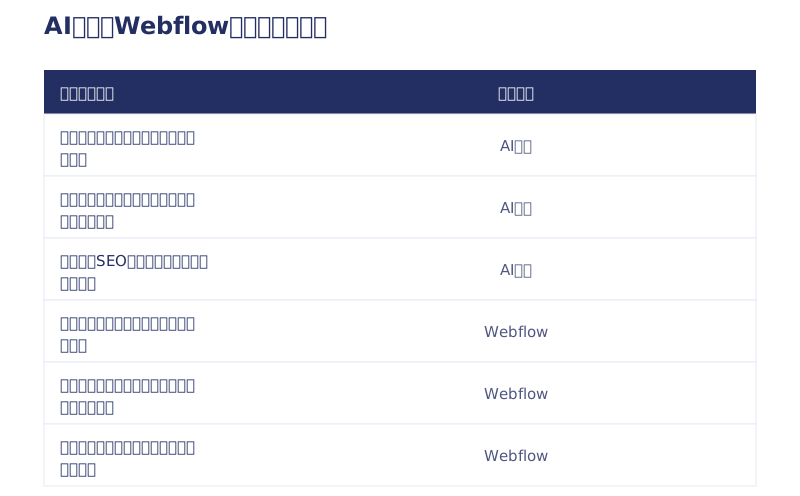
Companies AI production suits
- Sole traders, startups, and small-to-midsize companies
- Anyone who wants to hold running costs down (and avoid carrying a subscription)
- Anyone who wants to grow around publishing — blogging and SEO
Companies better off with Webflow
- Large enterprises, and organizations that put weight on governance and approval flows
- Teams whose staff want to update the site from an editor, no-code
- Anyone who needs the reassurance of being managed on a proven platform
It may sound odd coming from a company that has specialized in Webflow, but this is my honest view after actually running both. Roughly 20% of Web Haru’s projects are from overseas, 60–70% from across Japan, and about 10% from Sendai and Miyagi, and we have taken on large enterprise and overseas projects too. Even so, the majority of our clients are startups and small-to-midsize companies, and for that segment AI production is the better fit.
For those who want to build it themselves
I believe that if you pay for AI and practice for roughly a month, you can get to the point of producing a clean site. That said, in my case I already had the fundamentals of design, building, and SEO. For a company that wants to learn the basics and run its own site long term this is ideal, but keeping up with AI trends and the latest technology can be quite demanding depending on the person. How to build it with Claude Code is covered in the article on vibe coding.
In summary: the honest verdict on building a website with AI is “choose by size”
My honest take after building a website with AI is: “solo to small businesses are smart to use AI production; large and governance-focused organizations should use Webflow.” It is not magic, fine-tuning is slow, and if you hand it over wholesale you get a site with the same face as everyone else’s. Even so, running costs at ¥1,500 a year and a full rebuild in 7 days with SEO intact was more than enough return at our size. Every tool out there has now reached a level where it can build the thing; what makes the difference is judgment.
We take on this exact approach as AI Website Production (from ¥1,000,000). The cost and deliverables are all laid out in our article on AI website production costs. The full picture on Webflow itself is in our explainer on Webflow. If you are torn between “is our company suited to AI production, or is Webflow better,” tell us your situation in a free consultation. As a company that does both, we will tell you honestly which one fits.
Selected work

PonTech Lab Inc.
Built with AI (Claude Code) on Next.js and Cloudflare, with the build process published

Hosted by Nippon TV
High-fidelity Figma-to-Webflow conversion, with load speed and responsiveness optimized

JTB Americas
A full renewal of the North America site, with the operations team able to update it themselves
FAQ
Can AI build a website on its own?
It can handle the implementation on its own. But the planning, design judgment, and fact-checking stay human work. Even on Web Haru’s own site, the pages AI produced had wording and figures we never intended, so we visually checked every page before launch.
How long did it take to build a website with AI?
Web Haru’s own site took 3 days of building plus 4 days of planning, 7 in total. That said, it took about a month of practice before I could reliably get good designs out of it.
How much does building it with AI change the upkeep cost?
For Web Haru, a Webflow subscription of just under ¥100,000 a year became ¥1,500 a year for the domain alone. If you commission the work, Web Haru’s AI Website Production starts at ¥1,000,000 (excl. tax).
Which tool should I use to build a website with AI?
Pick it by use case. Claude Code for the company’s main site, Figma Make for prototyping a small app, Webflow AI (App Gen) for adding features to an existing Webflow site. For a first free try, v0, Bolt.new, and Lovable all have free tiers (as of July 2026).
Which companies is AI production not suited to?
Large enterprises, and organizations that put weight on governance and approval flows. If staff want to update the site from an editor without code, or management on a proven platform is required, Webflow is the better fit.

![Custom Website vs Web App | Full-Scratch or Full-Stack? [Cost, Timeline, Fit]](/assets/posts/thumb-full-scratch-vs-fullstack.avif?v=2b619e52)
![AI Website Cost: From ¥1,000,000 | Every Deliverable Disclosed [2026]](/assets/posts/thumb-ai-website-cost.avif?v=db2fd782)