
![Vibe Coding With Claude Code: Our Daily Work Routine [2026]](/assets/posts/thumb-vibe-coding-guide.avif?v=96cdb42c)
Hi, I’m Kurita, Representative Director of Webharu Inc. I do web production in Shiogama, Miyagi.
Let me start with the conclusion. I run vibe coding through Claude Code and have made it my daily work. Client sites, our own site, and the apps we publish on the App Store — almost all of it is built this way.
That said, the vibe coding we use for work isn’t “hand it over without reading the code.” It’s hand over the typing, then look and judge. AI does the hands-on work; deciding what to build, checking the facts, and taking responsibility stay with the human. Whether that division holds is what decides whether this becomes a real job.
Key takeaways
- vibe coding — what it means
- Vibe coding is a software development method in which you give an AI instructions in natural language and proceed with development without reading the generated code line by line. Andrej Karpathy coined it in February 2025, and it was named Collins Dictionary's “Word of the Year” that same year.
Contents
The daily work of running vibe coding through Claude Code
Claude Code is a coding agent that runs in the terminal. Give it an instruction and it will read and write multiple files, run them, and fix its own work while watching the results. I switch between the Opus and Fable models depending on the job.
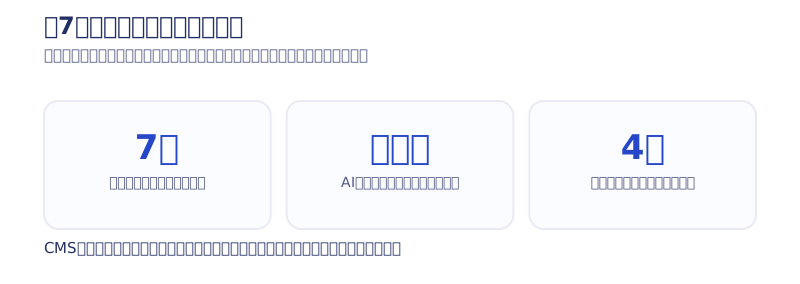
We rebuilt our own 26-page site in 7 days
In July 2026 I fully rebuilt Webharu’s own site with Claude Code. Building 26 new pages, migrating 62 articles and 24 case studies from the old site, connecting 4 contact forms, and setting up analytics and structured data all came in at 7 days (4 days of planning, 3 days of building). AI did the hands-on work; I handled deciding the concept and structure, judging the design, fact-checking the copy, and giving the go-ahead at each stage. The full process is in our complete guide to building a site with Claude Code, and the 7-day log is in the full record of our site rebuild.
I also build iOS apps with Claude Code and ship them to the App Store
Our 3 in-house iOS apps also had most of their implementation built through dialogue with AI. From planning to App Store release takes about a week. An app goes through a third-party check — store review — so pre-launch checking matters even more than for a site. The cost of publishing and the record of where review held things up are in our article on the cost of publishing an app on the App Store.
Running the site, invoicing, and sales materials all run on the same AI
Updating the site after launch also runs on AI. Because the AI holds all of the site’s code, design, and company information, it can put out invoices and sales-material PDFs with the same consistent look. My view is that the site becomes the foundation for “one AI per company.”
What vibe coding is
Vibe coding is a method where you give an AI instructions in natural language and move forward without reading the generated code line by line. “Vibe” is English for “atmosphere” or “mood.” Rather than understanding and writing each line of code, you proceed by relying on the feel of your back-and-forth with the AI — which is where the name comes from.
The person credited with coining it is Andrej Karpathy, formerly head of AI at Tesla and one of the founding members of OpenAI. In February 2025 he posted on X to the effect of “fully give in to the vibes and forget that the code even exists” — that post is considered the origin. Less than a year later, it was named Collins Dictionary’s Word of the Year for 2025 (the official Collins Dictionary blog, CNN).
Behind its spread is AI’s evolution from “autocomplete,” which returns one line of candidate code at a time, into “coding agents” that read, write, and fix implementation across multiple files on their own. Claude Code is exactly this kind of tool.
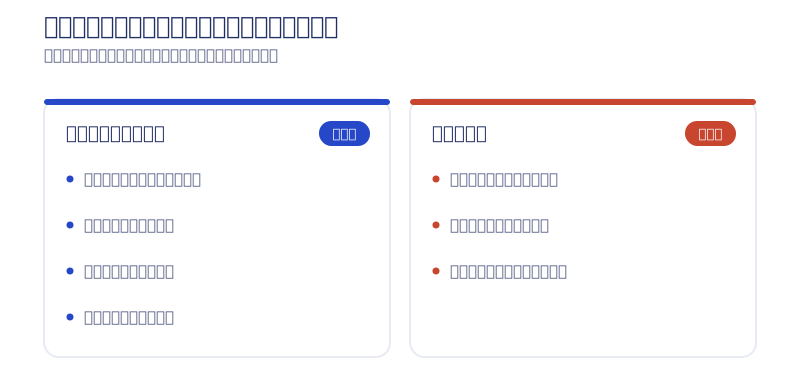
The difference between vibe coding as a hobby and vibe coding at work
In a hobby context, the term is often used exactly as Karpathy’s post intended: “hand it over without reading the code at all.” At work, by contrast, we always insert a step where a human checks the resulting code and design and verifies the facts and the security. Same word, completely different things to watch for.
The difference from no-code and full-scratch development
No-code tools like Webflow work by combining ready-made parts on screen. The underlying code was built and verified by the vendor in advance, so it tends to behave stably. Vibe coding, by contrast, has AI generate code specific to that project on the spot. The higher freedom makes human checking indispensable.
Compared with full-scratch development, where a human writes the code from zero, it’s easiest to think of vibe coding as having the same freedom while drastically compressing only the time the implementation takes. Webharu does both Webflow and AI website production, and I cover using AI on top of Webflow later, in “How we split work between Webflow and AI.”
3 steps to start vibe coding with Claude Code
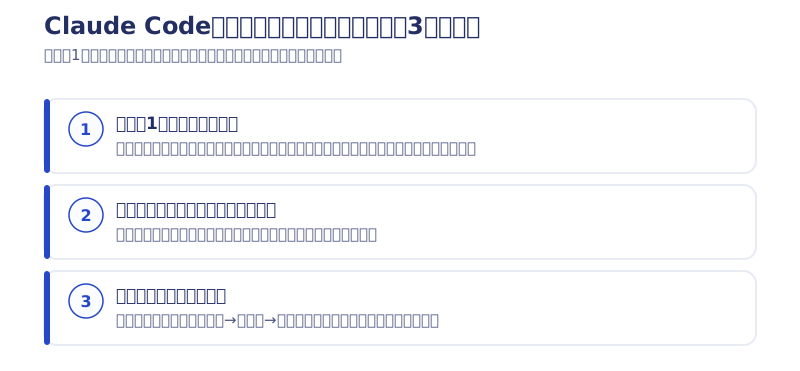
1. Settle on one tool and pay for it
Tools broadly split into two kinds.
| Type | Representative tools | Who it suits |
|---|---|---|
| Coding agent type | Claude Code and the like | People comfortable in a terminal who want to build something serious |
| Browser-only type | Figma Make and the like | People with no programming experience who want to try it first |
Here’s one harsh thing to say. It does cost money, and if you’re trying to finish everything on a study budget of zero, I’ll go as far as to say you’re better off not taking this on. If you can’t put money toward a tool, you won’t reach the point of making it a job.
That said, there are ways to hold the cost down. Chinese-made AI is said to be quite good lately — cheap, and capable enough. And once you can build with Chinese AI, you start matching with people who specifically want work built with Chinese AI, which becomes a doorway to jobs. Your choice of tool becomes the entry point to the work itself.
2. Build your own site and your own app
If you’re unsure where to start, the answer is clear: build your own site first, then build your own app. Building something for yourself, not for someone else, is the fastest route. A single-page site or a tool with just one feature is plenty to start with. If you want to build entirely in the browser, our record of building an attendance app with Figma Make is a useful reference.
3. Run it and fix it, repeatedly
Don’t try to finish it in one pass. Give an instruction, run it, say what bothers you, run it again — that back-and-forth is the basic motion. Think of it as close to handing work to a new staff member and giving feedback while looking at what comes back.
5 tips for making it work
- Instead of “make it nice,” write down who it’s for and what to prioritize
- Don’t expect perfection in one pass
- Throw away anything that isn’t what you meant
- Break instructions down small, by page or by feature
- Bring in one pair of eyes from outside the conversation — sleep on it, or show someone else
Of all of them, the most important is the courage to throw things away. We built around 50 variations of our own site’s design before narrowing it down. For about a month, before I could reliably get good designs out of it, I was mass-producing garbage with AI.
The downsides of vibe coding
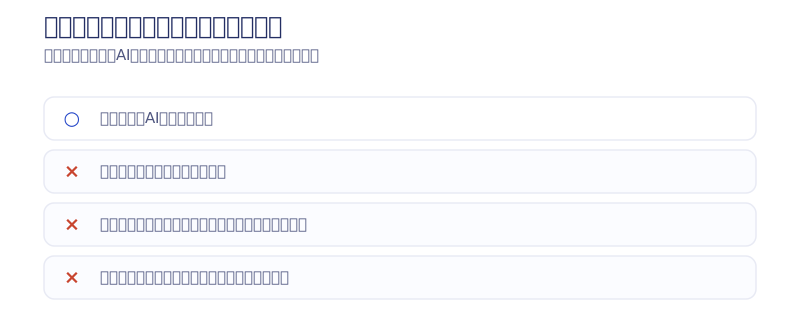
Some things worked but couldn’t be shipped, and I threw all of it away
Let me start with my own failures. Before the current models arrived, I tried to build a CMS, a booking form, and a no-code tool all myself. All of it turned into garbage, and I deleted it. Rebuilding our own site was the same — I tried about 4 times before this attempt worked, and none of them went well.
So, put provocatively, it’s “a site built in 7 days.” But open the lid, and counting from back when AI wasn’t yet very smart, it took about half a year.
Being able to build anything only pushes “finished” further away
Honestly, there are still pages on our own site I haven’t personally checked, and plenty more I want to publish. The more you’re able to build, the more things you want to do grows by the same amount. AI doesn’t make you finish sooner — it just lets you do more in the same time.
Skip the review, and mistakes go live exactly as generated
Deciding what to build, judging whether a design is good, and confirming whether what’s written is factually correct all remain human work. Code AI generates can also mix in known vulnerability patterns. And please avoid pasting a client’s personal data or an unannounced business plan straight into AI — how input data is handled differs from tool to tool.
Some development doesn’t suit this
Business systems that handle payments or large volumes of personal data, tightly regulated fields like medicine and finance, and development tightly coupled to an existing large-scale system are areas where someone with specialist knowledge should hold the lead on design. Judge “can it be done” and “is this method appropriate” separately.
Can vibe coding become a job, and can it pay?
It can be a job. But where the value gets created shifts. It used to live in “being able to write code.” Now it centers on four things: defining what should be built, judging the design, fact-checking the content, and the review that decides whether something is finished.
Build your first job with your own thing
If you’re starting with no track record, first build a 0-to-1 track record with your own thing — your own site, your own app. If it’s running, that alone becomes a track record. Try to fill your first job with someone else’s project, and you can’t escape the loop: no track record means no work, no work means no track record.
How we split work between Webflow and AI
Anything a client explicitly wants built in Webflow, we build entirely in Webflow. For everything else, we currently recommend AI website production. AI now simply performs better than a human at building it — a site has hundreds of items that need checking, and having a human fill them all in burns a lot of time on checking alone.
On top of that, a site held as code lets you switch the AI model running underneath (Claude, GPT, Gemini, and so on) to whichever is smartest at the time. You never have to rebuild the site just because you switched tools. Security holds up fine with human oversight too — Webharu’s site is A+ on both SSL Labs and Mozilla Observatory.
We use AI on Webflow-built sites too. Here’s the process I wrote in 2025 when I first combined Webflow with vibe coding, kept as it was at the time.
Webflow is a no-code tool for building websites visually, but it actually lets you embed custom code too. Combining the two makes advanced customization possible even without technical knowledge.
Webflow also recently announced a feature called Webflow Cloud. It supports GitHub integration, which means vibe coding and Webflow can now connect together more smoothly.
The concrete integration flow looks like this.
- Build the base site in Webflow.
- Then give AI an instruction in plain language, like “show a 3D animation when this button is clicked.”
- AI generates the JavaScript or CSS code, and you just paste it into Webflow’s custom code field.
I was skeptical at first too, but trying it was surprisingly easy. Even with no programming experience, you can get working code just by putting what you want into words.
I think the very concept of a site is going to change from here
Once anyone can make a clean site instantly, what gets called “stylish” today will be replaced by “the AI-looking site,” and its value will crash. But a new trend will always emerge from there too. Whether it becomes 3D, or something game-like, I don’t know yet. All you need to ride that wave first, I think, is to keep chasing the smartest AI.
In summary: vibe coding runs on Claude Code, judgment stays with the human
Vibe coding is a way of building things by instructing AI in natural language and letting it write the code. I build both sites and apps every day with Claude Code. If it’s a hobby, try it freely; if you’re making it your job, approach it on the premise that a human takes on the judgment and the review. Your first job is your own site and your own app.
The pitfalls I’ve hit building with Claude Code, and the instructions that worked, I write up first in the newsletter. If you’re building this yourself, sign up. The honest take on an AI-built site is in our honest review of building a website with AI, and the cost is in our article on AI website production costs. If you’d rather hand off the building, start with the AI Website Production page or the consultation form.
Selected work

PonTech Lab Inc.
Built with AI (Claude Code) on Next.js and Cloudflare, with the build process published

Hosted by Nippon TV
High-fidelity Figma-to-Webflow conversion, with load speed and responsiveness optimized

JTB Americas
A full renewal of the North America site, with the operations team able to update it themselves
FAQ
What is vibe coding?
A method of instructing an AI in natural language and proceeding with development without reading the generated code line by line. Andrej Karpathy coined it on X in February 2025, and it was named Collins Dictionary's Word of the Year in November 2025.
Can I do vibe coding with Claude Code?
Yes. Webharu works with Claude Code every day, having rebuilt its own 26-page site in 3 days of building (7 days including planning) and published 3 in-house iOS apps on the App Store.
What are the downsides of vibe coding?
Skipping review lets mistakes and vulnerabilities go live exactly as generated, and it takes time before you can reliably get what you want. Even Webharu narrowed its own site's design down from about 50 variations, and 4 earlier attempts at the rebuild failed.
Can I get paid work with vibe coding?
Yes. But build your first job with your own site or your own app. If it's running, that alone becomes a track record, and you can break out of the loop of “no track record means no work” by your own decision alone.
Can I do it with zero programming knowledge?
With a browser-only tool like Figma Make, you can build something small from zero knowledge. For a production site or app used in a business, you need either the knowledge to judge and review what comes out, or a setup where you work with someone who can.
Can vibe coding be done for free?
You can try it on a tool's free tier. But if you're making it your job, settle on one paid tool. If you try to get through everything on a study budget of zero, you won't reach the point of making it a job.

![Custom Website vs Web App | Full-Scratch or Full-Stack? [Cost, Timeline, Fit]](/assets/posts/thumb-full-scratch-vs-fullstack.avif?v=2b619e52)
![AI Website Cost: From ¥1,000,000 | Every Deliverable Disclosed [2026]](/assets/posts/thumb-ai-website-cost.avif?v=db2fd782)