

Hi, I’m Kurita, Representative Director of Webharu Inc.
Here is the conclusion first. If you build a website with Claude Code in five steps — plan, design, build, verify, launch — even 26 pages take just 3 days of building. In July 2026 I rebuilt Webharu’s own website with exactly this process. Twenty-six new pages, 62 migrated articles, and four form types connected: 7 days including planning.
That said, it took me about a month before I could produce design reliably, and I generated a mountain of junk along the way. What decides quality is less the procedure itself than where the human makes the judgment calls. This article walks through those five steps in order, for people who want to run Claude Code with their own hands and build a website.
Key takeaways
- Claude Code — what it means
- Claude Code is a development tool that lets you generate, edit, and run code while conversing in the terminal with Anthropic’s AI, Claude. Webharu used Claude Code to build its own 26-page website in 3 days of building (7 days including planning).
Contents
The tools I used to build the website with Claude Code
- Claude Code: I hand it everything from writing and fixing code to running it
- Astro: a framework for building static sites. I chose it for its compatibility with Cloudflare and its page speed
- Cloudflare: the hosting. There is no server cost; the only running cost is the domain fee of ¥1,500 a year (as of October 2026)
The only human doing the work is me. That said, I already had a base of design, site-building, and SEO knowledge going in. The old site ran on Webflow, with a subscription including localization costing just under ¥100,000 a year. Since the switch, only the domain fee remains.
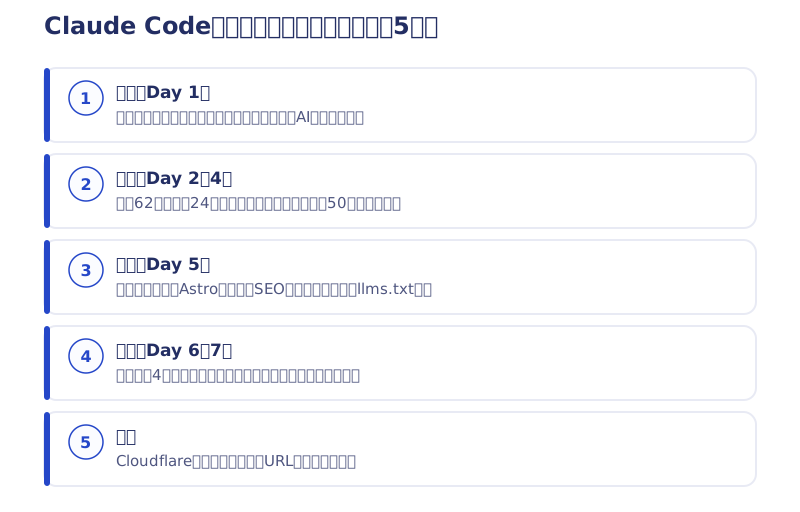
Step 1 | Planning (Day 1) can’t be left to AI
The first thing you do is not code but an inventory. Where does traffic come from, who is the site for, what kind of customers have we mostly had? I laid out the numbers I had and put into words the goal the rebuild had to achieve.
In my case, I originally intended to angle the site toward large enterprises. But roughly 90% of our actual customers were startups and small businesses, so I reset the target to them. AI cannot make that judgment. If you start building with this still vague, the later text review turns into a complete redo.
Step 2 | Design (Days 2–4) takes the longest with Claude Code
Migrate the old site’s data and define the design in words
I scraped 62 articles and 24 case studies out of the old site (Webflow) and pulled them down locally. At the same time, I decided the roots of the design in text: colors, how buttons are placed, the direction I wanted to express. That definition becomes the foundation for the prompts that follow.
About 50 rounds on the home page
I built the new design in HTML. I put the effort into the home page and repeated a loop — “generate three variations → say which parts I dislike and why → three more” — for roughly 50 variations in total. This is the step with the most back-and-forth with AI.
The trick is to give reasons, not impressions. Reply “something feels off” and you get more of the same.
Build the sitemap after the home page is settled
I made the sitemap only after the home page was settled. Normally the sitemap comes first, but I held it back because I thought locking it early would put needless constraints on the AI. Once the design is fixed on the home page, you just point the AI at it and the lower-level pages come together in one go.
Step 3 | Building (Day 5) is just moving it into Astro
Port the design you settled in HTML into Astro. I chose Astro over Next.js for its compatibility with Cloudflare and its page speed. Within what I tested, it was the fastest combination for a site that attracts visitors through articles.
On the same day, I also set up SEO and AI-search readiness across every page. I had Claude Code handle structured data, the sitemap, and llms.txt too. For the articles, I first built the design of a single detail page in HTML, then used it as a template to pour in all 62.

Step 4 | Verification (Days 6–7): a human looks at every page
I connected Google Tag, Cloudflare, and the four types of forms, bringing everything right up to production. The most important task here is reviewing the text. The AI-generated pages contained a great deal of wording and numbers I had never intended. Check them against the plan and fix them in one pass.
Finally, I checked every page with my own eyes. Errors in company information go straight to trust, so I don’t leave that to AI. AI does the hands-on work; the human makes the calls. That this division decides the quality is what I took away from those 7 days.
Step 5 | Launch, and the search numbers the next day
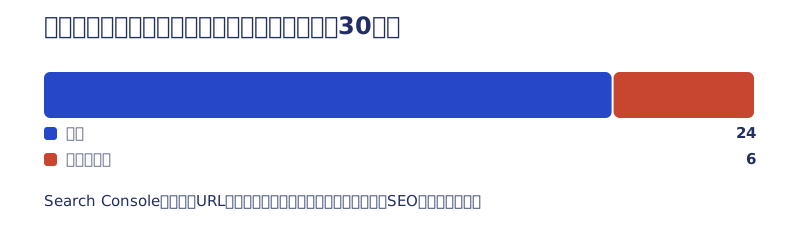
Launch means deploying to Cloudflare and handling migration from the old URLs. The day after the rebuild, 24 of the 30 old articles were still indexed (measured in Search Console). Design the migration properly and a rebuild won’t wipe out your search standing.
How search performed afterward is in our article measuring the SEO of an AI-built site, and what I was thinking during those 7 days is in our article on renewing a website with AI in 7 days.
I run post-launch operations with Claude Code too
Bulk AIO implementation across 63 articles
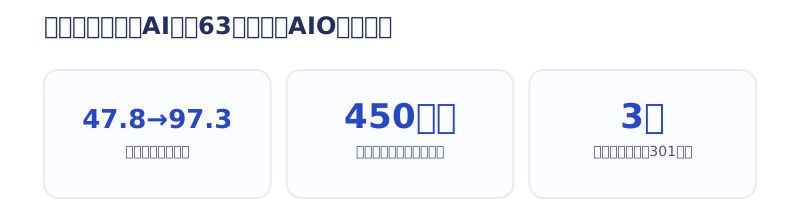
In July 2026, after launch, I added key-points boxes, FAQs (with FAQPage structured data), one-sentence definitions, and Speakable markup to 63 blog articles in one go. Our internal score went from an average of 47.8 to 97.3. Along with that, I corrected over 450 typos and ran three 301 consolidations of articles cannibalizing each other’s keywords. That volume is impossible by hand, but it worked because the site keeps articles as JSON and assembles them with templates.
Building a calculator tool
I also built our calculator tool for the transitional measures under Japan’s qualified invoice system with Claude Code (the tool itself is in Japanese). Being able to finish development like “add one tool to the blog” without outsourcing was the biggest change from switching to building with AI. How I use it every day is in our article on doing vibe coding with Claude Code as daily work.
What was slow and what I couldn’t do when building a website with Claude Code
- Fine adjustments are slower than in a no-code tool. “I want a bit more space between sections” tends to spread into a site-wide adjustment, and there were moments when brute-forcing it in Webflow was faster
- It took about a month before design came out reliably. Choosing words for prompts is hard, and several times I threw away a half-built site and started again from zero
- Launch something 100% left to AI and every site ends up with the same face. That lowers brand value, so the judgment of what looks good stays with the human
Even so, the wall of unfamiliar languages and technologies has all but disappeared. Because I have learned to use AI well, I can deliver this quality. That is what has truly changed.
Start by working on your own site with the five steps in this article. I share the next chapters of my Claude Code implementation first in our newsletter (emails are in Japanese). If building it yourself looks difficult, Webharu’s Full-Scratch Website Build starts at ¥1,000,000 (excl. tax) and takes at least 2–3 months (as of October 2026). What we deliver is in our article on full-scratch websites, and pricing is on our pricing page.
Selected work

New Paint
No.1 in Japan for its local painting keyword 8 days after launch (Search Console)

Hosted by Nippon TV
High-fidelity Figma-to-Webflow conversion, with load speed and responsiveness optimized

PonTech Lab Inc.
Built with AI (Claude Code) on Next.js and Cloudflare, with the build process published
FAQ
Can you build a website with Claude Code alone?
Yes. I built our own 26-page website in 3 days of building (7 days including planning). But planning, judging whether the design looks good, and fact-checking are human work — let go of those and you end up with a site that looks like one you have seen somewhere before.
How many days does it take to build a website with Claude Code?
Webharu’s own site took 7 days in total: 1 day of planning, 3 days of design, 1 day of building, and 2 days of verification. Before that, though, there was about a month of trial and error before I could produce design reliably.
Why did you choose Astro as the framework?
For its compatibility with Cloudflare and its page speed. Within what I tested, it was the fastest combination for a site that attracts visitors through articles. Next.js was a candidate, but I did not adopt it.
How much does it cost to run after launch?
Because it is served on Cloudflare, there is no server cost — only the domain fee of ¥1,500 a year (as of October 2026). When we ran it on Webflow, it was just under ¥100,000 a year.
Did your search rankings drop because of the rebuild?
The day after the rebuild, 24 of the 30 old articles were still indexed (measured in Search Console). This assumes you design the migration from the old URLs in advance.
If building it myself looks difficult, can I commission it?
Yes. Webharu’s Full-Scratch Website Build starts at ¥1,000,000 (excl. tax) and takes at least 2–3 months (as of October 2026). You can choose delivery as code or on Webflow.


