

Webflow App Gen is a new Webflow feature: you build the UI in Webflow, describe what you want in a prompt, and the backend — data storage, authentication, processing flows — is generated automatically inside the Webflow interface. In the range I tested, something on the order of “contact form → save to the DB → list it in an admin screen → change its status” came out working from a single prompt written in Japanese.
Hi, I’m Kurita, Representative Director of Webharu Inc.. Until now, Webflow meant the world’s finest website production tool. Unbeatable for corporate sites and landing pages — but the moment you wanted a web app, you had to stitch together outside tools: Memberstack for auth, Supabase for the database, Wized for API integration. In 2025, Webflow Cloud and the new Webflow AI (App Gen) changed that premise, so I sat down and tried it.
In this article I separate what I confirmed by actually using it from what I have not tested yet, and close with the criteria for deciding whether a Webflow user should try it today.
Key takeaways
- App Gen — what it means
- App Gen is a new Webflow feature: build the UI in Webflow and describe what you want in a prompt, and it auto-generates all three of the data structure, the logic (processing flows) and the frontend wiring.
Contents
What App Gen is: build the UI, describe what you want, get a backend
The conclusion up front: in one line, App Gen (App Generation) is a feature where AI reads the designer’s intent and assembles the machinery behind it. The development flow is three steps.
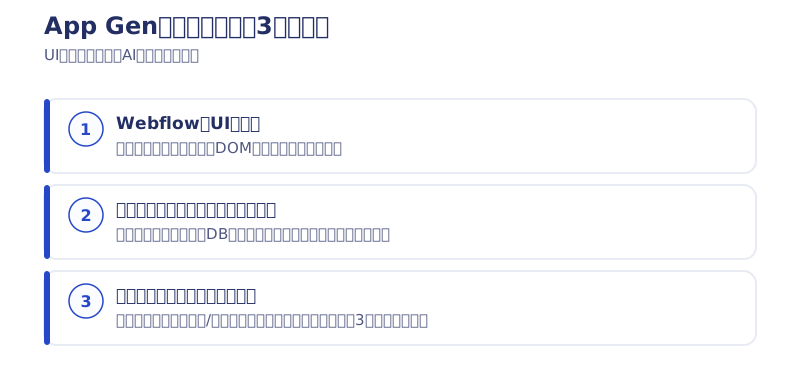
- Build the UI in Webflow
- Describe what you want to the AI in a prompt
- The backend is generated automatically
Tell it “when the user presses the register button, save it to the DB” and the basic backend set — data storage, authentication, actions — is generated automatically, right inside the Webflow interface.
What I actually tried: one Japanese prompt, all the way to an admin screen
What I typed in was genuinely no more than this.
“When something is submitted from the contact form, save it to the DB and list it in an admin screen. And I want to be able to change the status too.”
From that instruction alone, Webflow AI generated all three of the following in one go.
- CMS / data structure (a table with the fields it needs)
- Logic / actions (API-like processing flows)
- Frontend wiring (binding the form to the DB)
Instead of nailing down the DB column definitions first, you assemble the app conversationally — “here’s the experience I want; I want this button to behave like this.” The style commonly called vibe coding, running as-is on top of Webflow. The human concentrates on what to build; the AI handles the practical work of writing code.
The difference from AI tools that generate everything from zero is the division of labor
AI tools that generate an entire web app from text exist too. Trying them side by side, the difference I felt with Webflow’s approach is the division of labor.
- Human / designer: delicate UI design, class architecture, DOM structure (Webflow’s home ground)
- AI / App Gen: backend, data integration, logic (the AI’s home ground)
Leave everything to AI and the design tends to fall apart, or become hard to fix. With Webflow you keep the design and the HTML structure under your own control and hand only the machinery behind it to the AI. The aim is not “an app that works but looks bad” — it is an app that works while holding its design quality.
What I have not tested yet (written honestly)
The conclusion up front: this round of testing goes as far as a first check on whether small features can be generated from a prompt. I have not tried the following, so I make no claims about them in this article.
- Putting it into a real client project or production (behavior under load, and during incidents)
- A feel for the pricing (how far the free tier goes, what production actually costs)
- Maintainability of the generated backend (how far it keeps up when the spec changes later)
- Bolting it onto an existing live site (officially supported, but my testing covered new builds only)
- The fine behavior of authentication and permissions (showing different things per member type, and so on)
I will add to this when a real occasion to use it comes up.
A wider view: from search (SEO) to AI agents (AIO)
Widening the view a little: from here on it is not only humans who search — AI agents (ChatGPT, Gemini and others) increasingly look up information, book and pay on the user’s behalf. From what I saw, the structures App Gen generates are straightforward, leaning toward the shape an AI finds easy to read: clear HTML structure and data structures with well-defined roles. For thinking about traffic and citations arriving through AI (AIO), that is a tailwind.
I have collected measured data on AI and SEO in the article below.
→ Are AI-built sites weak at SEO? Measured data from a 63-article site
The verdict: should Webflow users try it today?
The conclusion up front: it is well worth trying on a small scale. But this is not the stage where everyone should push it into production immediately. The criteria are as follows.
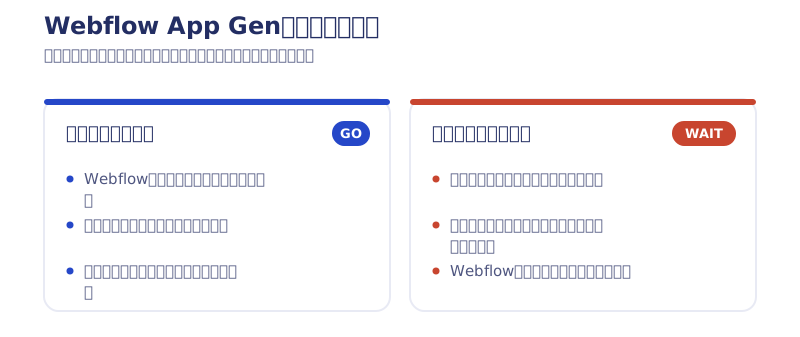
Worth trying now if you
- already run a site on Webflow and want to add a small feature on the order of “form → save → list”
- want a working prototype in front of people as fast as possible
- want out of managing a stack of outside tools for auth, DB and API integration
Better to wait if you
- want to put payments, core business operations or anything else you cannot afford to get wrong on it straight away
- are on a client project and need maintenance and running costs pinned down in the estimate first
- already have a development stack outside Webflow and no particular reason to switch
A roadmap for getting started
There is no need to build an enormous app straight away. Start here.
- Pick one feature of an existing site (a booking form, a members-only page)
- Set the backend up with App Gen
- Test whether the generated feature behaves as expected
- Turn the patterns that worked into templates
Summary: App Gen is practical enough for the “try it small” stage
Webflow is widening from a website production tool into a platform that can build web apps too. In the range I actually touched, the division of labor — UI in Webflow, backend by prompt — really did work. Production use, pricing and maintainability, on the other hand, remain items for future testing.
[August 2026 addendum] My conclusion: I never ended up using what I built with App Gen
An honest addendum. What I built for this article never went on to be used in a real client project.
The reason is simple: coding agents such as Claude Code started behaving the way I hoped they would. I have no plans to use App Gen going forward at all. Just build everything with vibe coding — that is my conclusion today (our guide to vibe coding).
That said, this is a question of where you put your main development ground. If the premise is that you run a site on Webflow and want to add a small feature inside it, the GO/WAIT criteria above still hold. If you can step outside Webflow, building outside is faster and more flexible.
At Webharu we provide technical support for website production and app-building with Webflow, and implement AIO (AI optimization) with the AI era in view. If you want to know how App Gen could work on your own site, feel free to get in touch through our contact form.
Selected work

JTB Americas
A full renewal of the North America site, with the operations team able to update it themselves

Hosted by Nippon TV
High-fidelity Figma-to-Webflow conversion, with load speed and responsiveness optimized

PonTech Lab Inc.
Built with AI (Claude Code) on Next.js and Cloudflare, with the build process published
FAQ
What is Webflow App Gen?
A new feature where you build the UI in Webflow, describe what you want in a prompt, and it auto-generates all three of the data structure, the processing flows and the frontend wiring, inside the Webflow interface. It arrived in 2025 alongside Webflow Cloud.
Can I use Webflow App Gen with zero programming knowledge?
Yes. This round of testing ran on prompts written in Japanese alone. That said, basic concepts such as what a database is will make your instructions to the AI sharper and raise the quality of the output.
What does App Gen auto-generate?
From a prompt it generates, in one go, a CMS/data structure with the fields it needs, logic/actions that behave like API processing flows, and the frontend wiring that binds the form to the database.
Can an existing Webflow site be turned into a web app?
Officially, member features and dashboards can be bolted onto a live site. My own testing covered new builds only, though — I have not tried adding it to an existing site.
Should I use Webflow App Gen right away?
For small feature additions or prototypes on the order of “form → save → list”, it is worth trying now. For payments, core business operations and anything you cannot afford to get wrong, the safe move is to wait until there are more cases and more testing.
Is the author still using App Gen?
No. What I built with App Gen never went into a real client project, and once coding agents such as Claude Code reached a practical level I moved all development to vibe coding (developing directly with AI). It remains a valid option when you want to keep everything inside Webflow.
![How to Choose a Webflow Agency: Cost and 5 Quote Checks [From a Rival Founder]](/assets/posts/thumb-webflow-agency-choice.avif?v=4c985a91)

![Webflow vs STUDIO: Pricing, CMS, and Which to Choose [2026]](/assets/posts/thumb-webflow-vs-studio.avif?v=7e977456)