

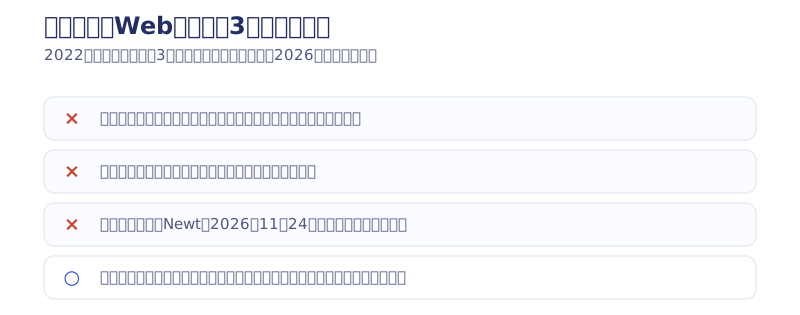
The conclusion first. Building a website with no-code carries three broad disadvantages.
- A website built with no-code depends on the company that runs the no-code tool (it can be deleted)
- You cannot migrate to another tool — switching means rebuilding from scratch
- If the no-code service shuts down, the site goes with it
The best defense is to keep your own copy of the programming code. That argument has been consistent since the first version of this article in 2022. And a shutdown is no longer hypothetical. Newt, the Japan-made headless CMS, is scheduled to end service on November 24, 2026 (announced May 20, 2025). In July 2026 I also moved our own site wholesale from Webflow, after six years, to a static site. This article keeps the 2022 text as it was written while updating the substance of each disadvantage, and the defenses, from the vantage point of 2026 — the year a shutdown case became real.
Key takeaways
- Vendor lock-in (no-code) — what it means
- Vendor lock-in is the state of depending on one specific tool and being unable to move elsewhere. A website built with no-code depends on the company that provides the tool, and Newt, a Japan-made CMS, really does end its service on November 24, 2026. On a tool with no data exit (code export or data export), a shutdown leaves you no choice but to rebuild from scratch.
Contents
The shutdown became real: Newt ends on November 24, 2026
The conclusion: the “service shutdown” risk of no-code produced a real case in 2026. Newt, the Japan-made headless CMS, announced its closure on May 20, 2025 and ends all service on November 24, 2026. After that, neither the admin screen nor the API works, and images that were served from Newt’s storage stop displaying along with their URLs.
What decides life or death here is the “data exit” covered below. Newt has an export function, so if you evacuate your data before the deadline you can migrate. Conversely, if a shutdown catches you on a tool with no exit, your only option is to rebuild from zero. If you use Newt, the full evacuation and migration procedure is collected in the complete guide to the Newt shutdown (Japanese), so start there.
What follows are the three disadvantages as written in the 2022 original. Read them alongside how those predictions turned out.
[Disadvantage 1] A website built with no-code depends on the no-code tool

As long as the company can control the site you built, it can delete that site at any time if the site becomes inconvenient for the company. If you were using Wix, for instance, a site that raised any question of illegality could be deleted. That is what it means.
You may be thinking “come on, I am not going to build anything illegal”, but you cannot afford to be that relaxed about it. There is the story of a woman who had used her Google account for ten years and was banned after mistakenly publishing a video of her child in the bath on YouTube.
User error or not, having ten years of data suddenly deleted would be a heavy blow both mentally and professionally.
The following incidents likewise show the danger of running a website under a company’s control.
- President Trump had his Twitter account frozen (Japanese)
- Meta unilaterally renamed an account called metaverse without notice
(2026 update: the items above are the incidents cited when the first version was written in 2022. The incidents themselves have aged, but the structure — an account can be stopped at the platform’s sole discretion — is unchanged as of 2026.)
Considering all this, you can see that producing websites on tools you cannot switch away from, such as Wix or STUDIO, is dangerous. The same can be said of building a website with any other no-code tool that cannot export programming code.
If the site you built suddenly disappeared, the Google standing and the revenue you had accumulated on it would vanish in an instant. You need to understand these dangers of no-code and prepare for them in advance.
Solutions: three defenses so a no-code site does not disappear
Now that the dangers of using a no-code tool are clear, let us think about the solutions. The solutions I have come up with are as follows
- Keep your own copy of the programming code
- Create two accounts inside the no-code tool and keep a copy of the site
- Use a no-code tool that can export programming code in the first place
Let me take them in order.
How to keep your own copy of the programming code
A method of turning the site you built with no-code into code using a source-extraction tool.
The article below introduces the method concisely.
By keeping the programming code you produced yourself, you should be able to restore the site if the worst happens. Depending on the tool, however, things like JavaScript can be tied to the no-code platform and may not run properly.
Create two accounts inside the no-code tool and copy the site
No-code tools make it easy to copy a site you have built. Many also have a feature for sharing a site with other users, and this method makes use of both.
That method is creating two accounts and keeping a copy in one of them. The steps differ by tool, so I will leave them out here.
With this method, even if one account is deleted you should be able to restore from the other. The problem is that some tools do not let you share a website with other users, or do not let you make a copy.
Use a no-code tool that can export programming code
Some no-code tools come equipped with the ability to export HTML and CSS code. Exporting programming code such as HTML and CSS and managing it yourself is the safest and most accurate route. That said, since I make use of Webflow, simply recommending Webflow would be too much of an advertisement. So alongside Webflow, let me introduce one more: Nicepage.
Nicepage can export not only HTML but also WordPress output, and generally feels like a tool that adds the features the no-code platforms popular as of 2023 lack. The impression is still of something in development, but its user base looks set to grow further.
The article below explains in detail what other tools are out there
[Disadvantage 2] A site built with no-code cannot be migrated elsewhere

Code-exporting no-code tools such as Webflow and Nicepage are a different story, but as a rule, no-code tools do not let you change tools.
So if partway through you decide to change tools because “the no-code tool raised its prices” or “I found a better no-code tool”, you end up rebuilding the site from scratch. Even with the same design, the build takes time, so the best choice is to think ahead as far as you can and keep yourself able to move flexibly.
Solution: choose a no-code tool you can migrate away from
As of 2023, WordPress is highly popular and cheap, which makes it the most used platform in the world.
Given the low cost, the large user base and the abundance of know-how in circulation, you may well want to use WordPress at some point. In an era that moves this fast, being locked to one tool for life is a considerable risk. Prepare in advance so that you can move to another tool at any time. I recommend checking whether the no-code tool you use can be converted to WordPress, and whether you can export the code and use it independently of the no-code platform.
Webflow, the tool I chose, lets you export HTML and then use it with WordPress. And Nicepage, introduced above, exports to WordPress natively. It feels like designing the way you would in Wix and then running the result on WordPress. Honestly, on features alone it is a superset of Wix. Note that it has drawbacks: sluggish controls, frequent errors.
No-code is moving from code export to code import
My prediction is that in 2024 no-code tools that can import HTML code will appear. Along with that, I think design tools such as Figma will make it possible to export the design you built as code, so the flow becomes: build in Figma, then import into and operate from a no-code tool.
That prediction is already playing out in Nicepage: build in Nicepage, then operate and update in WordPress.
I do not think Webflow or the other no-code tools will implement this feature in future. The reason is that it would reduce the company’s profits. Much of no-code’s revenue presumably comes from signing people up to a subscription and containing even the server fees inside the platform. For those reasons, today’s no-code tools are unlikely to make it easier to migrate to another tool.
When that happens, which companies will still be standing? One thing can be said for certain: the fewer updates a company ships, the surer its decline.
(2026 update: here is what became of that prediction. The lead role in migration was not switching between no-code tools, but code generation by AI. In July 2026 I myself moved our own site from Webflow to a static site rebuilt with AI (Claude Code). The measurements come later in this article.)
[Disadvantage 3] The fear of a no-code web development tool shutting down

For a no-code tool you cannot move away from, is this not the scariest fear of all?
Honestly, a no-code tool with a user base as large as Wix’s is not going to shut down in future barring something extraordinary. But with a minor no-code tool that you also cannot migrate away from, the site you built will certainly disappear.
Take STUDIO, famous among Japanese users: on a global view it is minor among the minor. It is popular in Japan, so a sudden shutdown is hard to imagine, but on a ten-year horizon there is no telling whether it survives. There are plenty of companies that leave a corporate site untouched for more than ten years, so using a minor no-code tool does carry risk.
(2026 update: four years on from the first version, this fear became real. Newt, the Japan-made headless CMS, ends its service on November 24, 2026. The fact settled in 2026 is that shutdowns happen even to tools widely used in Japan. The steps to take are collected in the complete guide to the Newt shutdown (Japanese).)
If you intend to start with no-code now, choose a no-code tool that can export the programming code, HTML and CSS, and that also has a large global user base.
Building so a shutdown cannot kill you: check the “data exit” before you sign
The conclusion: whether a shutdown kills your site is decided not once the closure is announced, but before you sign, by whether the tool has a “data exit”. An exit means HTML and CSS code export, article data export (CSV or JSON), and bulk download of images.
This is not theory: it is the road I walked myself in July 2026. Our own site, which ran on Webflow (26 pages, 62 articles), was rebuilt as a static site with AI (Claude Code) and migrated. Seven days of work, three of them building, with me as the only human involved. Because Webflow had an exit — code export and CMS CSV export — the migration could go at that speed.
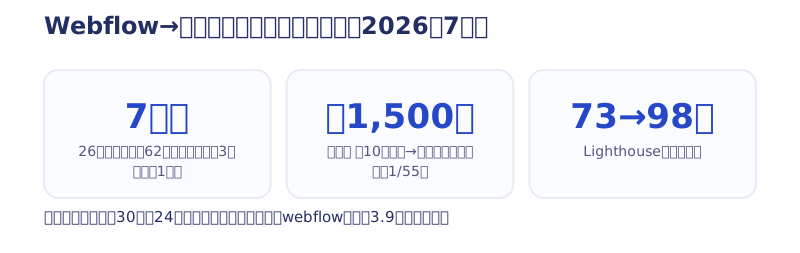
The measured results of the migration (as of 2026) are as follows.
- Running costs: just under ¥100,000 a year on the Webflow subscription (actual spend $576/year, about ¥83,000) → ¥1,500 a year in domain fees alone. About 1/55
- Speed: Lighthouse mobile measured 73 → 98
- SEO: the day after the relaunch, 24 of the 30 old articles kept their index. The average position of 3.9 for “webflow” held as well
The rankings carried over because we ran on our own domain and held the URLs as our own asset. Put the other way, on a tool with no exit plus a vendor-supplied subdomain, that migration would never have worked. What you should do sorts into three things.
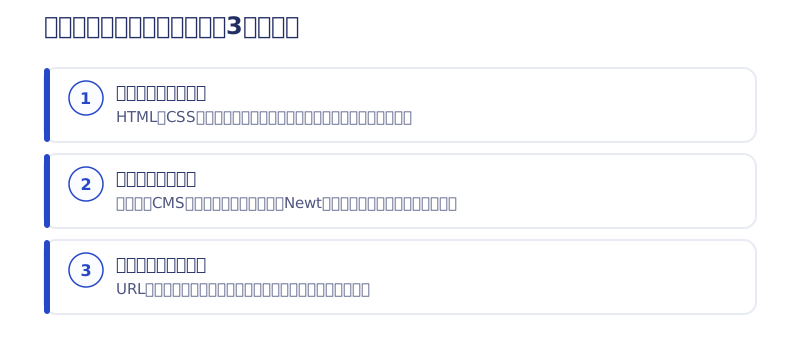
- Check the exit before you sign: can you export HTML and CSS, export the CMS data, and pull the images in bulk? If the official help does not say so, assume there is none
- Back up regularly: pull the code, the article data and the images down to your own machine or cloud. In Newt’s case the images vanish along with their URLs after closure, which made evacuating the images the biggest trap of all
- Run on your own domain: if the URLs are your asset, you can set up redirects at the new home and carry your search rankings over. On a vendor-supplied subdomain, everything you built up disappears with it
What you build on is also a decision that moves the total cost of the site by two to three times. The overall way to think about choosing a tool is in how to choose what to build your website on, and the traps of cheap monthly tools are covered in how cheap website production really works.
Where no-code still fits
The conclusion: I have lined up the disadvantages, but secure the two things — a data exit and your own domain — and no-code is still a strong option today. I spent six years producing sites on Webflow exclusively. The fit sorts out like this.
- Where it fits: you want to update a blog or news section yourself every day / you want to prioritize speed to launch / you want to keep touching the design with your own hands, on a small-to-medium site
- Where it does not fit: you want to minimize upkeep over a decade of operation / the site is updated rarely and mostly just sits there (the subscription becomes heavy) / you do not want the tool’s lifespan to hold your site’s lifespan
If you fall into the second group, please consider the question from how to choose a platform onward, including the option of a static site.
Summary: compete on no-code tools with fewer disadvantages and risks
The disadvantages above are the biggest risks and disadvantages that no-code carries today.
Is it not the case that many people who use no-code have not studied programming code, or have compromised on programming? It is understandable that such people show little interest in exporting programming code, but making the effort to be able to restore your company’s site immediately if the worst happens is necessary.
If your company’s site currently exists only on a no-code platform, export the programming code and keep it on your own computer.
So which no-code tool do I recommend?
For anyone starting with no-code from here, I recommend a tool that can export code and also has a large user base.
Webflow boasts overwhelming capability, and judging from the size of its funding rounds I expect it to grow further. Of course there will be many new no-code tools appearing from now on. But a company that has already raised more than Japanese companies can match is not one you can ignore.
The minor player with considerable power is Nicepage. Flying the banner of “Web Design 3.0”, Nicepage looks set to develop further.
As for WordPress, I do not consider it no-code at all. Low-code would be the word. WordPress involves more occasions on which you actually write code than the other no-code tools do.
(2026 update: I’m now based in Shiogama, Miyagi, running Webharu Inc. After six years specializing in Webflow, my main ground now is building static sites with AI. The first version’s conclusion — choose a tool with an exit — turned into greater conviction once I migrated my own site myself.)
I intend to keep working with no-code for web design and web development.
Until next time.
Related reading
- Newt shuts down on November 24, 2026: what to do now and how to choose where to move (Japanese)
- What to build your website on: the platform choice moves the total by two to three times
- How cheap website production really works: what ¥980 a month actually is, and the formula for the total
Selected work

JTB Americas
A full renewal of the North America site, with the operations team able to update it themselves

Hosted by Nippon TV
High-fidelity Figma-to-Webflow conversion, with load speed and responsiveness optimized

PonTech Lab Inc.
Built with AI (Claude Code) on Next.js and Cloudflare, with the build process published
FAQ
What are the disadvantages of building a website with no-code?
Broadly three. First, it depends on the company that provides the tool, so it can be deleted through an account suspension or similar. Second, you cannot migrate to another tool, so switching means rebuilding from scratch. Third, a shutdown takes the site down with it. The third became real with the shutdown announcement for Newt, a Japan-made CMS (announced May 2025; shutdown date November 24, 2026).
Have no-code services actually shut down?
Yes. Newt, the Japan-made headless CMS, announced its closure on May 20, 2025 and ends all service on November 24, 2026. After that, neither the admin screen nor the API works, and images that were served from Newt’s storage stop displaying along with their URLs.
Is there a way to keep a site from disappearing even if the service shuts down?
There are three. First, before you sign, choose a tool with a “data exit” — HTML and CSS code export, and export of articles and images. Second, back the code, article data and images up to your own machine regularly. Third, run on your own domain so the URLs are your own asset.
Can a site built with no-code be migrated to another tool?
As a rule it cannot, and migrating means rebuilding from scratch. Tools such as Webflow that can export code and CSV do allow migration: in July 2026 we migrated our own Webflow site (26 pages, 62 articles) to a static site in seven days.
How much does upkeep differ between no-code and a static site?
By our own measurements, the Webflow subscription ran to just under ¥100,000 a year (actual spend $576/year, about ¥83,000), while after migrating to a static site upkeep is ¥1,500 a year in domain fees alone — about 1/55 (as of 2026). The Lighthouse mobile score also rose from 73 to 98.
Is it dangerous to use Wix or STUDIO?
It is unlikely that a major tool would shut down soon, but the absence of an exit for exporting HTML and CSS is unchanged as of 2026. For a site you will run for a decade, we recommend choosing a tool that can export code, or a static site.
![How to Choose a Webflow Agency: Cost and 5 Quote Checks [From a Rival Founder]](/assets/posts/thumb-webflow-agency-choice.avif?v=4c985a91)

![Webflow vs STUDIO: Pricing, CMS, and Which to Choose [2026]](/assets/posts/thumb-webflow-vs-studio.avif?v=7e977456)