

![How Long Does It Take to Build a Website? [2026]](/assets/posts/thumb-homepage-production-time.avif?v=3b43bbb0)
- website build timeline — what it means
- A website build timeline is the total number of days a project takes from organizing requirements to launch. The common range is one to three months, and it varies widely with the production method and how prepared the client is.
Hi, I’m Masato, a Webflow specialist. I run Webharu, a web production company in Shiogama, Miyagi, Japan.
“How long does a website take to build?” — along with price, it is asked in almost every inquiry we receive. In this article I publish our own delivery table with timelines by scale, then set out what causes projects to slip and what the client side can prepare to shorten them.
What this article covers
- Timelines by scale (our actual delivery table)
- Where the time goes: the breakdown of a build timeline
- The three big causes of delay, and what to do about them
- How preparation on the client side shortens the schedule
The conclusion first.
Looking at the standard schedules production companies publish, a website build is usually put at one to three months from requirements to launch. In our case, AI Website Production runs from one to two weeks at the fastest, and an original design in Webflow with Figma takes roughly 1.5 to 2 months.
Honestly, though, the biggest factor in the timeline is not the hours the production company works. Waiting for copy and photographs, waiting for reviews and internal sign-off — the back and forth with the client side actually accounts for more than half of the elapsed time.
Note that “build time” here means the period from the point where the content is settled in the kick-off meeting through to launch. Getting from your first inquiry to that meeting depends on both parties’ calendars, so keep that separate.
I wrote this for anyone commissioning a website for the first time, and equally for the person who has to explain the schedule and get it approved internally.
Our actual delivery table, published
Let me put our real delivery table up front. “Build time” is defined differently by every production company and is hard to compare, so here it is as first-hand information, broken down by method and page count.
| Pages | AI Website Production | Website production (Webflow with Figma) |
|---|---|---|
| 1 page (landing page) | From 1–2 weeks | About 2–3 weeks |
| 2–5 pages | From 1–2 weeks | About 1.5 months |
| 6–10 pages | From 1–2 weeks | About 1.5 months |
| 11–20 pages | 2–3 weeks | About 2 months |
| 21–30 pages | 3–4 weeks | About 2–3 months |
| 31–50 pages | About 1 month | About 3 months |
| 51 pages or more | 1–2 months | 3 months and up |
Honestly, on a real client project I think one month is the true minimum
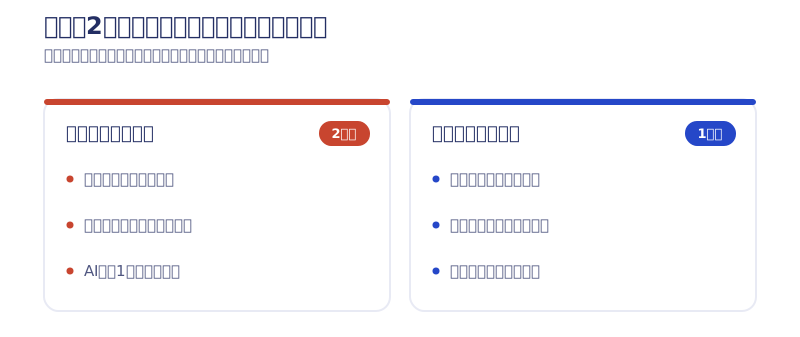
The table above is the build period, but at the level of a whole project the story changes, so let me be straight about it. The fastest a client project realistically goes is about a month.
In my early days I did launch a single landing page for ¥100,000 in about a week. But in practice, hearing the client out, organizing the information, building it, having the client check it, producing the design, having that checked, launching, checking again — once those steps are in there, a much shorter run is not realistic.
If it were only my build time, a week would cover nearly all of it. With AI doing the building, you could even say a whole site can be built in a day. But that assumes the stage where every piece of information is already in hand. Fundamentally the time goes into deciding what information to publish and how to present it, so however fast AI makes the build, about two weeks is the floor — and that is with the client’s full support as a condition.
In other words, the “from 1–2 weeks” in the table above is the builder’s working period, and the honest expectation is about a month from first conversation to launch. Say “we can do it in two weeks” without aligning on that first and there will always be a mismatch later. When you hire a company that sells speed, always confirm exactly which points that period runs between.
Why is the gap so wide? AI Website Production builds every page in one go once the requirements are settled in the kick-off meeting. Adding pages makes the build itself grow only gently. Website production in Webflow with Figma, on the other hand, designs each page originally in Figma before implementing it, so the timeline grows in proportion to the page count. Neither is superior; it is a difference of purpose — launch fast and grow it with AI, or take the time to build the brand.
The common market figure is one to three months from requirements definition to launch, but because every production company includes something different in “the timeline,” a straight comparison is not possible. When you compare quotes, check not only the price but what the period contains — requirements work, how many design reviews, the cap on revisions.
The “timeline” items to check when comparing quotes
Comparing the breakdown of the schedule as well as the number on the quote prevents the post-signature “this is not what I expected.” These four questions are worth asking when you put a job out to several companies.
- Does that period include requirements work and planning, or are those priced and scheduled separately?
- How many rounds of design review are covered, and how many business days are assumed per round?
- What is the cap on revisions, and what happens if you request more beyond it (extra fees, effect on the schedule)?
- How long is the post-launch support window, and what work does it cover?
Not being greedy about scale also shortens the schedule. A five-page structure limited to what you actually need launches sooner than a twenty-page structure stuffed with everything, for obvious reasons. Adding pages after launch is a perfectly workable route, so if you want to prioritize getting live, consider trimming the initial page count.
From an estimate to a confirmed delivery date
The numbers in the table are first-hand guidance, nothing more. The real delivery date is fixed once a free kick-off conversation has settled the page structure and priorities. Our estimate simulator shows three figures on the spot — setup cost, monthly fee and delivery time — once you pick your conditions, and lets you book a free meeting that includes a review of your current site. The design is estimate, then site review, then confirmed quote, with the numbers firming up in stages.
What about a redesign?
This delivery table does not change much between a new build and a redesign. On a redesign, though, migrating existing pages and articles is added work, so depending on scale it can run slightly longer than the table suggests. Designing the migration itself takes more effort than creating pages from scratch.
The breakdown: where the time actually goes
A build timeline is broadly made up of the following stages. Unlike a cost breakdown, the schedule breakdown is rarely written on a quote, so let me set it out here.
- Planning and discovery: Settling the purpose, the audience and the page structure. Move on from here while it is still vague and rework appears downstream. Whether you want more inquiries or more job applicants changes the priority of the information and the page structure completely.
- Design: Moving from wireframes (the skeleton of each page) to a settled visual design. The more original the design, the longer it takes; the closer to a template, the shorter.
- Build (implementation): Assembling the actual site from the design. AI compresses the coding and responsive work (adjusting the display for both phone and desktop) that takes days by hand.
- Preparing copy and assets: Gathering what goes on the site — text, photographs, logos. A message from the founder, descriptions of what the business does, and permission to use project photographs are often not ready before work starts, and this is where waiting tends to happen.
- Review and revision: Checking the finished pages and requesting changes. Where several people review, or internal approval is required, this stage alone can take weeks.
- Launch work: The final steps needed to go live — DNS settings, installing measurement tools. DNS can take several hours to a day to propagate, so leaving the work to the eve of your launch date is not safe.
Two ways of working, seen through the number of stages
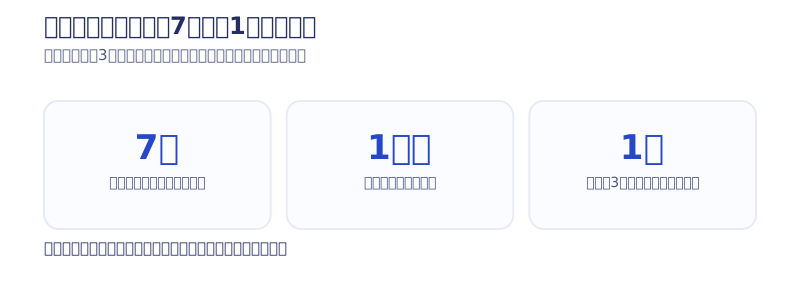
Our standard production flow runs seven steps from inquiry to operations (inquiry, kick-off, requirements, design, implementation, launch, operations — the detail is on our production process page). Of those, AI Website Production compresses requirements and design into the conversation with the AI, folding the work into four stages: kick-off, AI build, review and revision, launch. Neither is the correct one; it is a choice between separating the stages and going carefully, or combining them and going fast. Deciding which route you are on at the quoting stage prevents the later rework of “I wanted to think about this more carefully.”
How much time reviews take
Reviews normally happen more than once: the plan and requirements, the design proposal, and the final pre-launch check. In our AI Website Production, pre-launch review and revision are capped at two rounds. How many days you spend on each round, multiplied out, is what decides your launch date. If each reply comes three days late, that alone pushes launch back by nearly a week. Simply writing “it helps if we can have your reply by this date” when you send a review request improves this a great deal.
What our own 7-day rebuild felt like
From here on it is my own experience. In July 2026, when we rebuilt our own site with AI (Claude Code), it took seven days. The split was four days of planning (settling the concept and structure) and three days of building (actually assembling it with AI). During those four planning days I had the AI produce about 50 design directions and then narrowed them down. Being able to line up many options and compare them, rather than a person making one at a time from scratch, is what made the decisions fast.
Even at the scale of 26 pages built and 62 articles migrated, what took time was deciding, not making. That holds on client projects too. The bottleneck is not the working speed of the AI or the production company; it is the speed of human judgment and review. I wrote up the whole record in our log of the 7-day AI full rebuild.
The three big causes of delay
When the “X weeks” you heard at the quoting stage does not turn into the actual launch date, there are three causes in common. All of them arise from joint work with the client side, and none can be prevented by the production company alone.
Waiting for copy and photographs
The most common cause of delay. Design and build are finished, but the text and photographs to put on the site have not arrived, and launch slips by exactly that much. When the owner writes the copy personally, day-to-day business tends to take priority and it gets pushed back. Photographs can be slow too, when permission to use project images has to be obtained. The fix is simple: have the copy and photographs ready before work starts, or at the very latest by the design review.
Reviews left sitting
Where a reply to a design proposal or a post-build review request stalls for days or weeks. “I will look at it this week” followed by silence is not unusual, and it is almost never ill will — it simply gets buried under other work. The production side cannot move to the next stage and the whole schedule slides back. Agreeing internally in advance that “review and reply within X business days” prevents a great deal of this.
Changes to the spec mid-project
“Actually, we want to add a page,” “we want to change the design direction” — spec changes while work is under way. It happens most often when another colleague or a senior manager joins the conversation partway through. Change itself is not the problem, but the later the decision, the wider the rework. Getting everyone involved in at the planning stage, and raising any change as early in the process as possible, is the best way to protect the schedule.
A true story: six months planned, a year delivered
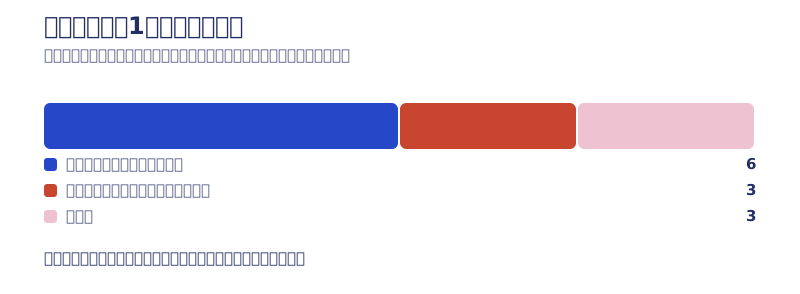
Abstractions only go so far, so here is one of my own failures. A project I scheduled expecting about six months ended up taking around a year.
What happened was that the review phases alone added up to about three months. We worked to the schedule we had issued and submitted the deliverables on the planned date at each stage. At quoting time I had allowed one to two weeks for each review. In practice it came out as a month for the design review, a month for the copy review, and another month for the final check after completion.
What is interesting is that there were almost no large change requests. There was no conflict, and the direction did not flip back and forth. Simply “we cannot find time to look at it” doubled the timeline.
What I learned from it: delays are usually not caused by conflict but by quiet waiting. And to be honest, there was a lesson in how I built the estimate too. I had assumed one to two weeks per review without checking how much work the other side was carrying. Now I ask up front how much time they can realistically give to reviews and who signs off. A schedule drawn without pinning that down generally does not hold.
From the client’s side there is one countermeasure. Declare honestly how much time you can give to reviews. Tell me at the start that “we are in our busy season and cannot look at it for two weeks” and I can draw a schedule that accounts for it. That gets you live sooner than agreeing to a date nobody can meet.
What to do when you notice you are slipping
If you feel the schedule is about to slip, sharing it with your production company early is the single most effective move. Early on, swapping the order of stages or adjusting priorities usually gets things back on track. Hold it in until the last minute and the only remaining option is to cut review time or quality to make the date. Saying “we may be late” is not a bad thing in itself.

What preparation on your side can shorten
Because so much of the timeline is set by how prepared the client is, the reverse is also true: getting the following ready shortens a build considerably.
- Narrow the purpose to one thing: Trying to pack customer acquisition, recruitment and branding all into one site leaves the requirements unsettled and drags out the planning. Decide first what the site is for — one thing.
- Collect copy and assets in advance: Listing what you want on the site before work starts — company overview, the founder’s message, descriptions of the business, case studies and testimonials, the photographs and logo files you want to use, qualifications and license numbers — prevents delays waiting for copy.
- Pick two or three reference sites: Having reference sites you can point to and say “I like this feel” cuts the time to settle a design direction dramatically. “I will leave it to you” alone tends to make aligning on direction slow.
- Set up a review by the decision-maker: Make sure design reviews and final approval can be done within the deadline by someone with authority to decide. If every review needs internal approval, that becomes the bottleneck.
A true story: live seven days after the first meeting
Here is the opposite extreme. A beta went out three days after the first meeting, and it was approved for launch as it stood. About seven days in total.
What was different? The meeting happened when the commission was already decided, so we proposed the design direction and the colors ourselves on the spot. The logo was already in hand, so we pulled the colors from the logo and built the site around them. There was nothing to hesitate over from the start.
That said, I consider it an exceptional case. The project came from my newsletter, and the client had prepared everything they wanted to publish before even approaching me. In other words, they came to the conversation already prepared. In the previous chapter I said a whole project takes a month at the fastest; what separated that month from these seven days was not the production side’s technical skill but the client’s preparation.
Concretely, having these makes it fast
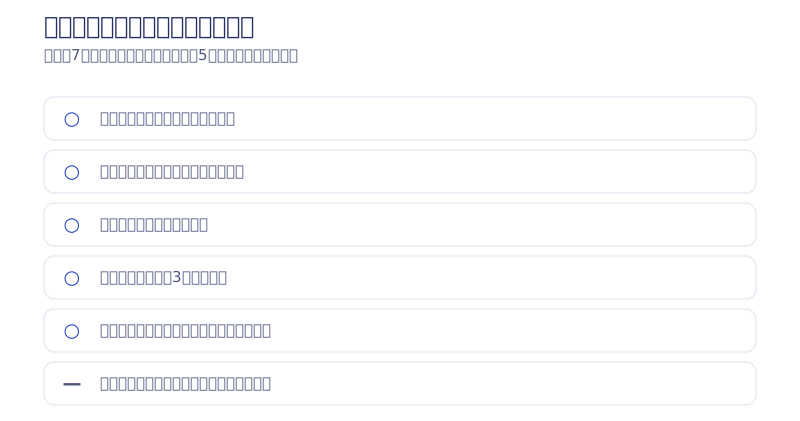
In practice, having the following in hand really does make a build fast.
- The color codes are decided (not “blue, roughly” but fixed as codes)
- The logo you want to use is already in hand (as a file. Given a logo, we can build the palette from it)
- The photographs are already gathered
- You have about three design references (candidate directions. They do not have to be narrowed to one)
- You can describe in words what you want (able to say in the meeting: this kind of hero section, this kind of palette)
“Leave it all to you” works too. We have built sites where we decided the direction ourselves and produced them with AI. In that case, though, the time it takes to decide is added straight onto the schedule. Leaving it to us is not a bad thing; the time simply moves from making to deciding. If you are in a hurry, hand over whichever of the five you can, first. That alone changes things by weeks.
Which preparation matters most
You do not need all four perfectly in place before starting. The top priority is copy and assets: with the other three ready, work still stops if the content does not arrive. Next comes the decision-maker setup, because delayed reviews hit the schedule directly. Reference sites and narrowing the purpose can be sorted out together during the first conversation.
Incidentally, whether we can meet in person barely affects the timeline. Outside Sendai, Shiogama, Tagajo, Rifu and Matsushima (all in Miyagi Prefecture) we work online as standard, and we have completed projects from other prefectures and overseas entirely online. Working online does not make things slower.
Nor do you need to prepare formal documents such as a requirements specification. Tell us the purpose and the current situation and we will organize the requirements for you. What we ask you to prepare is only two things: the content assets, and the person who decides.
All four are things you can start preparing today without any special skill. Put the other way round, when you choose a production company it is worth watching whether they tell you clearly, before work starts, what to prepare first. Companies that skip that explanation tend to end up in he-said-she-said territory later.
Why “fast” does not mean “sloppy”
Hearing “from one to two weeks” makes some people worry about quality. To be straight about it, the speed is not the result of skipping human work; it is the result of handing the mechanical work to AI.
What the AI does, what the humans do
An AI build compresses mechanical work — writing code, assembling pages, adjusting responsiveness. That frees the humans to concentrate on the judgments: is this design right, is this sentence factually correct, does this structure get through to the reader. The AI does the hands-on work; the human makes the calls.
How quality is actually assured
Quality assurance is done separately from speed. A person reviews every page by eye, fact-checking is done by humans, and we include a week of post-launch fixes (plus up to two rounds of minor revision requests). The whole build process, right down to the real git history, is published on our full build-record page, so anyone curious can inspect the process itself. Personally, I find that cap of two rounds creates a healthy pressure not to put reviews off. We also share progress at each milestone so that “I cannot tell whether anything is happening” never becomes a reason a review is late.
How to decide whether to choose speed
Whether to prioritize speed above all depends on your purpose. When the launch date cannot move — a trade show, a recruitment season — or when you want to see the market react before improving, speed is worth prioritizing. If you want to build a careful first impression for the brand, or you value design originality that separates you from competitors, designing patiently in Webflow with Figma suits you better. Speed and careful brand-building are a trade-off. If you are torn, I would put both figures side by side in the estimate simulator before deciding.
In summary
A website build timeline is set partly by scale and method, and partly by the client’s preparation. Our guidance by scale is in the table above: from one to two weeks with AI Website Production, about 1.5 to 2 months with Webflow and Figma. For what your own situation is likely to look like, we will answer on the spot in a free consultation. The whole production flow is also explained in detail on our production process page.
A last look back at the countermeasures for the three big causes of delay.
- Have copy and photographs ready before work starts, or by the design review at the latest
- Set a deadline for reviews and replies — “within X business days” — and do not push them back
- Raise spec changes as early in the process as possible and do not defer decisions
There is no correct answer between “fast” and “built carefully.” Sorting out your purpose and your schedule constraints first, then choosing the approach that fits, is the route with the fewest detours in the end.
If you are in a hurry, or you would like to talk about timing alone, use our contact form. Consultations are free.
FAQ
What is the fastest a website can be built?
With our AI Website Production, up to around 6–10 pages can go live in one to two weeks at the fastest. After a 60-minute kick-off, the AI builds every page at once, a person finishes it, and it launches after review and revision. At 11–20 pages, expect two to three weeks.
How long for a single landing page?
From one to two weeks with AI Website Production, or about two to three weeks for an original design in Webflow with Figma. A single landing page is smaller in scale, so the timeline is shorter.
What can we do on our side to shorten the schedule?
The most effective step is having assets such as copy and photographs ready before work starts. Alongside that, narrowing the purpose to one thing and agreeing internally not to put review replies off both translate directly into a shorter build.
Is there a way to know the exact timeline before getting a quote?
Our estimate simulator shows an approximate delivery time on the spot once you choose a build method and page count. What it shows is guidance derived from those conditions alone, so the exact timeline is fixed after we hear your requirements in a kick-off conversation.

![AI Overviews Optimization Across 63 Articles [Report #1]](/assets/posts/thumb-aio-field-report-1.avif?v=0c19cab8)
