


- AI website builder — what it means
- An AI website builder is any tool in which AI generates the design, code, and back end of a website or web app from natural-language instructions (prompts). The category ranges from conversational coding AI such as Claude Code to more no-code services such as Figma Make, Webflow AI, and v0.
Hi, I’m Masato, a Webflow specialist.
There are now so many tools that can build a website with AI that people keep asking me, “which one should I actually use?” I am someone who fully rebuilt his own company site with AI, so I will write only what I honestly think about the tools I have actually used.
✓ In this article
- An honest take on actually using Claude Code, Figma Make, and Webflow AI (App Gen)
- Where v0, Bolt, and Lovable sit (survey-based)
- The verdict on which to choose, by use case
The conclusion first: choosing an AI website builder by use case
Let me start with the conclusion.
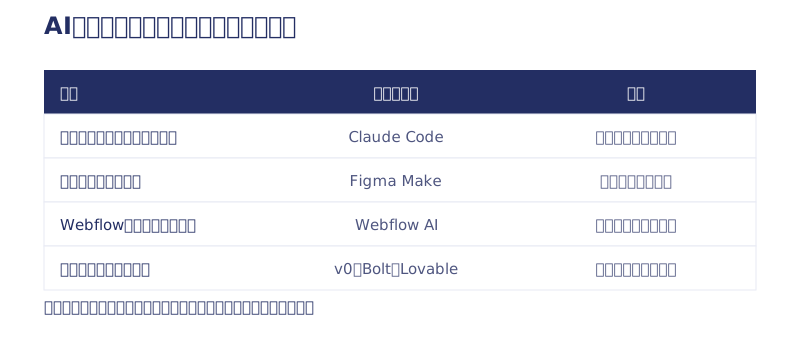
- Building your company’s main site for real → Claude Code (AI vibe coding). Freedom and quality are in another league. But human judgment is mandatory.
- Building a small app or a prototype quickly → Figma Make. No setup at all; you just chat.
- Adding features to an existing Webflow site → Webflow AI (App Gen). The design stays at Webflow quality while AI handles the back end.
- Getting a feel for it free first → v0, Bolt, and Lovable (survey-based, as I have not used them on real projects).
| Tool | Used / researched | Best for | Cost notes |
|---|---|---|---|
| Claude Code | Used | A company’s main site | Our site’s running cost is now ¥1,500/year for the domain |
| Figma Make | Used | Small apps and prototypes | No setup; chat only |
| Webflow AI (App Gen) | Used | Adding features to an existing Webflow site | Design stays at Webflow quality |
| v0 (Vercel) | Researched | Generating React UI | Free tier; paid from $20/month |
| Bolt.new | Researched | Full-stack prototypes | Free tier; Pro $20/month |
| Lovable | Researched | Apps with a DB and auth | Free tier; Pro $25/month |
Here is my reasoning for each, based on experience.
Claude Code: a full rebuild of our own site in 7 days
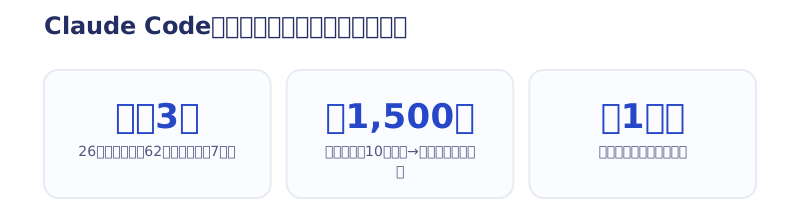
I rebuilt this very Webharu site with Claude Code in July 2026. Twenty-six pages built, 62 articles migrated, four form types connected, and GA4, structured data, and llms.txt all set up. Three days for the build alone, 7 including planning. One human: me.
The biggest strength is freedom. There is effectively no tool constraint, so you can push SEO and AI optimization as far as you want. Running costs changed dramatically too. What used to be just under ¥100,000 a year on a Webflow subscription (with localization) is now ¥1,500 a year for the domain alone.
To be honest, though, getting here took about a month of producing a lot of garbage. I made something like 50 design variations, and fine adjustments such as “widen the gap between these sections a little” are slower than brute-forcing them in no-code used to be. And if you publish something left 100% to AI, every site ends up with the same face and your brand value drops. Planning, aesthetic judgment, and fact-checking are human work. Abandon that split and you fail. The detailed process is in the article documenting every step.
Figma Make: a staff attendance app built from chat alone
Figma Make is Figma with site publishing plus AI vibe coding attached. A restaurant owner told me, “I’d like to build a staff attendance app,” and I actually built it in Figma Make.
All you do is type “build me a staff attendance app” into the chat. Unlike the Claude Code family, the biggest strength is that there is no setup whatsoever. Persisting data needs a back end, but Figma proposes Supabase for that, so you can simply go along with it.
Honestly, it takes patience. Errors come thick and fast, and you keep going by throwing “there’s an error, fix it” into the chat each time. Also, I got burned when I could no longer roll back to a previous version, so once you reach a good state, copying the whole file to save it is essential. For a small site or an app at the scale a single shop would use, you can make something perfectly satisfying. Details are in the article about building the attendance app.

Webflow AI (App Gen): let AI handle only the “back side” of an existing site
Webflow has introduced an AI feature called App Gen. When I tried it, a single prompt — “when the contact form is submitted, save it to a database and list it in an admin screen” — generated the data structure, the processing flow, and the front-end wiring in one go.
Its strength is the division of labor. Humans build the delicate UI and class structure in Webflow, and AI takes only the tedious back end. Unlike tools you hand everything to, you end up with an app that is both beautiful and functional, with no drop in design quality. Being able to retrofit member features or dashboards onto a live Webflow site is powerful too. My notes from testing it are in the App Gen article.
Incidentally, I have covered the combination of Claude Code and Webflow (custom code and migrating off Webflow) separately in the AI vibe coding article. On a client project, I have also migrated a painting company’s Webflow site to an AI-managed system this way, cutting the monthly cost substantially while adding customer management.
v0, Bolt, and Lovable: brief, and survey-based
I have not used the next three on real projects, so I am writing this explicitly as survey-based (from public information as of July 2026).
- v0 (Vercel): specialized in generating React component UI. Free tier available; paid from $20/month. Reviewers describe it as suited to people who prioritize UI visual quality.
- Bolt.new: rapidly generates full-stack prototypes inside the browser. Free tier available; Pro is $20/month.
- Lovable: generates apps including a database and auth from a prompt. Free tier available; Pro is $25/month. It is often described as aimed at non-engineers.
Positionally, they compete with Figma Make. Getting a feel for them on a free tier seems reasonable to me. What I can say from my own experience is that all of these tools share one thing: the last 20% — real data integration, squashing errors, and day-to-day operation — takes patience.
How to choose an AI website builder without regret
Choose on “can I run it?”, not “can I build it?”
Every one of these tools is genuinely impressive at the “building” part. The difference shows after launch. Who updates it? Who fixes the errors? How much do you keep paying every month? Choose without accounting for that and you end up with a beautiful ornament.
The order I recommend
- First, get a feel for instructing an AI using a tool with a free tier (Figma Make, v0, and so on)
- Once you decide to build your main site, spend time on planning and clarifying your audience (I spent 4 of my 7 days on planning)
- Before launch, check every page with your own eyes. AI will happily insert wording that is not true
In summary: the tools have arrived. The difference is judgment
AI moves the hands; humans make the judgments. Whichever tool you pick, that structure did not change. Put the other way round: as long as you hold the planning and the aesthetic judgment, the tools have reached a level where any of them can build it.
For those who think “doing it myself looks hard, but I do want a site built with AI,” Webharu offers AI Website Production (from ¥1,000,000), where I take the judgment side. It is the same process we used on our own site.
FAQ
Can AI website builders be used for free?
Stated as survey-based, v0, Bolt.new, and Lovable have free tiers (as of July 2026). The author recommends starting on a free tier to get a feel for instructing an AI.
Can I build one with zero programming knowledge?
Yes, according to the author. Both Figma Make and Webflow App Gen worked from chat instructions in Japanese alone. Errors will always appear, though, so you need the patience to ask the AI to fix them each time.
How long does it take to build a website with AI?
The author’s own site (26 pages, 62 articles migrated) took 3 days of building plus 4 days of planning, 7 in total. Getting to reliable generation, however, involved about a month of trial and error.
So which tool do you recommend most?
It depends on the use case. The author’s verdict is Claude Code for a company’s main site, Figma Make for small app prototypes, and Webflow AI (App Gen) for adding features to an existing Webflow site.


