


- MCP (Model Context Protocol) — what it means
- MCP (Model Context Protocol) is a shared standard that lets AI operate external systems and data directly. It translates an API into a tool shape the AI can understand, so that compatible clients such as Claude and Cursor can call it as it is.
Hi, I’m Masato. I started out as a Webflow specialist and have since widened my main field into AI website production and AI development. I run Webharu, a web production company in Shiogama, Miyagi, Japan.
We built a REST API and an MCP server into the CMS behind our site operations platform, and published the developer documentation for anyone to read. This article records those design decisions exactly as they were made. If you have wondered how an MCP server is actually built, or whether it is safe to let AI touch your own systems, here are answers from the side that implemented it.
What this article covers
- What we built (REST API, an MCP server with 8 tools, public documentation, llms.txt)
- Why an API alone was not enough, and we built MCP on top of it
- Three things we stopped in the design when handing AI the keys
- Writing documentation on the assumption that AI will read it
The conclusion first.
Most AI rollouts fail not because of the AI’s capability, but because the AI cannot reach the company’s own data. Provide a connection point (the API) and hands (MCP), and the AI already in use inside the company starts doing real work. And the part that deserves the most time is not the implementation — it is deciding what the AI must not touch.
What we built
What we built is an entrance for operating CMS articles from outside. There are two entrances.
- REST API — create, read, update and delete articles, list categories, upload images. Called with a Bearer-authenticated API key
- MCP server — the same operations, shaped so that AI clients such as Claude Code, Claude Desktop and Cursor can call them directly. Eight tools in total
Both of them run through exactly the same publishing pipeline as the CMS itself. Write in the browser editor, send it over the API, or instruct the AI — validation, revision history and audit logs are identical. Splitting them would open a hole where the editor rejects something but the API lets it through, so the implementation is shared.
The moment an article is set to published, the static site build and the deployment run automatically. There are no webhooks to wire up and no CI to configure.
Why an API alone was not enough
You may think that if there is an API, AI can already use it. In practice one more layer of translation is required.
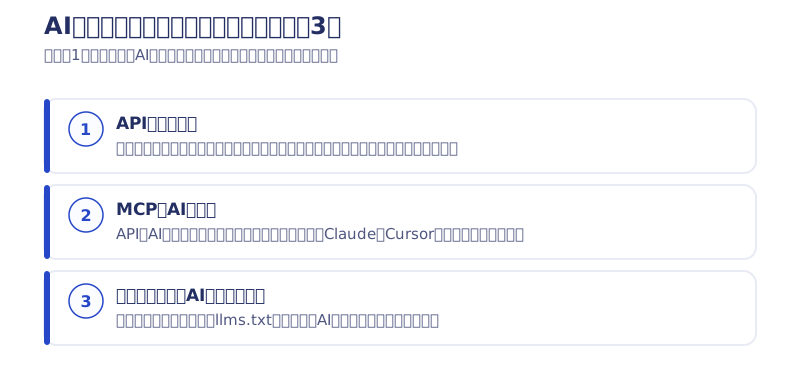
MCP (Model Context Protocol) is a shared standard for AI to operate external systems. If the API is the entrance to a system, MCP is the hands the AI uses to open it.
Using an API on its own from AI means explaining the endpoints, how to pass credentials and how to read responses in the prompt every single time. That is forgotten across conversations, and because everyone writes it differently the results vary. With MCP, the AI understands the list of tools and the shape of their arguments as structure, and that variance disappears.
The other large benefit is that the standard is shared. Build for one specific AI service and you rebuild every time you switch. MCP-capable clients keep increasing, so you can swap out the AI and keep the same connection point. The longer a business system is meant to live, the more this matters.
Three things we stopped in the design when handing AI the keys
This is where we thought hardest. Connecting a system to AI brings convenience and, with it, the risk of things being deleted or published without anyone intending it. And operating rules cannot protect you here. Instructing the AI politely does not prevent this class of accident.
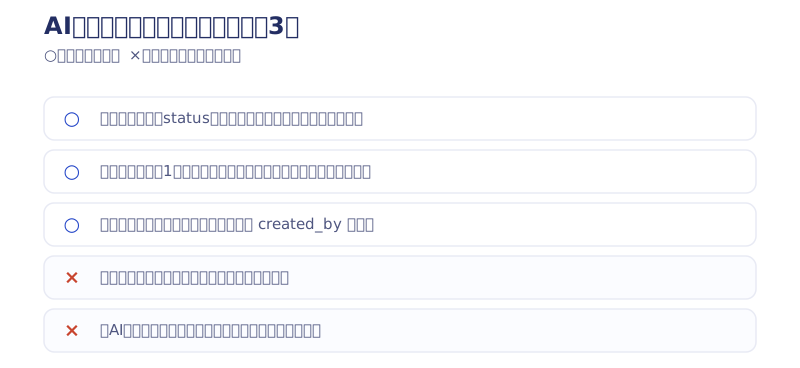
1. Put the default on the safe side
Creation without an explicit status always produces a draft. The AI never publishes on its own in the flow of a conversation. Publishing has to be specified explicitly. Reverse that, and an accident becomes unrecoverable.
2. Narrow what the key reaches, from the start
An API key carries permission for one site only. It reaches neither another site’s data nor any administrative function. What matters is not designing it as “hand over a key that touches everything and let the holder be careful”.
3. Record every operation, and be able to stop it at any time
When, which key, which article, and what was done to it — all of it stays in the audit log. Suspend a key and it expires on the spot. We also record who issued each key, so it stays traceable after the person in charge changes.
Whose key it is sounds like a minor detail, but keys that live independently of accounts create a state where the login has been revoked yet the external API can still write. To avoid that, suspending a member automatically suspends the keys that person issued. It suspends rather than deletes, so a misfire can be undone.
The decision not to let the outside produce HTML
A small point, but one that clearly pays off as a design decision. Article bodies accept Markdown only, and the conversion to HTML happens on the server.
Design it so that HTML can be pushed in from outside, and broken markup and unexpected tags end up on the production site — all the more so when the input is AI-generated. Restrict the entrance to Markdown and the look of the site stays consistent no matter where an article came from. Letting AI handle something only works together with deciding the range it handles.
Write documentation on the assumption that AI will read it
This is where the change of era felt largest. When you write developer documentation, humans are not the only readers.
We prepared three kinds: a reference for people (HTML), an llms.txt that hands AI the key points, and an llms-full.txt holding the entire specification in a single file. The last one exists to be fed straight to the adopting side’s AI agent so that it can implement against it.
With that in place, the people using it do not have to read and understand the documentation before writing code. Hand the full text to an AI, say “build me something that posts articles using this”, and it works. Documentation quality turns directly into ease of adoption.
[Added August 2026] A second MCP product: evolving the design with the HaruMail API
After the CMS implementation we developed HaruMail, a mail sending and receiving API, as our second MCP-capable product. Building on the first design, two things evolved.
- Two stages for dangerous operations: sending mail is the operation where a mistaken AI action hurts most. So every sending tool can only go as far as creating a draft, and the actual send runs only through a separate tool called confirm_send. Instead of asking the AI to be careful, an API that cannot send in a single step prevents accidents structurally.
- Right-sizing tool granularity: when we tried a general-purpose MCP from an external SaaS, merely connecting to it loaded a large amount of information and consumed most of the context, never reaching practical use (our Webflow MCP test). From that lesson, keeping the number of tools small and the returned payloads light became a design principle.
After two implementations it is clear that making a SaaS MCP-capable follows a repeatable pattern. The whole pattern is written up in how to make a SaaS MCP-capable.
We are turning this mechanism into a product, as is
Everything above is about our own CMS, but the required elements do not depend on the industry.
- An API that can be read from and written to from outside
- MCP so that AI can use it as a tool
- Documentation the AI itself can read
- And the design of what must not be touched
“We adopted AI, and we still end up pasting screenshots and copying text” — what is missing to escape that state is usually these four. At Webharu we take this whole set on as API and MCP Development. If you already have an API, layering MCP on top is enough; if you do not, we build the connection point first.
You can see the real thing in our public documentation. Not a diagram inside a proposal deck — the system that is running right now.
→API and MCP Development service details
FAQ
What is the difference between MCP and an API?
The API is the entrance to a system; MCP is the hands the AI uses to open it. An API alone can be operated from a program, but letting AI use it means explaining how to pass credentials and how to read responses every time. With MCP the AI understands the tool list and argument shapes as structure, so it runs reliably without that explanation.
Could the AI delete or publish our data without permission?
We stop that in the design. Creation without an explicit status always produces a draft, key scope is limited to a single site, and every operation is recorded in the audit log. Suspending a key revokes it on the spot, and who issued each key is recorded. The principle is to protect with defaults and permission scope, not operating rules.
Can we build an MCP server ourselves?
The specification is public, so with development resources you can. The harder part is not the implementation but the permission design of which operations to allow and what must not be touched, and that is also where accidents happen. If the existing system has no API, you have to start from designing the connection point.
If we already have an API, can we add only MCP?
Yes. If the existing API specification is in order, layering an MCP server on top of it is enough. We offer that configuration as a standalone plan.
What is llms.txt?
It is a text file that summarizes a site’s or service’s specification in a form AI can read easily. Attached to developer documentation, it lets the adopting side’s AI agent read it and implement directly, which removes the step of reading and understanding the documentation before writing code.


